
Introduction
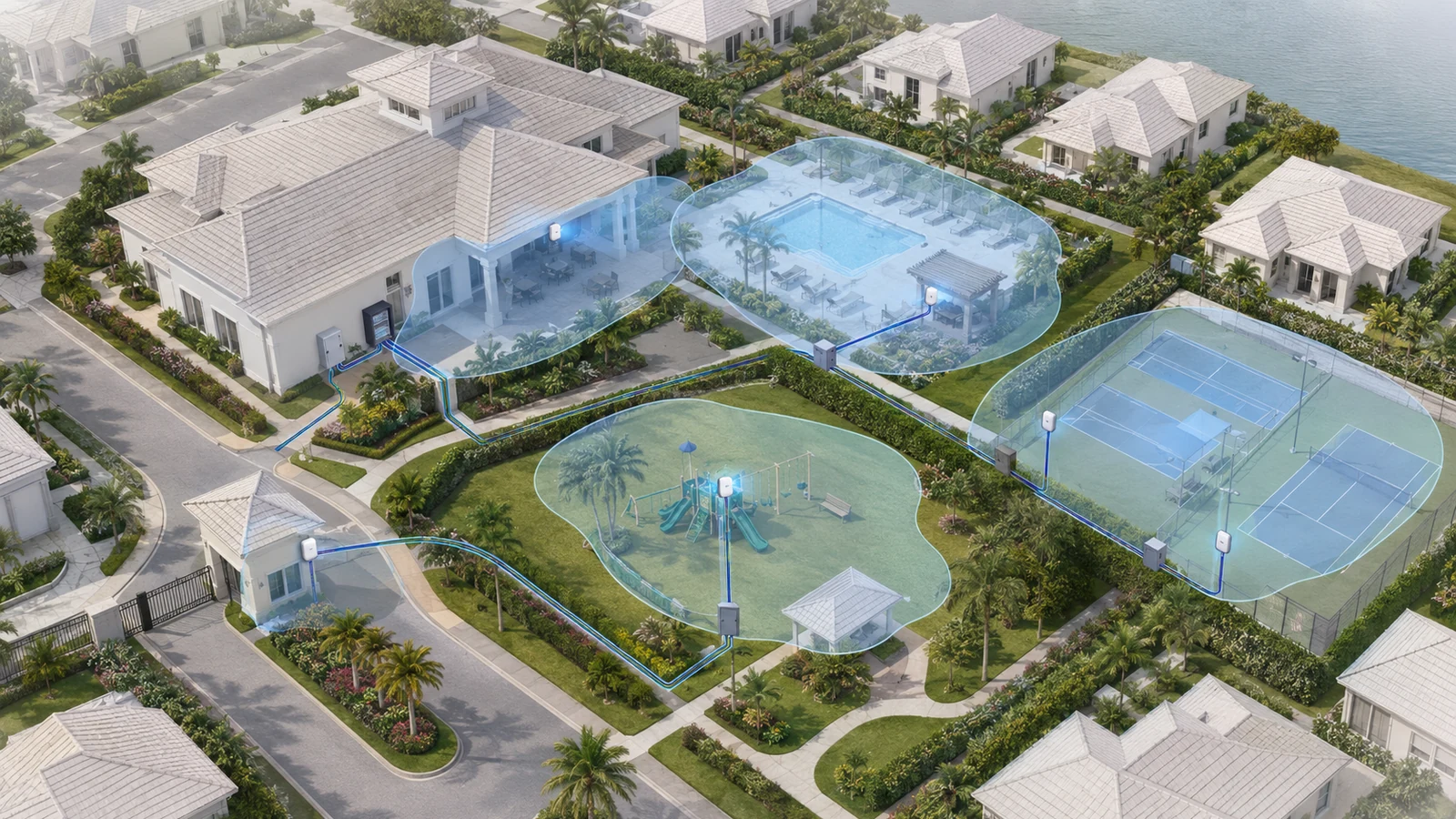
Outdoor Wi-Fi can turn a clubhouse patio, pool deck, park, or sports area into a more useful community amenity. It can also support staff mobility, events, maintenance activities, and selected operational applications.
But outdoor Wi-Fi is often approached as an extension of whatever signal already reaches through the clubhouse walls. That may produce a visible network name without delivering a stable connection where residents and staff actually use it.
A reliable outdoor design begins by defining which areas matter, who will use them, what those users need to do, and how each access point will connect back to the network. It must also account for weather, heat, moisture, salt exposure, landscaping, physical protection, security boundaries, and the long-term ability to service the installation.
01 Define the Areas That Actually Need Wi-Fi
Attempting to blanket an entire community can create high cost, complex pathways, difficult maintenance, and coverage that residents rarely use. Begin with the places where connectivity has a clear purpose.
Potential priority areas include:
- Clubhouse patios and outdoor seating
- Pool decks and cabanas
- Outdoor dining and event spaces
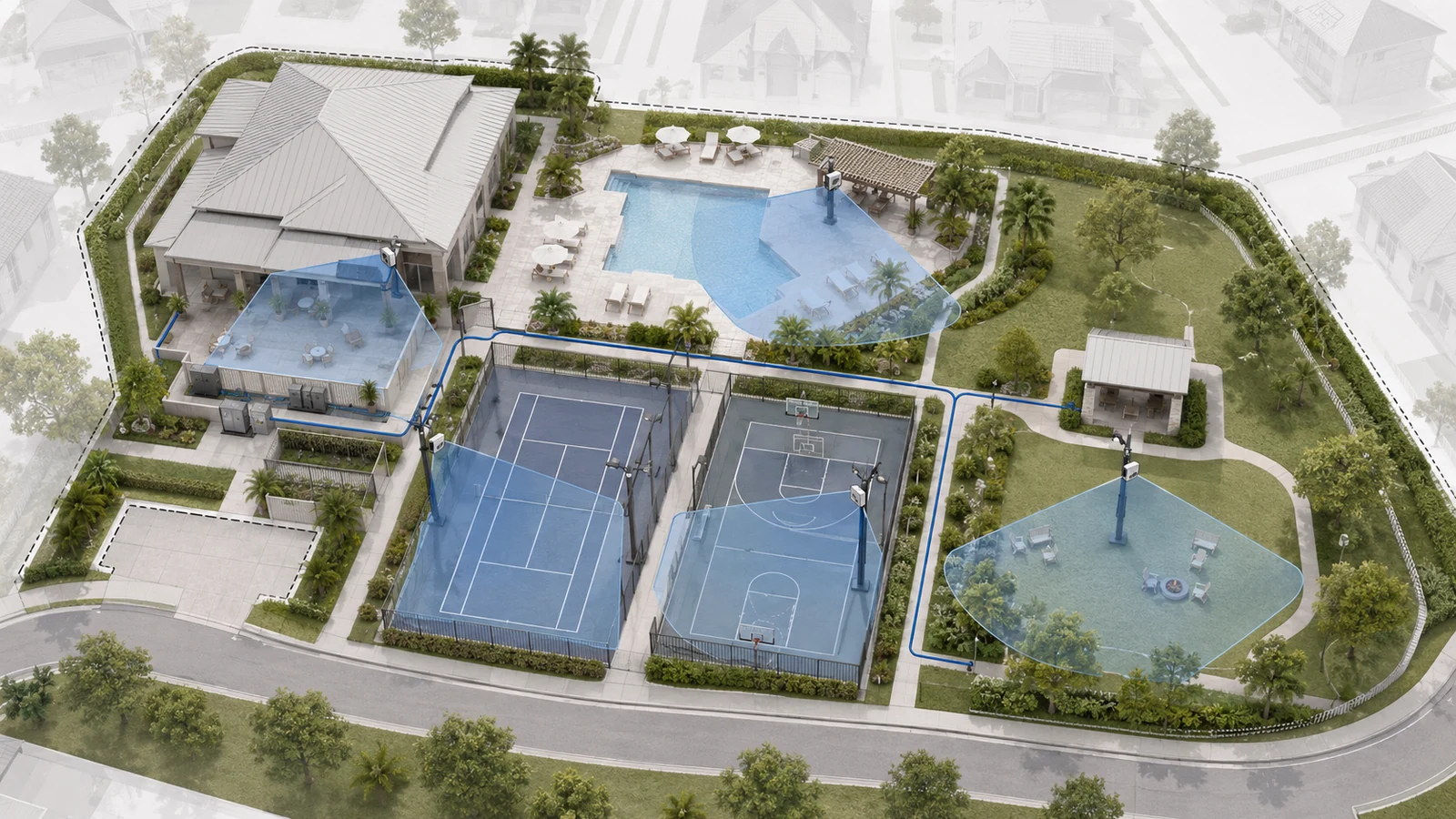
- Tennis, pickleball, and basketball areas
- Playgrounds and frequently used parks
- Fitness lawns and activity spaces
- Marinas, docks, or waterfront amenities
- Community entrances and guardhouse areas
- Maintenance or staff work zones
Walking paths, roadways, landscaping, parking areas, and property perimeters should not automatically receive public Wi-Fi. Coverage may be justified for operations or safety-related communication, but that requirement should be documented separately from resident amenity access.
For every proposed zone, define:
- The intended users
- Normal and peak activity
- The applications expected there
- The hours when service matters
- The acceptable coverage boundary
- The operational impact of an outage
This prevents an expensive design from being built around an undefined promise of “Wi-Fi everywhere.”
02 Separate Coverage, Capacity, and Service Priority
Coverage means a device can receive and return a usable wireless signal. Capacity means the wireless environment can support the demand concentrated in that area. Service priority identifies which applications must remain dependable when usage increases.
A quiet garden seating area and a crowded pool deck may have similar physical dimensions but very different capacity requirements. A gatehouse may have only a few devices yet require greater operational consistency than a recreational area serving many residents.
| Outdoor Zone | Likely Usage and Design Needs | Primary Planning Priority |
|---|---|---|
| Pool and Patio | Resident devices, streaming, events, staff mobility, cameras, and access control around a concentrated gathering area | Peak capacity, weather-ready placement, and separation between public and operational systems |
| Sports Courts | Intermittent resident use, events, scoring or audio equipment, and possible camera coverage | Targeted coverage without overserving unused surrounding areas |
| Park or Playground | Distributed family use, mobile devices, staff connectivity, and selected security equipment | Safe mounting, serviceable pathways, and realistic coverage boundaries |
| Entrance or Gatehouse | Staff systems, visitor management, phones, access control, and limited public demand | Operational continuity and controlled access rather than broad public coverage |
| Marina or Waterfront Area | Residents, staff, cameras, dock systems, and challenging environmental exposure | Corrosion awareness, protected pathways, mounting stability, and maintenance access |
| Walking Path | Moving users spread across a long route with limited concentration | Confirm that continuous coverage provides enough value to justify pathway and maintenance complexity |
Device count alone does not determine capacity. A large number of idle phones creates different demand from simultaneous streaming, video calls, event production, or operational uploads.
The Wi-Fi plan should preserve staff and critical system access even during a busy resident event. That may involve logical separation, bandwidth management, additional access points, or moving fixed operational devices to wired connections.
03 Do Not Rely on Accidental Indoor Coverage
Indoor access points may provide some service through windows, doors, and exterior walls. That signal can be useful near a building, but it should not be assumed to provide dependable outdoor coverage.
Exterior construction can significantly affect performance. Concrete, masonry, impact-resistant glass, metal framing, reflective materials, equipment rooms, and mechanical systems may weaken or reshape the signal before it reaches the outdoor area.
A phone may display a Wi-Fi connection while experiencing poor responsiveness because the signal is weak, interference is present, or the device cannot communicate reliably back through the building envelope.
Dedicated outdoor access points allow the design to:
- Serve the intended zone directly
- Use equipment suitable for environmental exposure
- Control the coverage direction and boundary
- Reduce dependence on indoor building materials
- Support outdoor capacity separately from indoor demand
- Create more predictable maintenance and troubleshooting
This does not mean every outdoor area needs its own access point. A properly selected and positioned unit may serve several adjacent spaces when their geometry and usage align.
04 Place Access Points According to the Space
Outdoor placement should follow the access point’s intended mounting orientation and antenna behavior. A device selected for wall mounting may serve an area differently from one intended for a pole, ceiling, or directional installation.
Placement decisions should account for:
- The shape and size of the target zone
- Mounting height and orientation
- Buildings, shade structures, trees, and landscaping
- Seasonal foliage and future landscape growth
- Reflective or obstructive surfaces
- Access for maintenance and replacement
- Potential vandalism or accidental impact
- Cable entry and weather protection
- Coverage spill into residences, roadways, or neighboring property
Mounting an access point as high as possible is not automatically better. Excessive height may create an inefficient angle to users on the ground, make maintenance difficult, and expand signal into areas that were not intended to receive service.
Likewise, placing several access points close together without channel and power planning can create unnecessary overlap. Outdoor signals often travel farther in open space, so placement and transmit settings should be validated rather than copied from indoor assumptions.
05 Give Every Outdoor Zone a Dependable Backhaul
Each outdoor access point needs a reliable path back to the community network. The preferred method depends on distance, pathways, electrical conditions, and the location of network equipment.
Possible backhaul methods include:
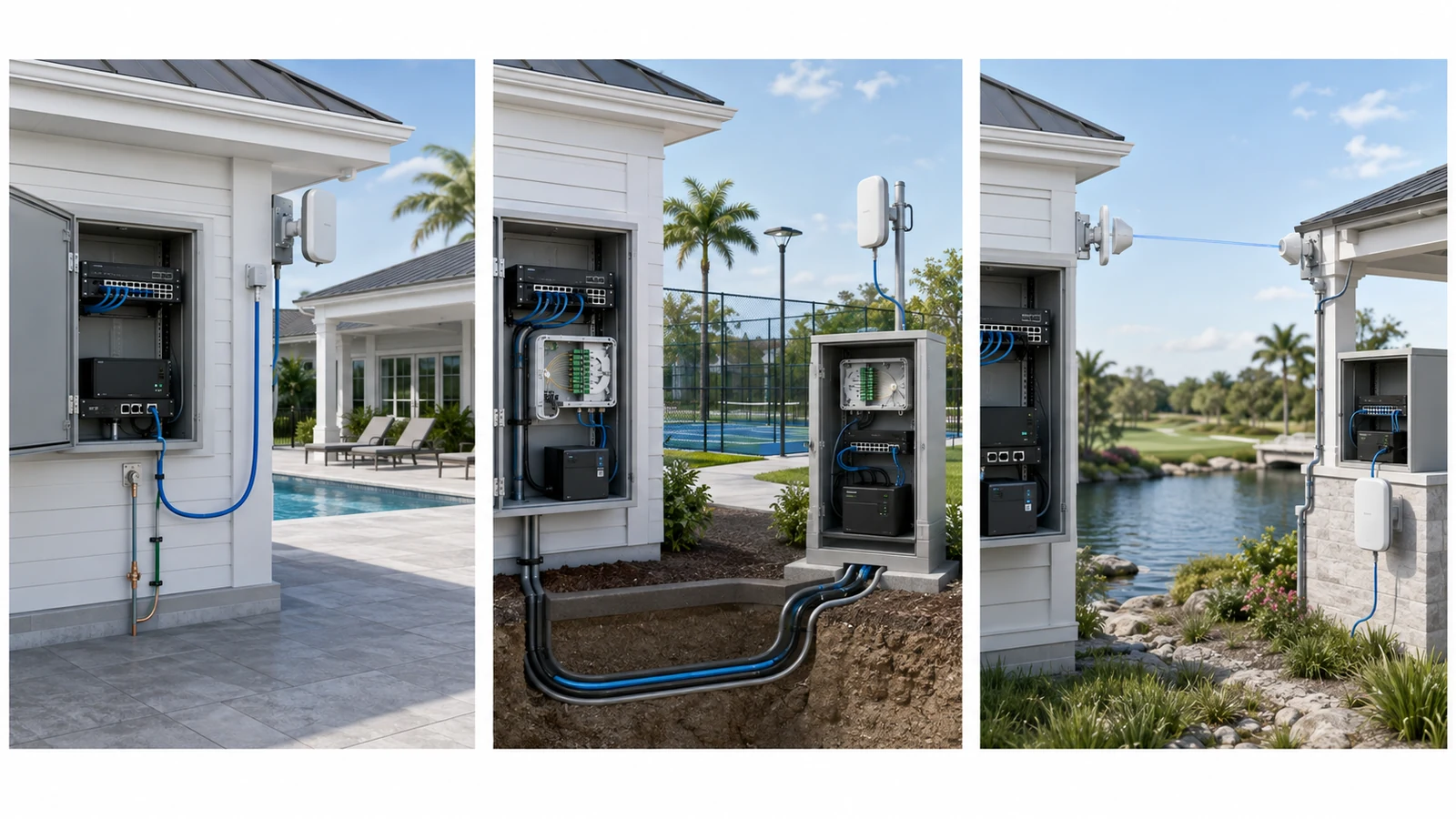
- Ethernet: appropriate for supported distances from a nearby building or local switch, with proper pathway and electrical planning
- Fiber to a remote cabinet or building: useful for long distances, multiple devices, or connections between separate electrical environments
- Point-to-point wireless: useful where excavation is impractical and a stable line of sight can be maintained
- Wireless mesh: sometimes practical for a difficult or temporary location, but dependent on the quality of its upstream wireless connection
Ethernet is often preferred for an access point mounted near a clubhouse or local equipment room because one cable can provide data and PoE. Distance, surge exposure, grounding, conduit, and environmental ratings still require attention.
For remote amenity areas, fiber may connect a local switch or cabinet that then serves nearby access points, cameras, and access-control devices through shorter copper runs. Review fiber versus copper between HOA buildings when designing those paths.
Point-to-point wireless should not be confused with ordinary client Wi-Fi. It uses dedicated equipment to create a planned network bridge. Its performance depends on mounting stability, line of sight, environmental conditions, frequency planning, power, and alignment.
A mesh access point placed inside an existing dead zone begins with a weak backhaul and cannot create a strong connection from nothing. Wireless backhaul should be treated as an intentional compromise or specialized solution, not the automatic substitute for a missing pathway.
06 Design for the Outdoor Environment
Outdoor equipment must operate through heat, humidity, rain, direct sun, wind, landscaping activity, insects, and physical exposure. Coastal communities may also face salt and corrosion concerns.
The access point’s environmental rating is only one part of the installation. The complete assembly includes the mount, fasteners, cable, connectors, entry points, junction boxes, conduit, seals, grounding, surge protection, and supporting structure.
Environmental planning should address:
- Direct rain and wind-driven moisture
- Temperature and solar exposure
- Humidity and condensation
- Salt air and corrosion
- Water inside underground conduit
- Cable movement and strain
- Vegetation and landscape maintenance
- Pest or insect entry
- Vandalism and accidental impact
- Lightning and surge exposure
Conduit should not be assumed to remain dry. Cable installed underground or in wet pathways should be selected for that environment.
Equipment should remain serviceable. An access point mounted in a location that requires unusual equipment, landscape removal, or disruption of resident activities for every inspection will increase long-term maintenance cost.
07 Separate Public Access From Operational Systems
Outdoor areas often combine resident Wi-Fi with cameras, pool gates, staff devices, environmental controllers, digital signage, or event equipment. These services may share fiber, conduit, switches, and power locations without sharing unrestricted network access.
A practical design may include separate service groups for:
- Resident and visitor internet access
- Staff and property-management devices
- Surveillance cameras
- Access control and gate systems
- Building or amenity controls
- Network management
- Temporary events and vendors
Public Wi-Fi should not provide a route to cameras, controllers, staff systems, or network-management interfaces. Operational devices should communicate only with the services necessary for their function.
Wireless network names and VLANs are part of the design, but they are not the entire security model. Firewall policy, administrator accounts, remote vendor access, software maintenance, logging, and credential ownership also matter.
The clubhouse network infrastructure guide explains how these service groups fit together at the primary shared building.
08 Plan Roaming and Internet Access Realistically
Residents may move from the clubhouse to the patio or pool while remaining connected. Proper overlap and consistent configuration can help devices transition between access points, but the client device ultimately participates in the roaming decision.
The design should provide enough overlap to avoid abrupt coverage gaps without creating unnecessarily large cells that encourage devices to remain connected to a distant access point.
Roaming validation should follow actual movement paths:
- Clubhouse interior to patio
- Patio to pool deck
- Pool deck to cabana or outdoor dining
- Parking or entrance to an amenity
- Walking between adjacent recreational areas
Not every path requires uninterrupted real-time roaming. A user browsing while walking has different expectations from a staff member using Wi-Fi calling or an operational application. The requirement should be defined before the network is evaluated.
Internet capacity must also support the intended service, but outdoor demand should not be considered in isolation. Clubhouse users, offices, events, restaurants, and other association services may share the same connection.
Bandwidth policies can help prevent a few public users from consuming a disproportionate share of available internet capacity. Those limits should be tested to ensure normal resident activities remain useful.
09 Validate, Document, and Maintain the Installation
Outdoor Community Wi-Fi Checklist
- Define the exact outdoor zones where Wi-Fi provides operational or resident value.
- Identify normal use, peak use, applications, and service priority for each zone.
- Separate public connectivity from cameras, access control, staff, and building systems.
- Select access points according to environment, mounting method, antenna behavior, and coverage shape.
- Confirm safe, serviceable mounting locations and acceptable coverage boundaries.
- Choose Ethernet, fiber, point-to-point wireless, or another backhaul method for each location.
- Verify switch ports, uplink capacity, PoE requirements, and local power protection.
- Use cable, conduit, enclosures, connectors, mounts, and seals suitable for the complete environment.
- Review grounding, bonding, surge, and structural requirements with qualified professionals.
- Test important areas, edges, movement paths, and peak-use scenarios after installation.
- Document access-point locations, pathways, switch ports, service groups, credentials, and vendor responsibilities.
- Inspect and reassess the system after landscaping changes, construction, damage, or significant usage growth.
Testing should be performed where users actually sit, walk, work, and gather. It should include more than maximum speed. Connection stability, responsiveness, roaming behavior, backhaul health, and performance near zone boundaries are also important.
Documentation should identify mounting locations, cable and conduit routes, switch ports, PoE sources, network segments, management accounts, equipment ownership, warranties, and support contacts.
Outdoor environments change. Trees grow, landscaping is redesigned, event layouts evolve, buildings are renovated, and resident use increases. Periodic review helps determine whether complaints come from damaged equipment, new obstructions, backhaul limitations, interference, internet congestion, or changing expectations.
A successful outdoor Wi-Fi system does not need to be invisible across every acre. It needs to be dependable in the places the community has intentionally chosen to serve—and understandable enough to maintain long after installation.