
Introduction
A connection between two community buildings may appear to be one more cable run. In practice, it can become a critical part of the property’s infrastructure, carrying traffic for cameras, access control, offices, Wi-Fi, phones, building systems, and other shared services.
That makes the choice between fiber and copper more consequential than the material price shown in an installation proposal. The correct decision depends on distance, electrical conditions, pathway quality, bandwidth, service criticality, repair access, equipment locations, and future expansion.
Fiber is usually the stronger foundation for permanent links between separate buildings. Copper remains extremely useful within buildings and may be appropriate in selected short-distance applications. The goal is not to declare one medium universally superior; it is to understand where each belongs and what the complete connection requires.
01 Understand What the Connection Must Support
An inter-building link is rarely used by one device for one purpose. It often aggregates several systems operating within a remote building or property zone.
A single backbone connection may carry traffic for:
- Administrative workstations and staff services
- Resident or visitor Wi-Fi in common areas
- Security cameras and recording platforms
- Gate, door, and amenity-access systems
- VoIP phones and communication equipment
- Building automation, HVAC, lighting, or irrigation controls
- Audiovisual and event systems
- Network monitoring and remote management
The consequences of failure should influence the design. A temporary link serving one noncritical device does not have the same requirements as the only connection to a gatehouse, clubhouse, camera cluster, or maintenance facility.
Before comparing media, document:
- The buildings and systems being connected
- The approximate route length
- The existing conduit and pathway condition
- The current and expected traffic
- The required availability
- The equipment and power available at both ends
- The process for reaching and repairing the pathway
This information also affects the larger property topology. Review centralized versus distributed community network models when determining how individual building links fit into the overall architecture.
02 Where Copper Ethernet Works Well
Twisted-pair copper Ethernet is the standard connection medium for many devices inside a building. It is familiar, cost-effective, easy to terminate with common tools, and capable of carrying both data and Power over Ethernet to supported endpoints.
Appropriate copper applications commonly include:
- Access points inside a clubhouse
- Cameras connected to a nearby access switch
- Office computers, printers, and phones
- Access-control panels within the same structure
- Connections from a local IDF or cabinet to building endpoints
For conventional balanced twisted-pair Ethernet, the commonly recognized maximum channel length is 100 meters, including the permanent cable and patch connections. The permanent installed portion is normally shorter to leave room for patch cords at both ends.
That limit is not a target for every outdoor or inter-building installation. The actual route—not straight-line distance—must include vertical sections, equipment-room pathways, service loops, handholes, and termination locations.
Copper’s ability to provide PoE is valuable for endpoint connections, but it is less important for a building-to-building backbone when the remote location already requires local power for switches and other systems.
03 Why Copper Between Buildings Requires Extra Caution
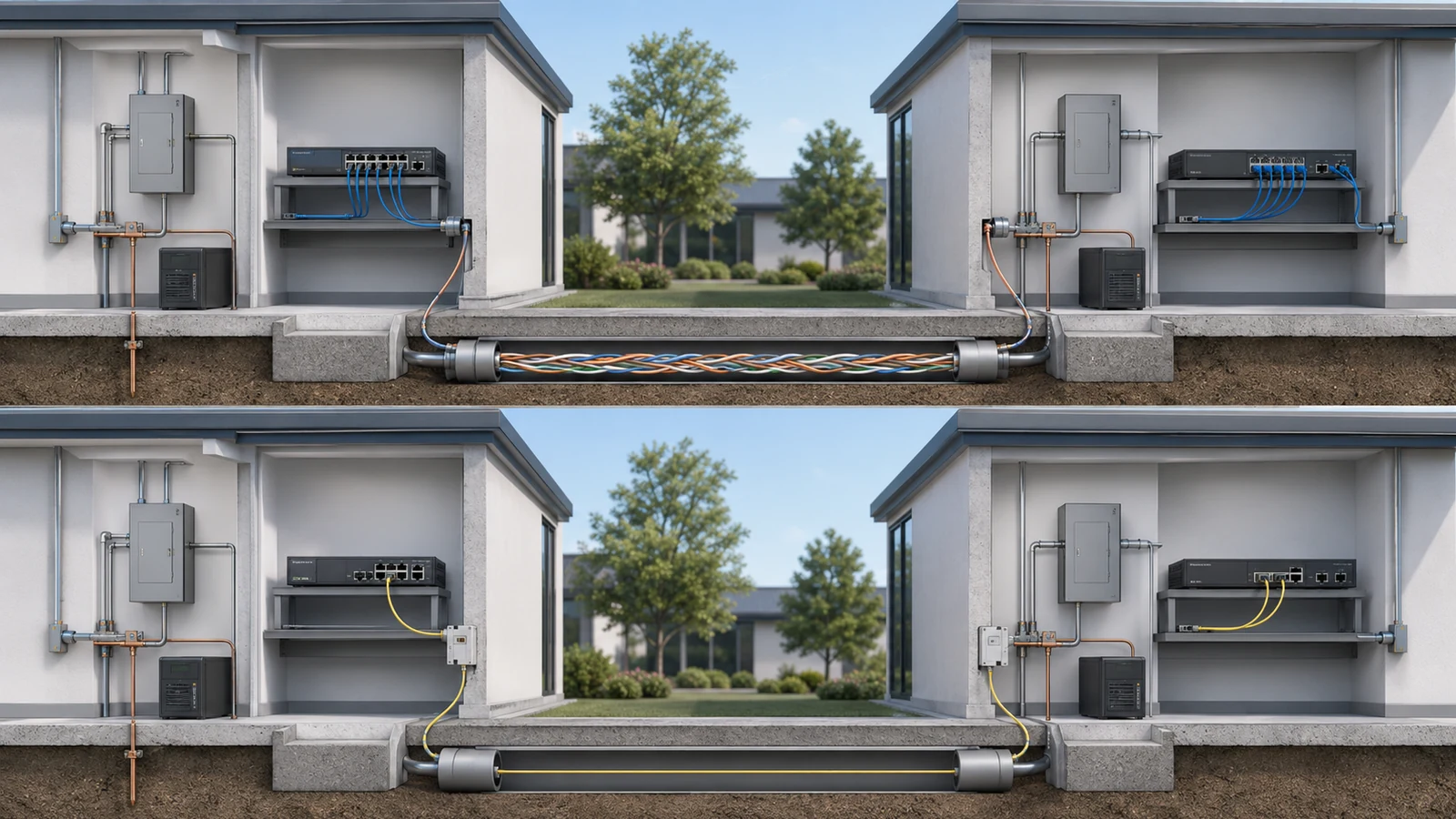
Separate buildings can have different electrical conditions. A conductive network cable creates a metallic path between equipment located in those environments. Lightning, utility events, grounding differences, induced voltage, and other electrical conditions can damage connected interfaces or equipment.
Surge protection, grounding, and bonding may reduce risk in an appropriately designed installation, but they do not transform every inter-building copper route into the equivalent of an optically isolated link.
Other considerations include:
- Distance: Long routes can exceed the supported Ethernet channel length before the cable reaches the destination.
- Interference: Copper can be affected by electromagnetic conditions and poor separation from electrical systems.
- Environment: The cable must be rated for the pathway and exposure in which it is installed.
- Surge exposure: Exterior cameras, gates, poles, and separate buildings can introduce additional electrical risk.
- Repair complexity: A marginal link may appear intermittent rather than failing cleanly, making diagnosis difficult.
- Expansion: One copper link installed for one device may not provide a clean growth path for a future building network.
Outdoor-rated, shielded, or surge-protected copper products can be appropriate for specific applications, but each addresses only part of the design. Shielding, for example, introduces its own bonding and installation requirements and should not be treated as a universal solution.
04 Why Fiber Is Commonly Preferred Between Buildings
Fiber transmits data using light rather than electrical signals through copper conductors. That gives it several important advantages for property backbones.
Fiber can provide:
- Support for significantly longer pathways
- High capacity with upgrade options determined by the cable plant and connected optics
- Resistance to electromagnetic interference
- Electrical isolation when the optical pathway is all-dielectric
- Multiple strands for primary links, spare capacity, or future services
- A cleaner foundation for connecting switches in separate buildings
Electrical isolation is one of the strongest reasons to use fiber between structures. Because the optical fibers do not conduct electricity, the data path does not create the same metallic connection between network equipment in separate buildings.
This advantage should not be overstated. Fiber does not make the entire installation immune to lightning, power problems, water intrusion, construction damage, or equipment failure. Fiber cables containing metallic armor, strength members, or tracer components may still require appropriate bonding and grounding. The powered devices at both ends still need suitable electrical and surge protection.
Fiber also separates the backbone from endpoint power delivery. A local switch in the remote building receives power there and then provides Ethernet and PoE to nearby cameras, access points, phones, and controllers. This creates a logical division between the inter-building backbone and the building’s access layer.
05 Fiber Is a System, Not Just a Cable
A proposal that simply says “install fiber” leaves many important decisions unresolved.
A complete fiber design should specify:
- The selected fiber type
- The number of installed strands
- Indoor, outdoor, underground, or other environmental rating
- Whether the construction is all-dielectric or contains metallic components
- The pathway and conduit route
- Termination method and connector type
- Patch panels, enclosures, and cable management
- Network interfaces, transceivers, or media conversion equipment
- Supported link speed and compatibility at both ends
- Testing, labeling, and documentation requirements
- Spare strands and future connection strategy
Single-mode and multimode fiber can both serve network applications, but they should not be selected from distance alone. Existing standards, connected equipment, expected lifecycle, consistency across the property, installer capability, and upgrade strategy also matter.
The transceivers or optical interfaces at both ends must match the fiber design and one another. Installing the correct cable without compatible optics does not produce an operational link.
Termination quality and testing are equally important. The finished project should include identification of each strand, end-to-end test records, termination locations, patching details, and the optical equipment used.
06 The Pathway May Matter More Than the Medium
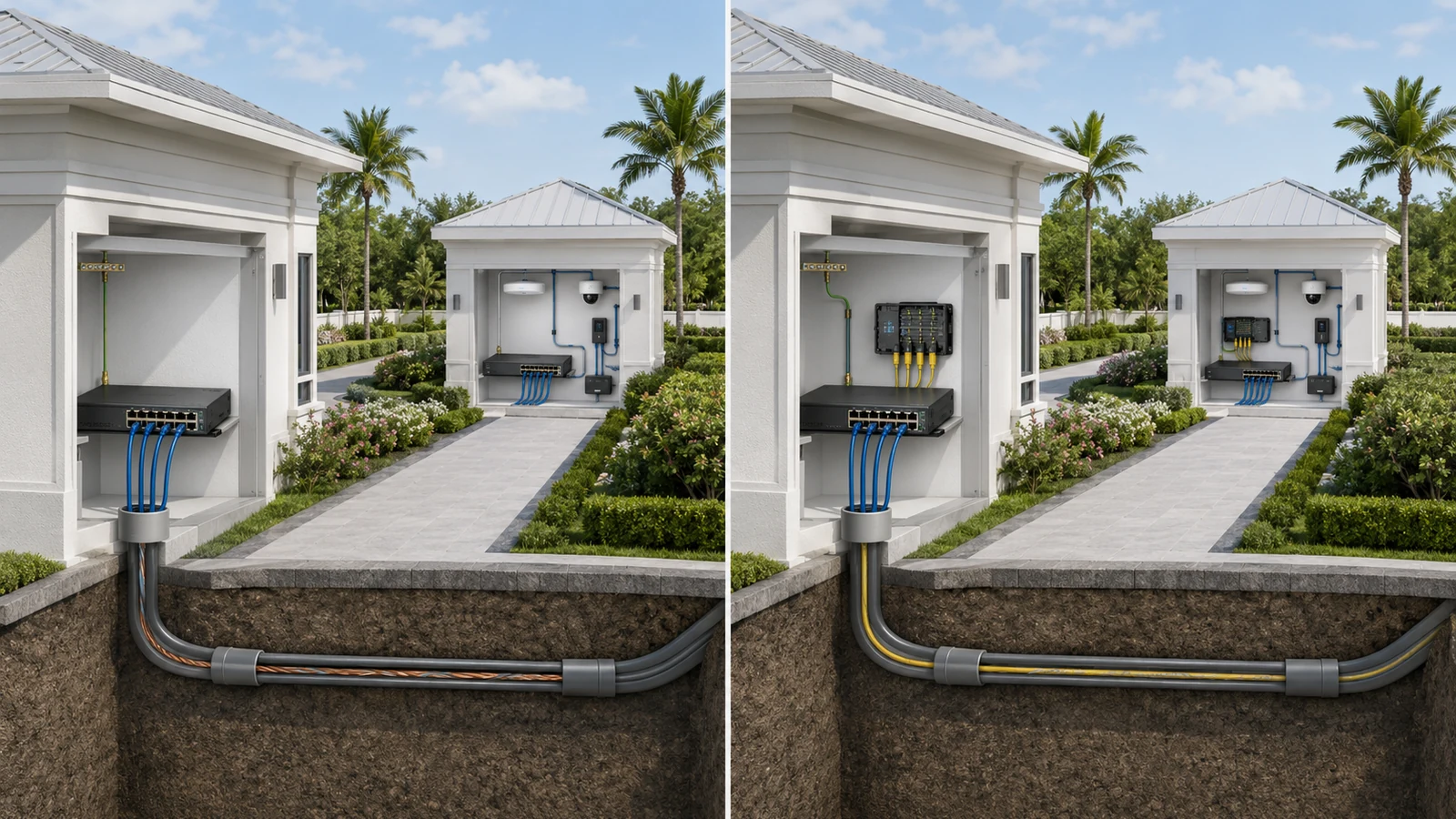
A high-quality cable cannot compensate for a damaged, flooded, inaccessible, undersized, or poorly routed pathway.
Underground conduit should be expected to experience moisture. Cable installed in that environment must be suitable for the location even when the conduit was intended to keep water out.
A properly planned pathway should consider:
- Route length and changes in elevation
- Conduit size, occupancy, and bend limitations
- Pull points and accessible handholes
- Separation from electrical infrastructure
- Water entry and drainage conditions
- Physical protection at building entrances
- Identification of both ends and intermediate locations
- Spare capacity for future cable installation
- Construction records showing the route
- Repair access if landscaping or pavement changes
A pathway installed during construction may be far more valuable than the first cable placed inside it. Proper conduit, pull access, and spare capacity allow the community to repair or upgrade the backbone without reopening finished property areas.
Wireless point-to-point connections can sometimes provide temporary service, reach a location where excavation is impractical, or serve as a backup path. They require clear line of sight, stable mounting, power, environmental protection, frequency planning, and realistic availability expectations. They should be evaluated as a separate design option rather than assumed to be identical to a physical cable backbone.
07 Compare Fiber and Copper in the HOA Environment
| Planning Factor | Copper Ethernet | Fiber-Optic Cabling |
|---|---|---|
| Typical role | Endpoint and access-layer connections within a building | Backbone connections between buildings, zones, and major network locations |
| Distance | Conventional twisted-pair Ethernet channels are limited to 100 meters | Supports substantially longer links when the fiber and optical interfaces are selected correctly |
| Electrical path | Creates a conductive connection between network equipment | An all-dielectric optical path does not conduct electricity between buildings |
| Interference | Can be influenced by electromagnetic conditions and installation quality | Optical data transmission is resistant to electromagnetic interference |
| Power delivery | Can provide PoE to supported endpoints | Does not deliver endpoint power; remote network equipment requires local power |
| Capacity strategy | Determined by cable category, channel quality, distance, and connected interfaces | Can support multiple upgrade generations when the fiber plant and optics are planned appropriately |
| Installation system | Familiar termination and testing, with careful electrical and environmental planning | Requires compatible fiber, termination, enclosures, optics, testing, and trained installation |
| Best fit | Short local device connections and carefully evaluated special cases | Permanent inter-building links and community backbone infrastructure |
The comparison does not mean fiber must replace copper everywhere. A strong community network commonly uses both: fiber between major locations and copper from local switches to nearby endpoints.
08 Compare Total Project Cost, Not Cable Price
Copper cable and interfaces may appear less expensive for a short link. Fiber may require optical interfaces, termination equipment, specialized labor, and testing. Those initial differences should be considered—but not in isolation.
A complete cost comparison should include:
- Pathway construction and restoration
- Cable and pulling labor
- Building-entry protection
- Patch panels, enclosures, and termination
- Optical interfaces or copper surge-protection components
- Local switching and power
- Testing and documentation
- Maintenance and troubleshooting access
- Expected expansion
- The operational consequence of failure
- The cost of replacing the link if the original design becomes unsuitable
Pathway work often represents a significant portion of the project. If excavation, boring, pavement restoration, landscaping, or building penetration is required, installing an appropriately designed fiber backbone and spare pathway capacity may be more economical than repeating that work later.
The least expensive initial link is not necessarily the lowest-cost infrastructure. At the same time, a small, noncritical, short-distance connection should not be overbuilt without a clear operational reason.
09 Make the Decision Through a Documented Review
Inter-Building Connectivity Checklist
- Identify every system that will use the link.
- Measure the complete pathway rather than straight-line building distance.
- Document the operational impact if the connection fails.
- Inspect existing conduit, handholes, building entrances, and termination spaces.
- Confirm the environmental rating required for the entire cable route.
- Review electrical, grounding, bonding, and surge considerations with qualified professionals.
- Estimate current traffic and known expansion requirements.
- Confirm local power, UPS support, and switching at the remote building.
- Specify fiber type, strand count, construction, terminations, and compatible optics when using fiber.
- Specify copper category, channel length, pathway, and protection requirements when using copper.
- Include labeling, end-to-end testing, test records, and as-built pathway documentation.
- Preserve reasonable conduit and strand capacity for maintenance or future expansion.
For most permanent links between independent community buildings, fiber provides the stronger architectural foundation. It removes the conductive data path, supports longer routes, offers substantial capacity, and aligns naturally with building-level switches and local endpoint cabling.
Copper remains the practical access-layer medium inside those buildings and may serve selected short or temporary connections when the distance, electrical environment, pathway, and service risk have been properly evaluated.
The best design usually does not choose fiber instead of copper across the entire property. It assigns each medium the role it performs best: fiber for the backbone, copper for nearby endpoints, and a documented pathway system connecting the two.