
Introduction
Wi-Fi equipment may be replaced every few years. Properly installed Ethernet cabling can remain useful through several generations of access points, switches, cameras, computers, and entertainment systems.
That difference makes residential cabling a long-term property decision rather than a simple accessory purchase. The most important choices are not limited to whether the cable says Cat6 or Cat6A. A complete strategy must also determine where the runs begin, where they terminate, which rooms and infrastructure devices need connections, how future cables can be added, and how the finished installation will be tested and documented.
The best plan provides enough connectivity for the property’s realistic future without filling every wall with unused cable. It prioritizes difficult-to-reach and infrastructure-critical locations while preserving practical expansion paths.
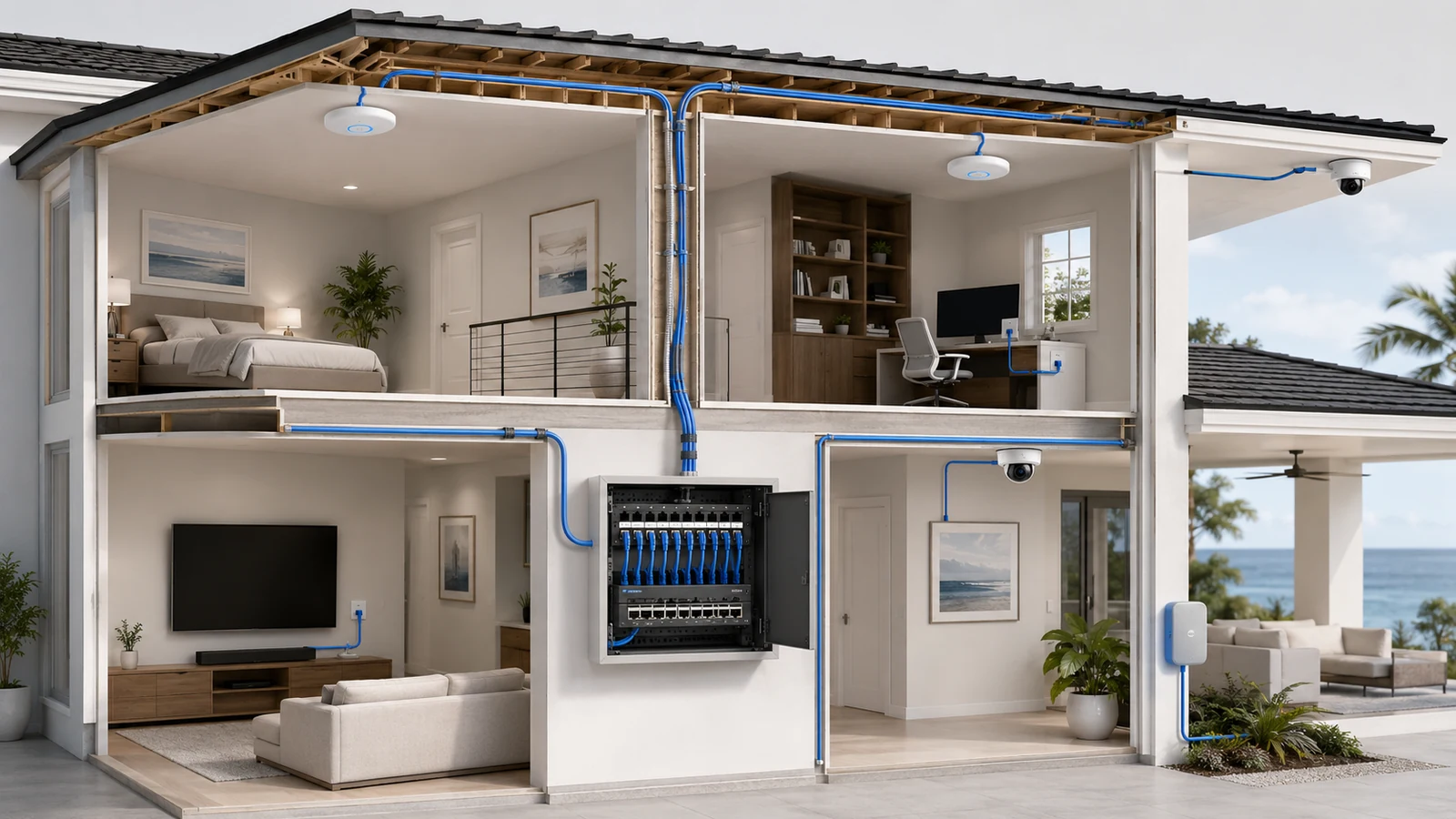
01 Build the Wireless Network on a Wired Foundation
Ethernet and Wi-Fi serve different roles. Wi-Fi provides mobility and convenience. Ethernet provides a stable path for fixed devices and the infrastructure that creates wireless coverage.
High-value wired connections commonly include:
- Wireless access points
- Home-office computers and docking stations
- Televisions, streaming devices, and game consoles
- Security cameras and video recorders
- Network-attached storage and local servers
- Secondary switches and equipment locations
- Automation controllers and other fixed infrastructure
- Outdoor access points, gates, and property systems
Not every Ethernet-capable device must be wired. The objective is to remove predictable fixed traffic from the wireless network and provide dependable connections where performance or continuity matters most.
Access-point cabling is particularly valuable. Ethernet backhaul allows an access point to be positioned according to the coverage zone rather than according to its ability to maintain a wireless connection with another node. The tradeoffs are explained in Wi-Fi mesh versus wired backhaul.
A cabling plan should therefore begin with the overall architecture. Review how Wi-Fi and wired infrastructure work together before finalizing individual cable routes.
02 Choose Cat6 or Cat6A According to the Project
Cat6 is a practical default for many new residential installations. It supports common gigabit and multi-gigabit applications and can support 10 Gigabit Ethernet over qualifying distances when the complete installed channel meets the applicable performance requirements.
Cat6 is generally easier to route and terminate than Cat6A, making it well suited to:
- Access points
- Security cameras
- Televisions and media devices
- Home offices
- General residential network outlets
- Moderate-length equipment and backbone connections
Cat6A is designed to support 10 Gigabit Ethernet across the full standard copper-channel distance when properly installed as a complete compatible system. It may be appropriate for new construction, demanding workspaces, equipment backbones, or projects where full-distance 10-gigabit capability is a defined requirement.
Cat6A also introduces practical tradeoffs. The cable is commonly thicker, requires more pathway space, has a larger bend radius, and may be more demanding to terminate. Cat6A can be shielded or unshielded; the category name alone does not determine shielding.
| Consideration | Cat6 | Cat6A |
|---|---|---|
| Typical residential role | Strong general-purpose choice for access points, cameras, offices, media devices, and ordinary room drops | Higher-performance option for defined 10-gigabit goals, longer demanding links, or selected backbone locations |
| Installation | Smaller and generally easier to route and terminate | Typically larger and more demanding on pathways, bend radius, hardware, and workmanship |
| 10-gigabit planning | Can support 10 Gigabit Ethernet over qualifying shorter channels | Designed for full-distance 10 Gigabit Ethernet when the installed channel meets requirements |
| Component cost | Usually lower | Usually higher and may require larger compatible jacks, panels, and pathway capacity |
| Best decision basis | Use when it satisfies the documented speed, distance, PoE, and environmental requirements | Use where its additional capability solves a real design requirement rather than as a label-driven upgrade |
Existing Cat5e should not be discarded automatically. A properly installed Cat5e run may continue to serve many gigabit devices reliably and may support faster applications under suitable conditions. For a new installation, Cat6 often provides a better balance of capability and cost, but replacing functional existing cabling should be based on testing and actual requirements.
03 Select Cable Construction and Jacket for the Location
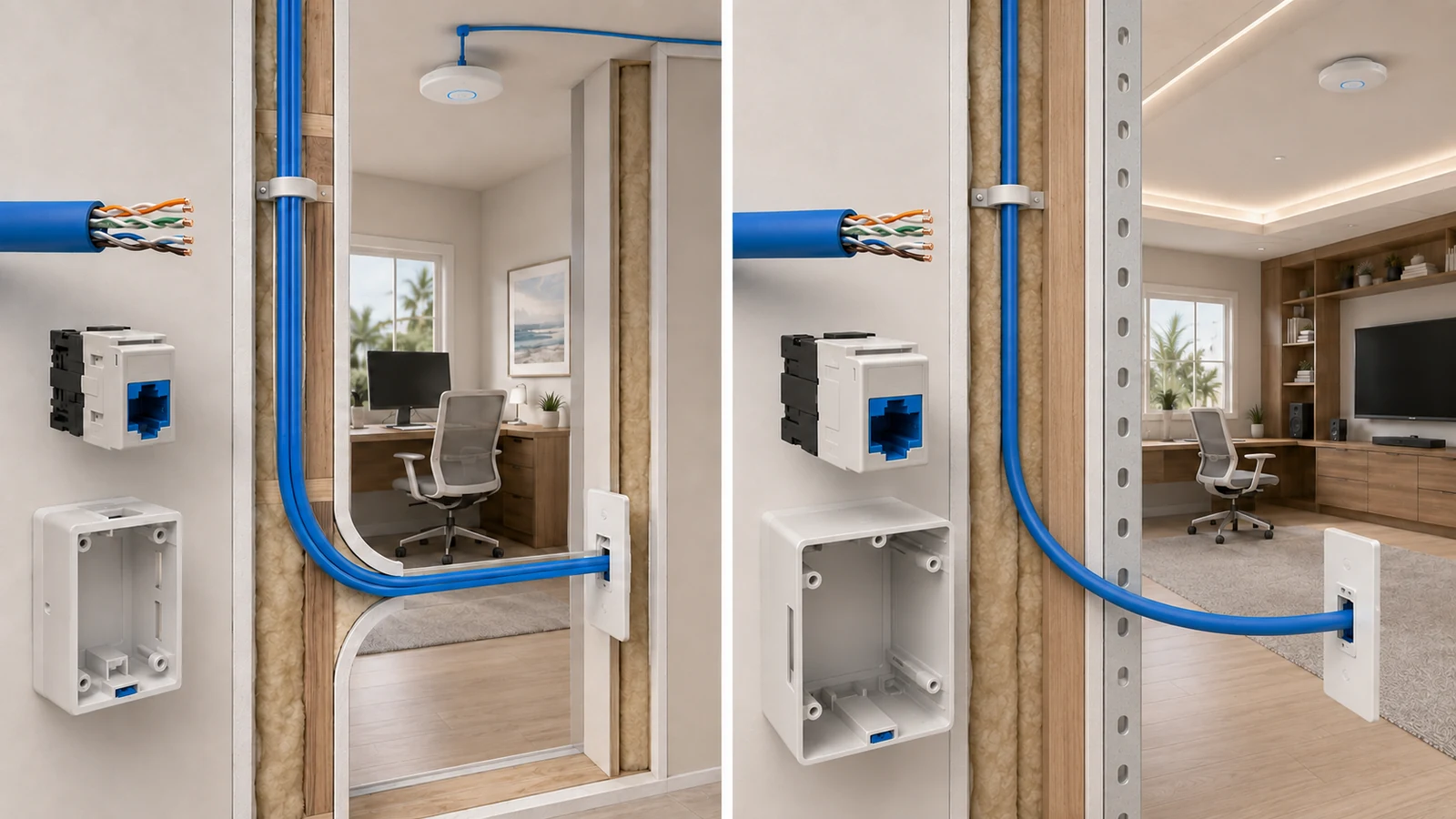
Permanent in-wall and in-ceiling cabling normally uses solid conductors and terminates on appropriate insulation-displacement contacts in keystone jacks or patch panels. Flexible stranded cable is commonly used for manufactured patch cords between the wall outlet and device or between the patch panel and switch.
The cable must also be suitable for its physical environment. Depending on the pathway, the installation may require cable with an appropriate fire or building listing, outdoor-resistant jacket, wet-location suitability, direct-burial design, or conduit protection.
Important distinctions include:
- Indoor general-purpose cable: Intended for approved interior pathways.
- Riser- or plenum-rated cable: Used where the building pathway and applicable requirements call for those ratings.
- Outdoor-rated cable: Designed to tolerate ultraviolet exposure and environmental conditions when installed accordingly.
- Wet-location or direct-burial cable: Selected where moisture exposure or underground installation requires it.
- Shielded cabling: Used only as part of a correctly designed and bonded system when the environment justifies it.
Do not assume that indoor cable becomes suitable for an exterior run merely because it is placed inside a short piece of conduit. Outdoor and underground pathways can experience moisture and temperature conditions that require appropriately listed materials.
Copper-clad aluminum cable should not be treated as equivalent to standards-compliant solid-copper communications cable. Use reputable, properly identified cable and compatible connectivity from reliable sources.
04 Use Centralized Home Runs and Structured Termination
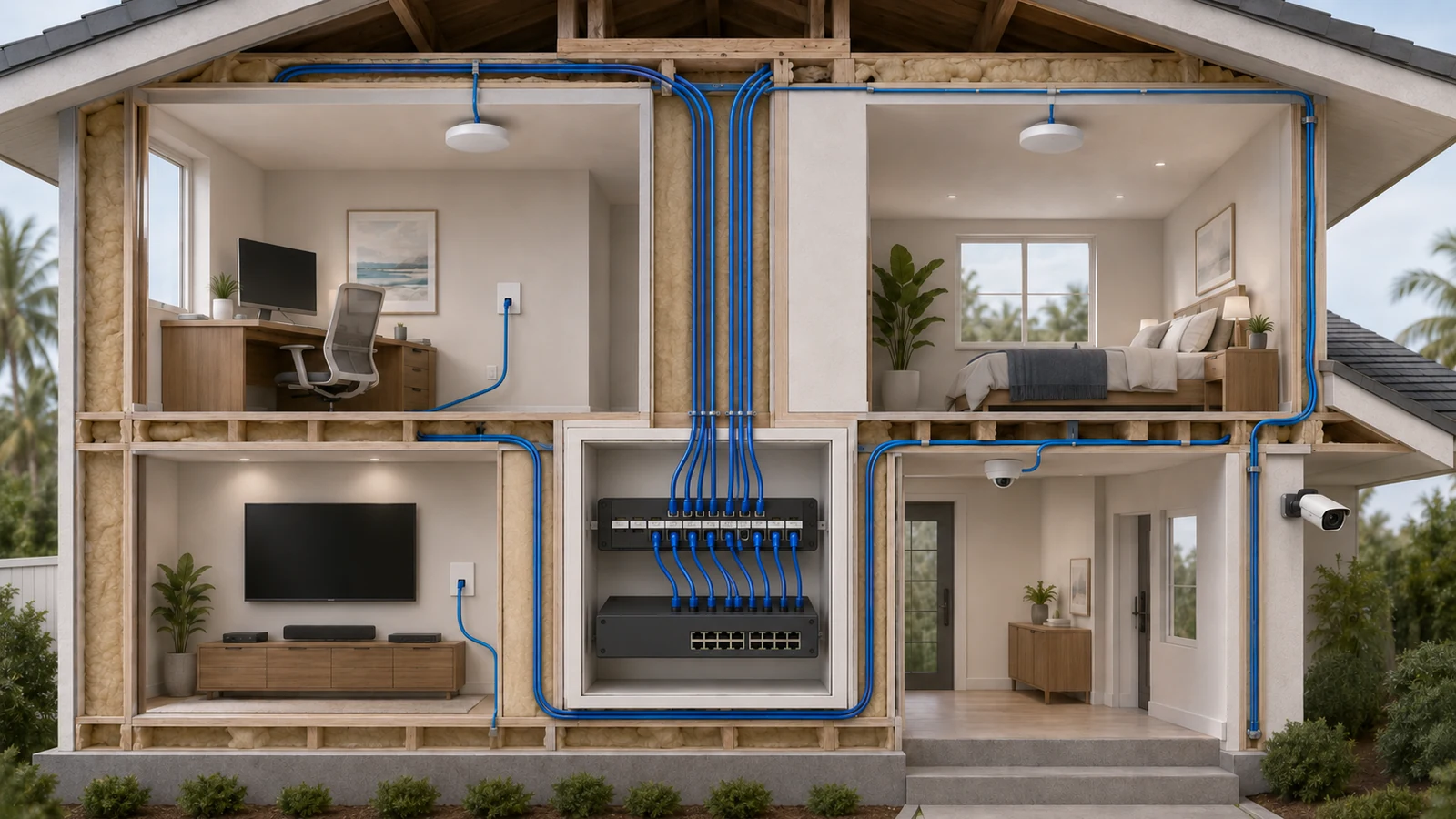
In a structured residential design, each permanent cable normally runs from an individual outlet or device location back to a central patch panel. This is known as a home-run topology.
Centralized termination provides several benefits:
- Any room jack can be connected, disconnected, or reassigned at the patch panel.
- Switch replacement does not require disturbing permanent building cable.
- Individual runs can be tested and documented clearly.
- PoE devices can receive power from a protected central switch.
- Troubleshooting remains organized as the system grows.
Use one termination scheme consistently throughout the installation. T568A and T568B can both produce valid straight-through connections when used consistently at both ends. The correct choice may depend on project conventions or applicable requirements; consistency and documentation matter more than selecting one universally.
Permanent cables should terminate on compatible patch-panel ports or keystone jacks rather than being treated as long flexible patch cords. Short factory-made patch cords can then connect the patch panel to the switch and the wall outlet to the endpoint.
Bring all home runs to a suitable equipment location with enough space, ventilation, power, and service access. The guide to building a home network closet explains how that location should support the finished infrastructure.
05 Put Ethernet Where It Creates Lasting Value
A universal number of drops per room is rarely the best rule. Some rooms may need several connections, while others may need none. Prioritize locations that will be difficult to reach later or that support fixed, important equipment.
Home offices: Provide multiple connections when the room may contain a computer, dock, phone, printer, television, or secondary workstation. Consider more than one wall when the furniture layout may change.
Media areas: Prewire the television wall and any separate equipment cabinet. Several fixed devices can share a local switch, but dedicated home runs provide more flexibility, simplify troubleshooting, and reduce another point of failure.
Bedrooms and flex rooms: At least one strategically placed connection may be valuable when a bedroom could later become an office, study, or media space. Furniture placement should guide the outlet location.
Wireless access points: Install a dedicated cable to every planned ceiling, wall, or in-wall access-point location. Consider optional future locations in large or uncertain floor plans. Use the access-point placement blueprint before fixing those positions.
Security cameras: Run individual cables to planned exterior and interior camera locations. Confirm field of view, mounting surface, accessibility, environmental exposure, and cable protection before rough-in.
Doors, gates, and exterior systems: Consider video doorbells, access control, gate operators, intercoms, irrigation equipment, outdoor access points, and future automation. Not every device will use Ethernet or PoE, but providing a suitable pathway can preserve options.
Network and AV equipment: Connect secondary cabinets, media racks, automation panels, and other distribution points with appropriately sized backbone links.
Spare runs have the greatest value where adding cable later would be unusually difficult. Two cables pulled through the same open pathway during construction may be inexpensive insurance; installing unused drops indiscriminately throughout a completed home may not be.
06 Plan the Physical Pathway, Not Just the Endpoints
Good endpoints are useless if the cable cannot reach them safely and without damage. Pathway planning should account for structure, electrical systems, bend radius, pulling tension, support, heat, accessibility, and future service.
General planning principles include:
- Avoid unnecessary parallel routing beside power cabling.
- Maintain the separation required by applicable rules and the project design.
- Cross power pathways in a controlled manner when separation cannot be maintained.
- Follow the cable manufacturer’s bend-radius and pulling-tension requirements.
- Use supports designed for low-voltage cable without crushing or deforming the jacket.
- Protect penetrations and fire-rated assemblies appropriately.
- Keep cable away from heat sources, sharp edges, and moving equipment.
- Preserve service access at both ends.
A standard balanced-copper Ethernet channel is generally limited to 100 meters from equipment to equipment, including the permanent link and patch cords. Most residential runs are far shorter, but large properties, gates, docks, and detached structures can approach practical copper limits.
Long exterior or interbuilding connections may be better served by fiber. Fiber supports distance and provides electrical isolation between buildings, although it requires suitable equipment, pathways, termination, and power at the remote location.
07 Use Conduit Where Future Access Will Be Difficult
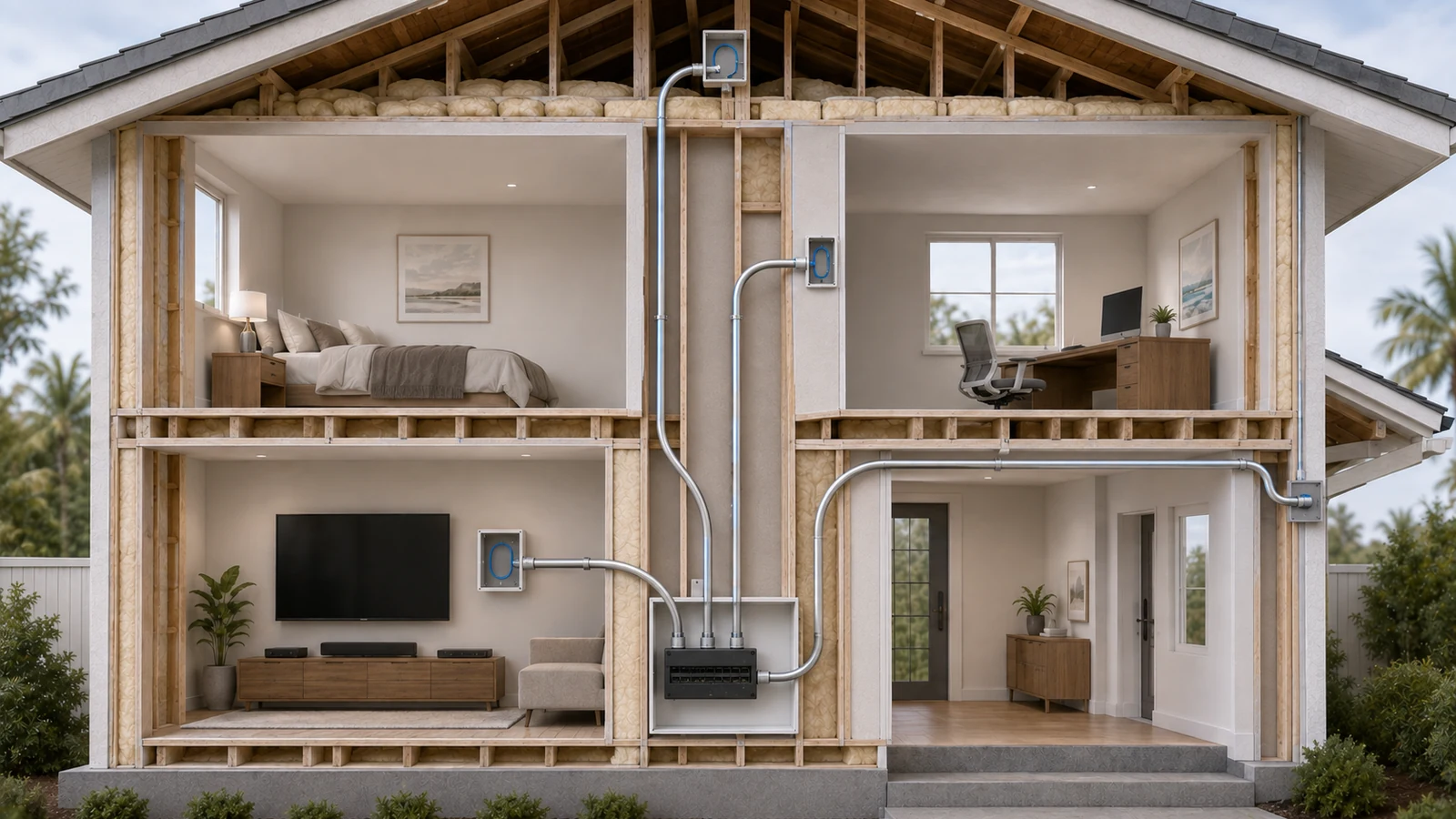
Conduit does not need to reach every outlet to provide substantial future value. Strategic pathways can make later additions possible without reopening finished walls.
High-value conduit routes may include:
- The network location to an accessible attic or crawlspace
- A vertical pathway between floors
- The equipment room to a media or AV location
- The main house to an exterior demarcation area
- A pathway toward a gate, dock, detached garage, or guesthouse
- Difficult concrete or masonry sections
- Locations where future fiber or replacement cable is plausible
Conduit must be sized and routed so that it remains usable. Too many tight bends, an undersized pathway, missing pull string, crushed sections, or inaccessible ends can turn an apparently future-ready conduit into a decorative pipe.
Leave an appropriate pull string and document both endpoints. When practical, preserve space for future cable rather than filling the pathway completely during the initial installation.
08 Design Cabling for PoE and Multi-Gig Equipment
Modern residential cabling often carries both data and electrical power. Access points, cameras, phones, door controllers, and other devices may receive Power over Ethernet from a central switch.
PoE planning should consider:
- The power requirement of each endpoint
- The PoE capability of the individual switch port
- The switch’s total available power budget
- Cable category, conductor material, and installation quality
- The number and arrangement of cables in bundles
- Ambient temperature and ventilation
- Voltage drop and distance
- Appropriate surge and environmental protection for exterior devices
Large bundles carrying substantial PoE loads require more care than several lightly loaded residential runs. Cable design and pathway conditions should be evaluated together rather than assuming that any category-marked cable is automatically suitable for every power configuration.
The switching plan must match the cabling plan. A switch may have enough ports while lacking the required PoE capacity or desired link speeds. Review how PoE powers access points, cameras, and other devices and whether the property needs a managed switch.
Multi-gig planning should also be selective. High-speed links may provide clear value between network storage, workstations, switches, gateways, and capable access points. Many cameras, televisions, and smart devices do not require the same bandwidth. Build the backbone for important future needs without assuming every endpoint must operate at the network’s maximum speed.
09 Adapt the Strategy to Construction and Renovation
New construction: This is the best opportunity to coordinate cable pathways with framing, electrical, HVAC, cabinetry, ceilings, and exterior systems. Finalize access-point and camera positions before drywall, photograph concealed pathways, and preserve strategic conduit.
Major renovation: Take advantage of open walls and ceilings in the affected areas. Even when the entire property is not accessible, a new backbone or vertical pathway can improve future options throughout the home.
Finished-home retrofit: Use attics, crawlspaces, closets, chases, baseboards, soffits, and discreet surface raceway where appropriate. Prioritize access points, offices, media areas, and central links instead of attempting to duplicate a full new-construction prewire at any cost.
Florida block construction: Concrete and masonry can restrict routing and make future changes expensive. Plan penetrations carefully, inspect for structural and utility conflicts, use accessible attic or soffit routes where appropriate, and consider conduit through difficult sections.
Detached buildings and outdoor areas: Evaluate distance, moisture, lightning exposure, grounding, electrical potential differences, and local requirements. Fiber is often attractive for interbuilding backbones because it does not conduct electricity, but the complete system still needs proper pathway protection and remote power.
Drilling, firestopping, exterior penetrations, and work near electrical or structural systems may require qualified trades and permits. The installation method should fit the property and local requirements.
10 Test, Label, and Document Every Run
A cable that looks neatly terminated is not necessarily a verified connection. Every permanent run should be tested after installation and again after significant finishing work that could have damaged it.
Testing can range from basic wiremap verification to qualification or certification appropriate to the project. The required level depends on the performance goals, project scope, warranty expectations, and whether formal documentation is needed.
At minimum, documentation should record:
- A unique identifier for each cable
- The room, outlet, or device location
- The corresponding patch-panel port
- The cable category and approximate pathway
- The test result
- Any reserved, unterminated, or future-use cable
- Photographs of concealed pathways when available
Label both ends using a consistent naming system that remains understandable to someone who did not install the network. “Office-East-01” is more useful than an unexplained number written on painter’s tape.
Provide reasonable service slack without leaving large tangled coils. Patch panels, keystones, wall plates, and cables should remain accessible for testing and replacement.
Residential Ethernet Planning Checklist
- Document the network’s current and realistic future requirements.
- Select Cat6, Cat6A, fiber, or another pathway according to distance and performance needs.
- Use cable with the correct conductor construction, jacket, and environmental listing.
- Plan centralized home runs to a suitable patch-panel and equipment location.
- Prewire access points, offices, media areas, cameras, and difficult exterior locations.
- Consider alternative furniture layouts in offices, bedrooms, and flex rooms.
- Coordinate cable routes with power, HVAC, plumbing, structure, and fire-rated assemblies.
- Include strategic conduit with usable bends, accessible endpoints, and pull strings.
- Evaluate PoE requirements, cable bundles, switch ports, and total power capacity.
- Consider fiber for long or interbuilding links where it provides practical value.
- Use compatible jacks, patch panels, and patch cords throughout the channel.
- Label both ends and document every patch-panel relationship.
- Test every completed run and retain the results.
- Photograph concealed pathways before walls and ceilings are closed.
A strong residential cabling strategy does not chase the highest category number or install the largest possible quantity of cable. It creates reliable pathways to the locations where wired connectivity provides durable value.
Choose the cable based on real requirements. Centralize and document the termination. Prewire access points and fixed infrastructure. Add conduit where future access will be difficult. Test the work before depending on it.
Wireless standards and network equipment will continue to change. Well-planned pathways give the home a foundation that can change with them.