

When planning a property network, the conversation often becomes a simple contest: Ethernet or Wi-Fi?
That framing misses how reliable networks are actually built.
Wired infrastructure provides stable paths for gateways, switches, access points, cameras, computers, controllers, and building systems. Wireless infrastructure provides mobility and flexible access for phones, tablets, laptops, resident devices, guests, and equipment that cannot reasonably be cabled.
Both are necessary in most modern properties. The real decision is where each medium belongs and which constraints must be addressed first.
01 Wired and Wireless Solve Different Problems
Wired Ethernet and fiber provide dedicated physical paths. Wi-Fi provides shared radio access within a coverage area.
| Design Factor | Wired Infrastructure | Wireless Infrastructure |
|---|---|---|
| Primary strength | Stable, predictable connectivity for fixed equipment and backbone links | Mobility, flexible access, and service where cables cannot follow users |
| Capacity model | Dedicated link capacity per connected port | Shared radio airtime among nearby devices |
| Main constraints | Pathways, distance, cable quality, ports, uplinks, and physical installation | Coverage, interference, client density, channels, construction, and backhaul |
| Typical lifecycle | Installed pathways and cabling may remain through several equipment generations | Access points and radio standards generally evolve more frequently |
| Best suited for | Infrastructure, fixed devices, high-consistency applications, and PoE endpoints | Mobile users, flexible locations, guest access, and devices designed primarily for Wi-Fi |
Neither medium guarantees performance by itself. A wired connection can be limited by damaged cabling, poor termination, an overloaded uplink, or an incorrect configuration. Wi-Fi can perform extremely well when placement, channels, backhaul, capacity, and client behavior are designed appropriately.
The objective is not to maximize one medium. It is to avoid placing requirements on a medium that does not suit them.
02 Plan Wireless Early, Even When Wiring Comes First
The wireless design should not wait until cabling is already installed.
Access-point locations depend on:
- Building layout and construction materials
- Ceiling height and mounting restrictions
- Expected users, devices, and applications
- High-density rooms and amenity spaces
- Outdoor areas and transition zones
- Available channels and neighboring interference
- Roaming and coverage requirements
Those findings determine where wired access-point drops, PoE switching, pathways, and distribution points should be installed.
The stronger sequence is therefore:
- Define wireless and wired requirements together.
- Identify likely access-point and fixed-device locations.
- Design pathways, cabling, switching, PoE, and uplinks to support them.
- Install and test the wired foundation.
- Deploy access points according to the design.
- Validate and optimize the wireless environment after installation.
This avoids two opposite mistakes: installing cables without knowing where wireless equipment belongs, or buying access points before confirming that stable power and backhaul can reach the required locations.
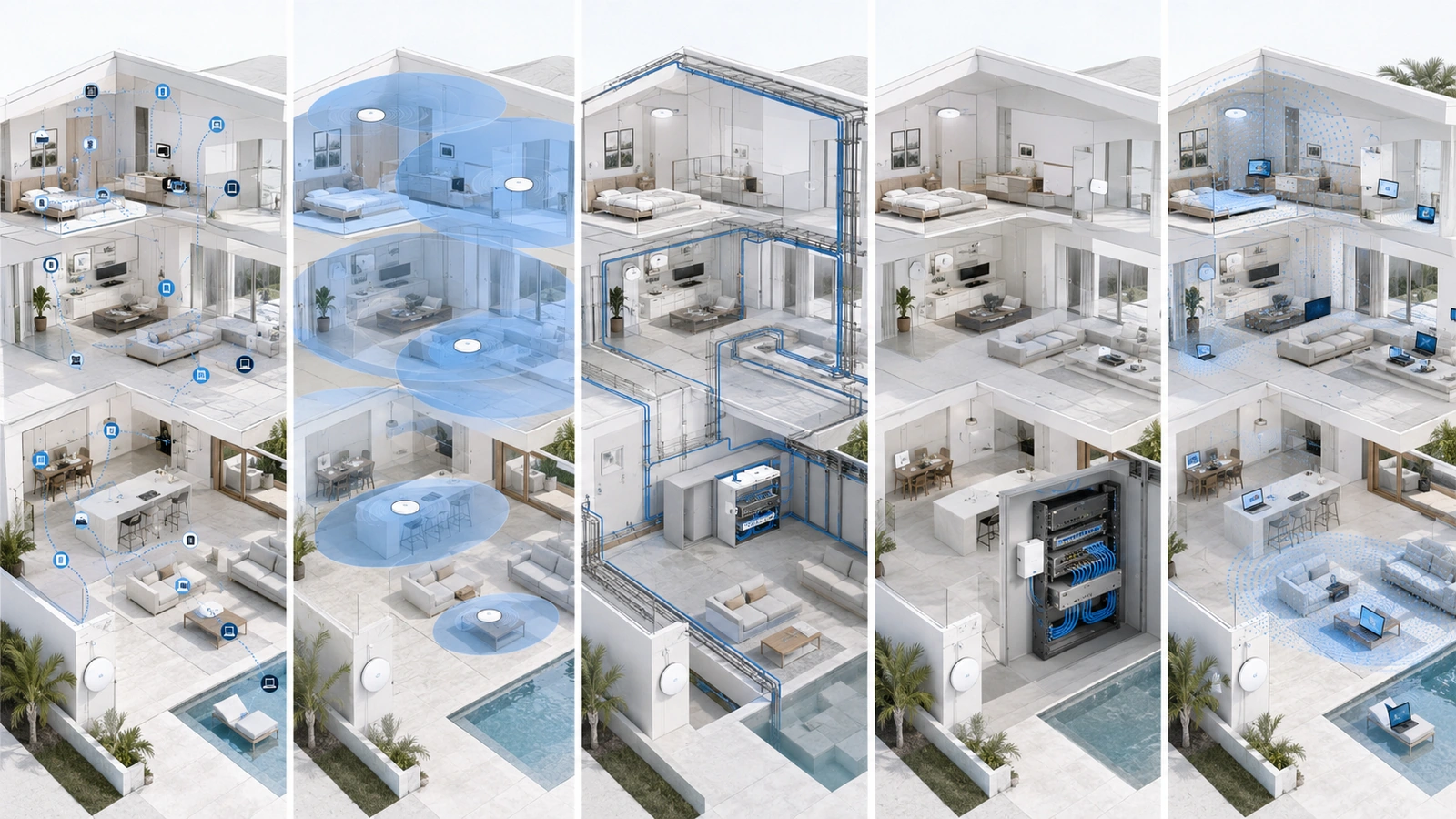
03 Prioritize Wired Connections for Infrastructure
Several network components generally benefit from wired connections because they form the foundation used by other services.
These commonly include:
- Gateways and firewalls
- Core and distribution switches
- Wireless access points
- Network controllers and local servers
- Video recorders
- Building-to-building and floor-to-floor uplinks
Wired access-point backhaul is particularly valuable because Wi-Fi users already share the radio medium. Carrying their traffic back across another wireless hop can consume additional airtime and make performance more dependent on radio conditions.
Fiber is often appropriate for backbone connections between buildings, floors, distant network rooms, or electrically separate locations. Copper Ethernet remains practical for many endpoint and access-point connections within supported distance and environmental requirements.
The wired foundation should include more than cable. It also depends on capable switches, sufficient uplinks, appropriate PoE, tested terminations, organized equipment spaces, reliable power, and documentation.
04 Wire Fixed Devices Where the Benefit Justifies It
Fixed devices often benefit from wired connectivity when cabling is practical and the device supports it.
Examples may include:
- Desktop workstations and office printers
- Cameras and video recorders
- Access-control and intercom components
- Televisions, media players, and audiovisual equipment
- Voice and conferencing devices
- Automation controllers and building systems
Wired connections can reduce wireless airtime use, provide stable physical placement, support PoE, and make device relationships easier to identify.
That does not mean every fixed device must be cabled. Some products are designed primarily for Wi-Fi, certain routes may be impractical, and low-bandwidth devices may operate reliably through a properly designed wireless service.
The decision should consider:
- Operational importance
- Bandwidth and latency sensitivity
- Whether PoE provides installation or power advantages
- Availability and cost of an appropriate cable path
- Wireless conditions at the device location
- Support and replacement requirements
- Consequences if the connection becomes intermittent
Wiring low-value devices at extreme cost is not automatically responsible infrastructure planning. The benefit must justify the construction and lifecycle burden.
05 Prioritize Wireless for Mobility and Shared Access
Wireless becomes the primary access method for devices and users whose location changes or whose value depends on mobility.
These may include:
- Phones and tablets
- Laptops moving between rooms
- Resident and guest devices
- Mobile operational equipment
- Temporary event devices
- Selected sensors and smart devices
- Areas where permanent cabling is not practical
Wireless should be designed for both coverage and capacity. Strong signal alone does not guarantee that enough airtime exists for the users and applications in the area.
Priority wireless projects may include:
- Correcting coverage gaps in occupied spaces
- Supporting high-density amenity or event areas
- Improving roaming between access points
- Reducing interference and excessive channel reuse
- Extending service to patios, pool decks, gates, or outdoor facilities
- Replacing poorly positioned or unsupported access points
If the wired foundation is healthy and complaints are clearly tied to wireless conditions, radio design becomes the correct investment priority.
06 Recognize When Wireless Must Come First
There are legitimate situations where wireless service must be addressed before a complete wired modernization.
Examples include:
- A temporary event or construction office
- An occupied building awaiting a future cabling renovation
- A historic or finished structure with restricted pathways
- An outdoor or remote location where trenching is not immediately practical
- An emergency restoration requirement
- A small residence whose existing wired foundation is already adequate
- A wireless assessment required to locate future access-point drops
Temporary wireless solutions should be documented as temporary when they create capacity, reliability, or support limitations.
A wireless bridge may provide a practical connection to a remote structure when line of sight, mounting, power, weather protection, spectrum conditions, capacity, and operational consequence are evaluated. It should not be treated as equivalent to fiber in every environment.
Wireless mesh may be appropriate for a small residence, difficult retrofit, temporary deployment, or noncritical extension. It becomes problematic when it is used blindly to avoid feasible cabling despite high density, difficult radio conditions, or important service requirements.
07 Spend First on the Hardest Constraints to Correct Later
Investment priority should reflect lifecycle and construction difficulty.
During new construction or major renovation, money is often best directed first toward:
- Conduit, sleeves, pathways, and accessible distribution points
- Structured copper and fiber cabling
- Appropriate equipment spaces
- Electrical capacity and backup-power planning
- Access-point and fixed-device cable locations
- Testing, labeling, and documentation
These elements are disruptive and expensive to correct after walls, ceilings, landscaping, and finishes are complete.
Active electronics should still meet current requirements, but speculative overinvestment in premium equipment may provide less long-term value than properly designed pathways and cabling.
In an existing building, the priority may be different. If the pathways are fixed and the current switching is healthy, replacing poor wireless placement may create the greatest immediate benefit.
The correct sequence is therefore property-specific, even though durable physical infrastructure usually deserves early attention.
08 Diagnose the Layer Before Choosing the Upgrade
Wireless complaints can originate from several parts of the infrastructure chain.
Before buying equipment, determine whether the problem involves:
- Internet capacity or provider availability
- Gateway performance or configuration
- Switch ports, PoE, errors, or uplinks
- Damaged, unsuitable, or poorly terminated cabling
- Access-point placement or orientation
- Interference, channels, power, or client density
- Wireless backhaul limitations
- A particular device, application, cloud service, or location
Testing should include both wired and wireless reference points. A wired test near the relevant switching layer can help determine whether the upstream infrastructure is healthy before wireless behavior is evaluated.
Measurements should occur under representative conditions. An empty clubhouse early in the morning may not reveal capacity problems that appear during an event.
The roles of the individual components are explained in Core Network Components Explained: Router, Switch, Access Point, and Firewall.
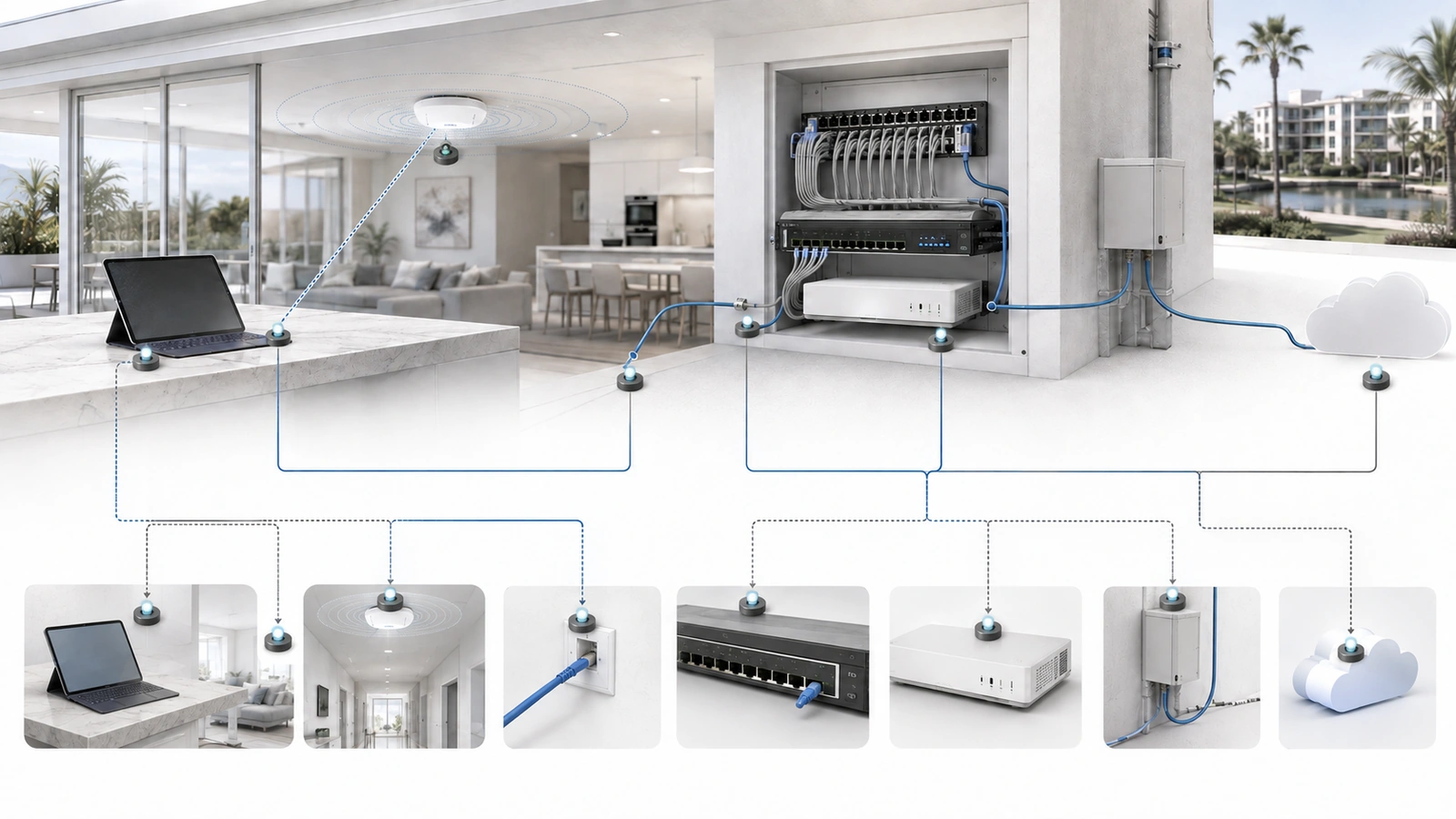
09 Use a Property-Specific Priority Framework
Wired and Wireless Priority Checklist
- Document the areas, users, devices, applications, and operational systems requiring service.
- Identify mobile devices, fixed devices, infrastructure components, and temporary requirements.
- Assess existing copper, fiber, pathways, terminations, switches, PoE, uplinks, and power.
- Evaluate wireless coverage, capacity, interference, placement, roaming, and backhaul.
- Identify which constraint is currently limiting service.
- Prioritize pathways and cabling during open-wall construction or major renovation.
- Wire infrastructure and important fixed devices where the benefit justifies installation.
- Use wireless deliberately for mobility, flexibility, temporary requirements, and impractical cable routes.
- Document mesh, bridges, or temporary connectivity with their limitations and replacement plans.
- Validate wired and wireless performance after implementation under representative demand.
- Preserve reasonable pathway, port, PoE, uplink, and radio-capacity headroom.
- Update diagrams, inventories, test results, and support procedures.
The larger architectural relationship appears in Building a Reliable Network Stack for Homes, Communities, and MDUs.
Budget decisions should follow the diagnosed requirement rather than marketing claims. See How to Choose the Right Networking Equipment Without Overspending.
Final Perspective
Wired and wireless infrastructure should not be planned as opposing strategies.
Wired connectivity provides durable backbone paths, reliable connections for infrastructure and fixed systems, and stable backhaul for access points. Wireless provides mobility, flexible user access, and practical service where cables cannot follow people or equipment.
In new construction, wireless requirements should be designed early so the correct pathways and cable locations can be built before finishes close. In existing properties, the immediate priority should address the layer actually causing the problem.
The most reliable approach is neither “wire everything” nor “make everything wireless.” It is to use each medium intentionally and support both through capable switching, clear security boundaries, appropriate power, documentation, and ongoing validation.