
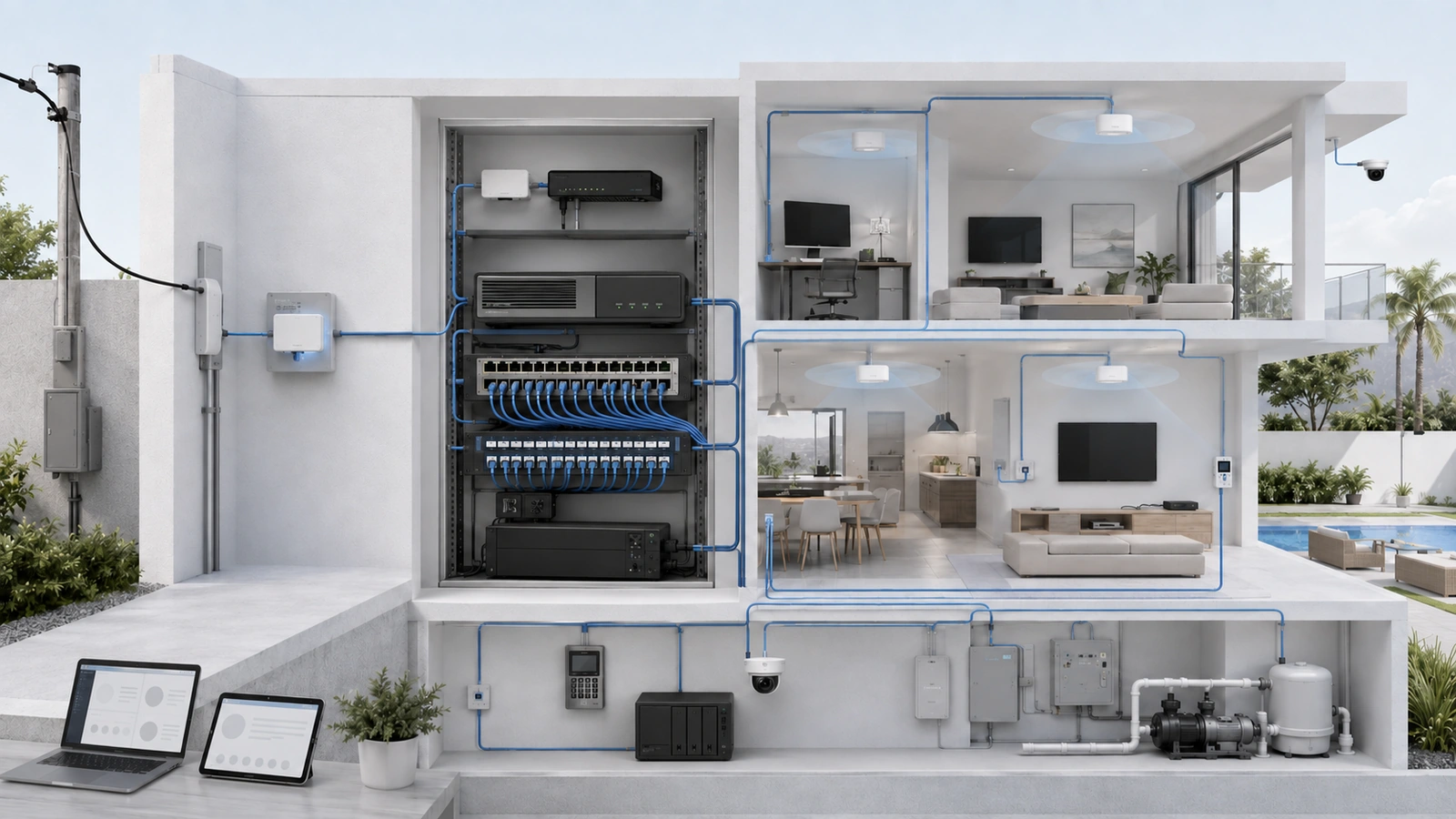
Network problems are frequently described as internet or Wi-Fi problems even when the actual cause is a failed switch, an incorrect firewall rule, an overloaded gateway, or a poorly positioned access point.
Understanding the principal network components makes those distinctions easier.
Four functions appear in most residential and community networks: routing, switching, wireless access, and firewall enforcement. They may exist in separate devices or be combined inside one appliance.
The internet provider also contributes equipment—typically a modem, optical network terminal, or provider gateway—that connects the property to the external service.
01 Begin at the Provider Handoff
Before traffic reaches the property’s router, the internet provider must deliver the service through an appropriate handoff.
Depending on the service, the provider may install:
- Cable modem: Converts the provider’s cable service into an Ethernet connection.
- Optical network terminal: Terminates fiber service and presents the connection used by the property.
- Provider gateway: May combine modem or fiber termination, routing, firewall, switching, and Wi-Fi.
- Fixed-wireless receiver: Connects the property through an external wireless provider network.
The handoff equipment is not always the property’s complete router, even when people casually call it “the router.”
If a separate property-owned gateway is installed, the provider device may operate in a bridge, passthrough, or other supported handoff mode. The exact configuration depends on the provider and service.
The property should document:
- Which equipment belongs to the provider
- Which equipment belongs to the property
- Where the service enters the building
- Which device holds the public-facing connection
- Who is responsible for troubleshooting each side
- What power supports the provider handoff
This boundary helps responders distinguish a provider outage from an internal infrastructure problem.
02 The Router Connects Different Networks
A router moves traffic between different networks and selects the appropriate path for that traffic.
In a simple residence, the router connects the private home network to the internet. In a segmented property, it may also route between staff, guest, camera, access-control, management, and other internal networks according to approved policy.
Common router or gateway responsibilities include:
- Routing traffic toward the internet
- Routing between authorized internal network segments
- Using the provider’s addressing information
- Providing local address assignment through DHCP where designed
- Performing network address translation where required
- Supporting VPN connections
- Managing primary and secondary internet services
- Applying traffic or quality-of-service policies where supported
The term gateway is commonly used for the device that combines routing with firewall and other edge functions. In many modern environments, “router” and “gateway” refer to the same physical appliance even though routing is only one of its functions.
A router should be evaluated using real operational requirements: internet throughput, number of devices and sessions, network segments, VPN use, failover, management, security features, logging, licensing, and configuration recovery.
03 The Firewall Enforces Communication Policy
A firewall evaluates traffic and permits or blocks communication according to defined rules.
Firewall functionality may exist inside the property gateway, inside a dedicated security appliance, within cloud-managed infrastructure, or across several enforcement points.
A residential firewall may control:
- Traffic entering from or leaving for the internet
- Communication between internal network segments
- Remote administrative or VPN access
- Connections initiated by cameras, smart devices, and property systems
- Guest access to internal resources
- Published services and inbound connections
A firewall does not automatically create strong security simply because it is installed. Its protection depends on the design and maintenance of its rules, administrative access, software, logging, remote exposure, and recovery process.
Default-deny approaches between separated trust zones can reduce unnecessary communication, but required applications and operational dependencies must be identified and tested.
Security inspection features may reduce the appliance’s usable throughput compared with an idealized routing specification. Equipment should be evaluated with the intended functions enabled.
04 The Switch Connects Devices Within the Property
A switch provides wired connectivity for devices on the local infrastructure. It forwards traffic through the appropriate physical port based on the network design.
Connected devices may include:
- Desktop computers and printers
- Wireless access points
- Cameras and video recorders
- Phones and communications equipment
- Access-control and intercom components
- Servers, controllers, televisions, and audiovisual systems
- Uplinks to other switches, buildings, or floors
Managed switches can support operational features such as:
- VLAN assignment and trunk connections
- Link status, errors, and traffic visibility
- Loop-protection and topology features
- Link aggregation where supported and appropriately designed
- Port security and access controls
- Configuration backup and centralized management
A PoE switch can deliver electrical power and data through compatible Ethernet cabling. Port availability and PoE capacity must be calculated separately. A switch may have unused ports but insufficient remaining power for additional access points or cameras.
An unmanaged switch can be entirely appropriate for a small, isolated, low-risk use case. It becomes limiting when the property requires segmentation, PoE visibility, monitoring, configuration control, troubleshooting detail, or coordinated management.
05 The Access Point Provides Wireless Connectivity
An access point connects wireless devices to the underlying network through radio communication.
Even when a home router appears to “create Wi-Fi,” the wireless service comes from an access-point radio built into that combined device.
Dedicated access points allow wireless coverage to be placed where users and devices require it instead of forcing radio placement to follow the location of the provider handoff or network closet.
Access-point planning should consider:
- Building materials and room layout
- Coverage and client-density requirements
- Interference and available channels
- Mounting position and orientation
- Transmit-power relationships
- Roaming between access points
- Wired or wireless backhaul
- PoE requirements
- Wireless networks and their mapped security zones
An access point is not merely a more powerful antenna. It is a managed part of the access layer whose performance depends on placement, radio conditions, switching, cabling, configuration, and the capabilities of connected clients.
Coverage should not be evaluated by signal strength alone. Capacity, retransmissions, channel use, roaming, and application performance also matter.
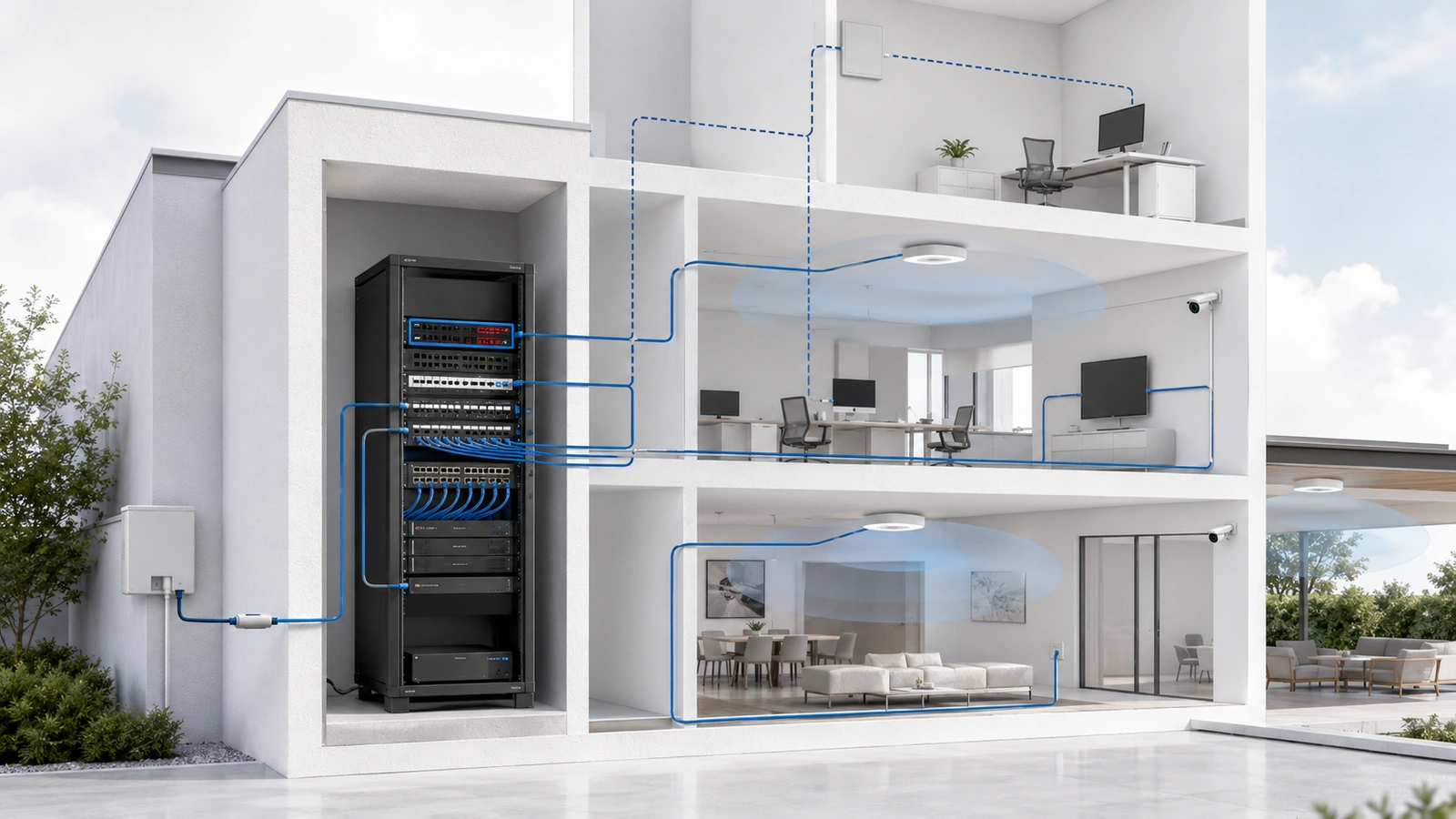
06 Controllers and Management Platforms Coordinate the Environment
Many modern network ecosystems use a controller or management platform to configure, monitor, and coordinate gateways, switches, and access points.
The controller may run:
- Inside the gateway
- On a dedicated local appliance
- On a server or virtual system
- As a vendor-hosted cloud service
Management platforms may provide:
- Centralized configuration
- Wireless coordination
- Network and device visibility
- Alerts and performance history
- Firmware management
- Configuration backups
- Remote administration
The controller is not always in the traffic path. In some designs, network operation continues if the management interface becomes unavailable, although configuration, monitoring, authentication, or certain features may be affected.
The property should understand whether local operation depends on the controller or cloud, who owns the administrative account, how configurations are backed up, what licenses are required, and how management is recovered.
07 How the Components Work Together
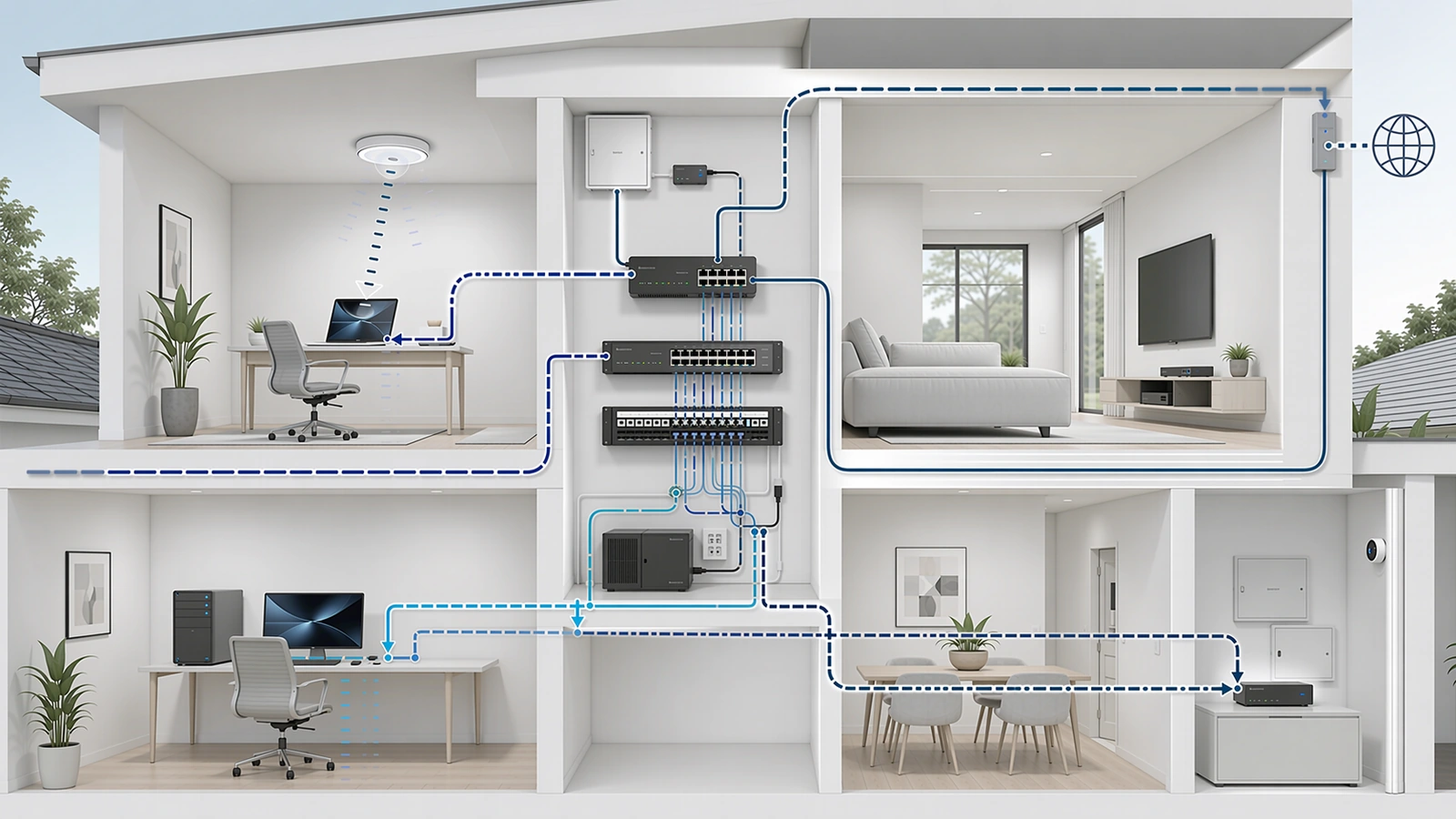
Consider a resident opening a website through community Wi-Fi:
- The device connects by radio to an access point.
- The access point bridges the device into its assigned network.
- The wired connection carries the traffic to a switch.
- The switch forwards the traffic toward the gateway.
- The firewall evaluates whether the communication is allowed.
- The router sends approved traffic through the provider handoff to the internet.
- Return traffic follows the appropriate path back to the device.
Now consider a staff computer reaching an internal printer on the same network. The switch may handle that local communication without sending it to the internet gateway.
If the printer is on a different network segment, the traffic generally reaches a routing and firewall enforcement point. The firewall determines whether that communication is permitted before the router forwards it between the networks.
This explains why different failures produce different symptoms:
- A failed provider circuit can remove internet access while local devices still communicate.
- A failed access point can affect Wi-Fi in one area while wired systems remain online.
- A failed switch can disconnect every device and access point attached to it.
- An incorrect firewall rule can block one application while other connectivity remains normal.
- An overloaded gateway can affect several networks even when switching and wireless coverage appear healthy.
08 Combined Devices Are Not Automatically Wrong
A provider or consumer gateway may combine modem or ONT functions, routing, firewall, switching, wireless access, and management inside one enclosure.
This can be appropriate when:
- The residence is small
- One equipment location provides acceptable wireless coverage
- There are relatively few wired and PoE devices
- Segmentation and remote-access requirements are limited
- The integrated device meets performance and support needs
- Simplicity is more valuable than independent component replacement
Separating functions becomes more useful when:
- Several access points must be placed throughout the property
- PoE switching is required
- Staff, guest, security, vendor, and device networks need controlled separation
- Gateway performance or security requirements increase
- Equipment must be distributed across buildings or floors
- Monitoring and configuration control become operationally important
- Independent replacement reduces lifecycle disruption
Role separation can improve flexibility and troubleshooting, but it also introduces additional equipment, power, configuration, space, and support requirements.
The correct objective is not the highest possible component count. It is an architecture proportional to the environment.
09 Select Components as One Coordinated System
Components should be evaluated together because the requirement placed on one layer often affects another.
Core Network Component Review Checklist
- Identify the provider handoff and whether a separate property gateway is required.
- Confirm router throughput, network-segment capacity, VPN, failover, and management requirements.
- Determine firewall policies, inspection features, logging, and remote-access controls.
- Calculate switch ports, uplinks, PoE standards, total power budget, and expansion requirements.
- Design access-point placement around coverage, capacity, construction, interference, and backhaul.
- Determine whether a local, integrated, or cloud controller is required.
- Confirm administrative ownership, licensing, configuration backups, and recovery procedures.
- Review physical space, cooling, circuits, UPS support, and serviceability.
- Verify compatibility without assuming every component must come from one manufacturer.
- Document the role, location, owner, dependencies, and lifecycle of each component.
The complete architectural relationship is explored in Building a Reliable Network Stack for Homes, Communities, and MDUs.
Once the roles are understood, equipment can be selected according to requirements and budget. See How to Choose the Right Networking Equipment Without Overspending.
Final Perspective
Router, switch, access-point, and firewall functions form the active core of most property networks.
The router connects networks. The firewall enforces communication policy. The switch distributes wired connectivity and PoE. The access point provides wireless access. The provider handoff connects the property to its external service, while a controller may coordinate configuration and visibility.
These functions may live inside one appliance or several dedicated devices. Neither approach is universally correct.
The correct design depends on property size, coverage, connected systems, security boundaries, performance, failure impact, support capability, and future growth.
Understanding each role makes it easier to identify the real source of a problem, select equipment intelligently, and expand the network without losing architectural clarity.