
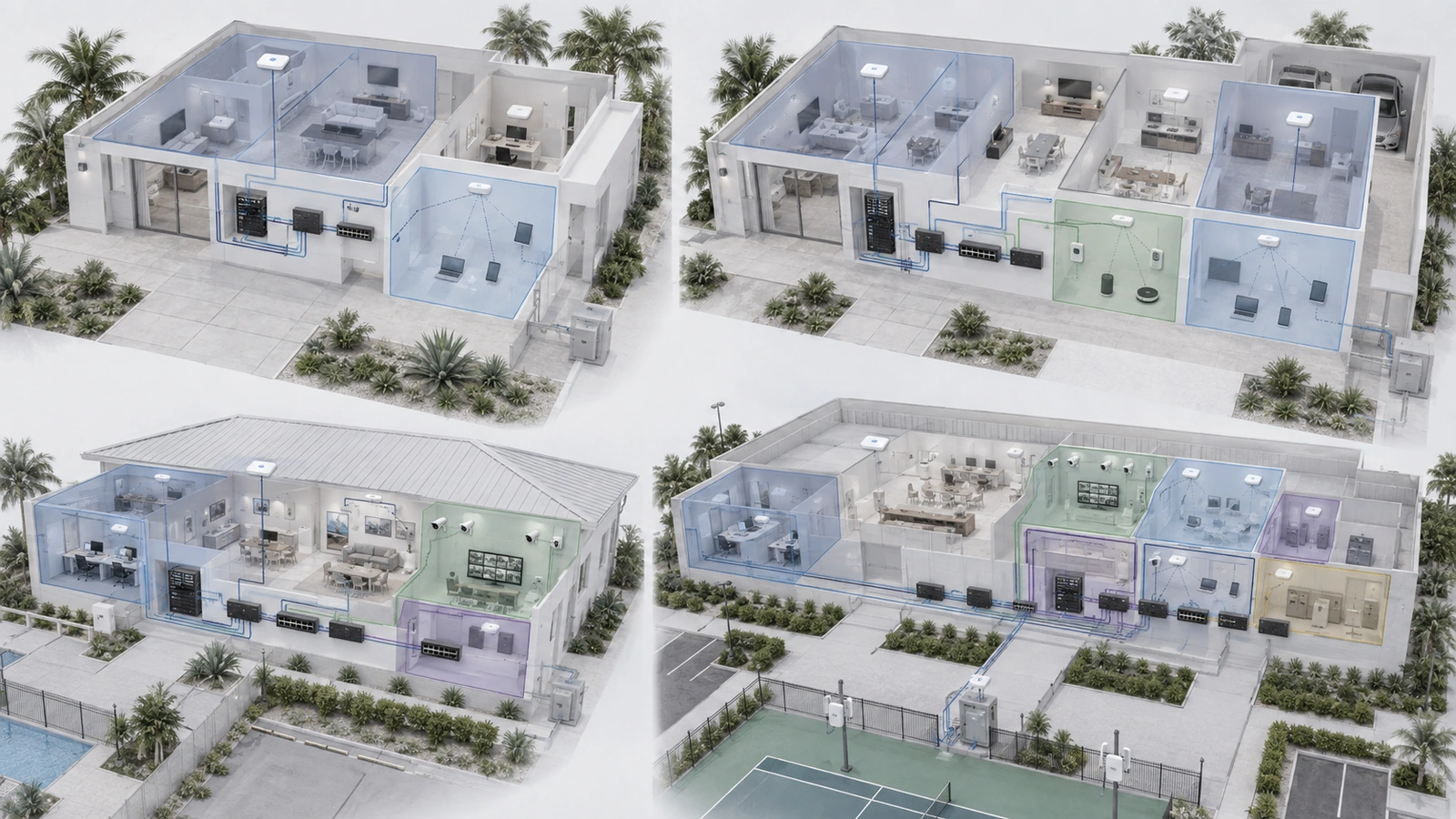
Network segmentation works best when it separates systems with genuinely different trust levels, responsibilities, or operational consequences. It becomes counterproductive when a property creates more zones than anyone can understand or maintain.
Most homes and smaller community properties do not need enterprise-scale complexity. They need a proportional structure that separates visitors, trusted users, connected devices, security systems, and network administration where appropriate.
The following templates provide practical starting points for five common environments. They are not universal configurations. Each property should confirm its device inventory, required communication, infrastructure capability, and long-term support plan before implementation.
01 How to Use These Templates
Each template identifies logical groups that may be implemented through VLANs, separate interfaces, guest-network features, client isolation, physical separation, or a combination of controls.
The implementation method matters less than whether the intended boundary is real and enforceable.
Before selecting a template, document:
- The people and devices using the network
- The owner and administrator of each system
- Required local and internet communication
- Guest, resident, staff, and vendor access
- The consequence of unauthorized access or service failure
- The equipment and expertise available to maintain the design
A separate SSID does not automatically prove separation. If VLANs are used, compatible gateways, switches, access points, and controllers must carry the configuration consistently. Firewall policy must then control routed traffic between the zones.
Do not copy VLAN numbers, subnets, or example access policies without adapting them. The templates describe functions and trust relationships, not mandatory technical values.
02 Template 1: Simple Residential Home
This template is appropriate for a smaller residence with trusted household users, relatively few connected systems, and occasional visitors.
Recommended zones
- Private: Household computers, phones, tablets, printers, televisions, and other approved devices
- Guest: Visitor, contractor, and temporary wireless devices
| Zone | Required Access | Restricted Access |
|---|---|---|
| Private | Normal internet and approved local services | Firewall and infrastructure management unless authorized |
| Guest | Internet, DHCP, DNS, and required time services | Private devices, router management, and other internal destinations |
This design may be implemented using a router’s properly isolated guest-network feature. A customized VLAN architecture may not be necessary if guest access is the only meaningful separation requirement.
Verify that guest users cannot reach private IP addresses, shared storage, printers, cameras, or the router’s administrative interface. If guest-to-guest communication is unnecessary, enable and test client isolation where supported.
This template should be reconsidered when the residence adds numerous connected devices, surveillance, automation, sensitive work equipment, or multiple managed access points.
03 Template 2: Connected or Smart Home
A connected home contains more devices with different security characteristics. Smart televisions, voice assistants, appliances, thermostats, lighting systems, cameras, doorbells, and automation products should not automatically receive the same access as trusted computers.
Recommended zones
- Private: Trusted user devices and approved personal services
- Guest: Visitors and temporary devices
- IoT: Smart appliances, entertainment devices, voice assistants, and appropriate automation products
The usual policy objective is to prevent IoT devices from initiating general connections to trusted devices. Private devices may initiate approved connections toward selected IoT services, with the stateful firewall permitting the associated return traffic.
Internet access should reflect the devices’ actual requirements. Some products depend heavily on vendor cloud services. Others operate locally and may require only DNS, time synchronization, updates, or a controller.
This template requires additional planning for:
- Smart-home controllers and hubs
- Television and audio casting
- Printer discovery
- Camera applications
- Multicast or mDNS discovery
- Vendor cloud services
A controlled discovery gateway may be required when trusted users must discover devices in the IoT zone. Reflect only the necessary services between approved zones instead of broadly repeating discovery traffic throughout the network.
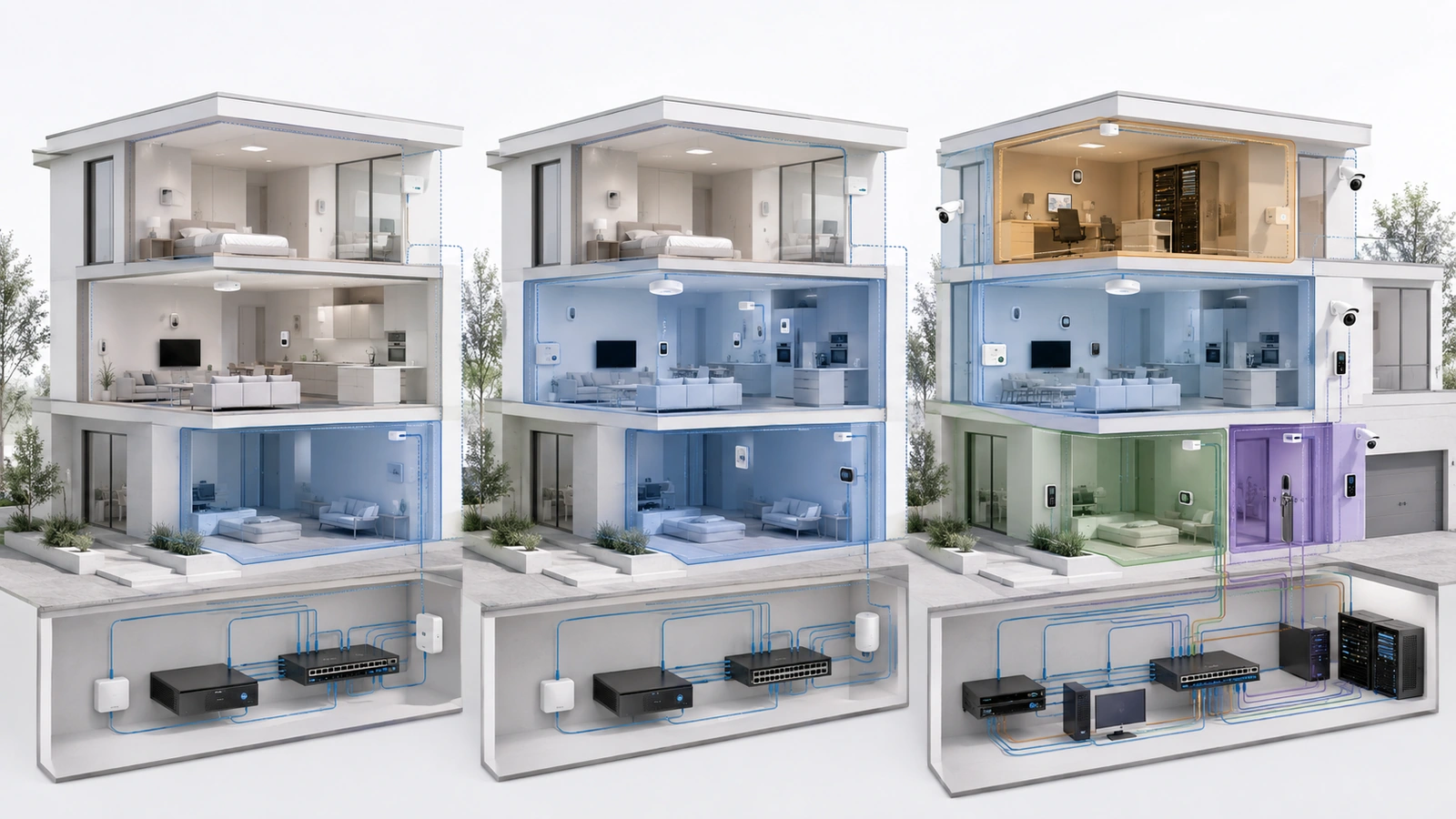
04 Template 3: Advanced Residential Property
Some large or highly connected residences function more like small managed facilities. They may contain several access points, structured cabling, network storage, extensive automation, local surveillance recording, dedicated media systems, remote-work infrastructure, and a managed equipment rack.
Recommended zones
- Private: Trusted personal and approved work devices
- Guest: Visitors, contractors, and temporary users
- IoT: Connected appliances, entertainment, and automation devices
- Security: Cameras, recorders, doorbells, and appropriate monitoring devices
- Management: Firewall, switches, access points, controllers, UPS interfaces, and administrative platforms
The Security zone allows cameras and recording systems to receive policies different from ordinary IoT devices. Cameras may need to reach a local recorder, approved monitoring stations, time services, and limited vendor services. They should not automatically communicate with every trusted device.
The Management zone protects the infrastructure’s control interfaces. Only authorized administrator devices and approved remote-access paths should reach it.
This template is appropriate only when the property can maintain:
- Managed switching and wireless infrastructure
- Consistent VLAN assignments across uplinks and endpoint ports
- Documented firewall policies
- Configuration backups
- Application and discovery testing
- Secure administrative access
If these responsibilities cannot be supported, a smaller design may be safer and more dependable.
05 Template 4: Small HOA Clubhouse
A small HOA clubhouse combines public access with association-owned operational systems. Even when the building is physically small, its users and responsibilities may differ substantially.
Typical systems include guest Wi-Fi, management computers, printers, televisions, cameras, access control, audio equipment, thermostats, and network infrastructure.
Recommended zones
- Guest or Resident Wi-Fi: Internet access for residents and visitors
- Office or Staff: Association-managed computers, printers, and approved business systems
- Security and Operations: Cameras, recorders, access control, and appropriate building devices
- Management: Network infrastructure and administrative interfaces
| Source Zone | Typical Destination | Policy Objective |
|---|---|---|
| Guest or Resident Wi-Fi | Internet | Allow through approved usage controls |
| Guest or Resident Wi-Fi | Internal property systems | Block unless a specific amenity service is provided |
| Office or Staff | Approved operational services | Allow only required business functions |
| Security and Operations | Office or Staff | Block new general access unless documented |
| Authorized administrator | Management | Allow approved administrative protocols |
Combining cameras and access control in one Security and Operations zone may be reasonable for a small property. Separate them if vendor requirements, system criticality, ownership, or communication patterns justify stronger boundaries.
Public Wi-Fi should not reach association records, office devices, cameras, gate controls, or network interfaces. If the property offers casting, printing, or event services to residents, create narrowly defined access rather than opening the entire operational network.
06 Template 5: Shared Community Infrastructure
A larger shared property may support several buildings, amenity areas, management operations, security platforms, gates, and third-party systems over common infrastructure.
Recommended zones
- Guest or Public Wi-Fi: Internet access for visitors and amenity users
- Staff or Administrative: Property-management users and approved business systems
- Surveillance: Cameras, recorders, and monitoring stations
- Access Control: Gates, doors, intercoms, readers, and controllers
- Building Operations: Environmental, pool, lighting, irrigation, and other operational devices
- Management: Firewalls, switches, access points, controllers, and monitoring tools
- Vendor: Restricted locally connected or remotely supported vendor systems where justified
Not every community needs all seven zones. The template should be reduced or expanded based on actual systems and responsibilities.
Surveillance and access control may warrant different zones because they have different vendors, support methods, and operational consequences. Building systems may need vendor cloud connectivity but no access to administrative files. A vendor zone may allow a contractor to service one system without placing the contractor inside a trusted office or management network.
Multi-building properties must also consider where routing and policy enforcement occur. Extending the same VLAN throughout every building may be convenient, but it can expand broadcast and failure domains and complicate troubleshooting. In some designs, each building or service area should have local subnets routed through defined security boundaries.
The architecture should reflect physical distribution, uplink resilience, service ownership, and recovery requirements—not merely reuse one template everywhere.
07 Compare the Five Templates
| Property Type | Suggested Starting Zones | Primary Decision Factor |
|---|---|---|
| Simple home | Private and Guest | Basic visitor isolation |
| Connected home | Private, Guest and IoT | Connected-device trust differences |
| Advanced residence | Private, Guest, IoT, Security and Management | Managed infrastructure and critical systems |
| Small HOA clubhouse | Guest, Office, Security/Operations and Management | Separation of public and association systems |
| Shared community | Role-based operational zones | Multiple systems, buildings, owners and vendors |
The transition from one template to the next should be driven by a change in requirements. Adding two smart devices does not necessarily justify redesigning the entire network. Adding association records, public Wi-Fi, surveillance, access control, or several vendors may.
08 Translate the Template Into Infrastructure
A template becomes operational only after it is mapped to the property’s physical and logical infrastructure.
For each zone, determine:
- The VLAN identifier and IP subnet, if VLANs are used
- The DHCP, DNS, and time services
- The wireless SSIDs assigned to the zone
- The wired switch ports assigned to the zone
- The uplinks that must carry the VLAN
- The firewall rules governing other zones and the internet
- The administrator and support owner
Wireless segmentation alone is not enough when operational devices use wired connections. Similarly, configuring a VLAN on the firewall and core switch does not make it available through every downstream switch or access point.
Confirm that tagged and untagged traffic is handled consistently across the infrastructure. Disable or restrict unused switch ports, especially in accessible community spaces.
Where IPv6 is enabled, apply equivalent segmentation and firewall intent. The template should not protect only IPv4 traffic.
09 Document Required Communication
Every zone should have a short statement describing who and what belongs there. Every cross-zone exception should have a reason.
Useful documentation includes:
- Zone purpose and expected device types
- VLAN identifier, subnet, gateway, and DHCP scope
- SSID and switch-port assignments
- Required local and internet services
- Approved controller, recorder, printer, or discovery paths
- Remote administration and vendor-access methods
- Configuration backup location
- System owner and support contact
- Last test and review date
Documentation is especially important for associations. Board members, employees, management companies, vendors, and service providers may change while the infrastructure remains.
A simple documented architecture is normally safer than a sophisticated configuration understood only by the installer who created it.
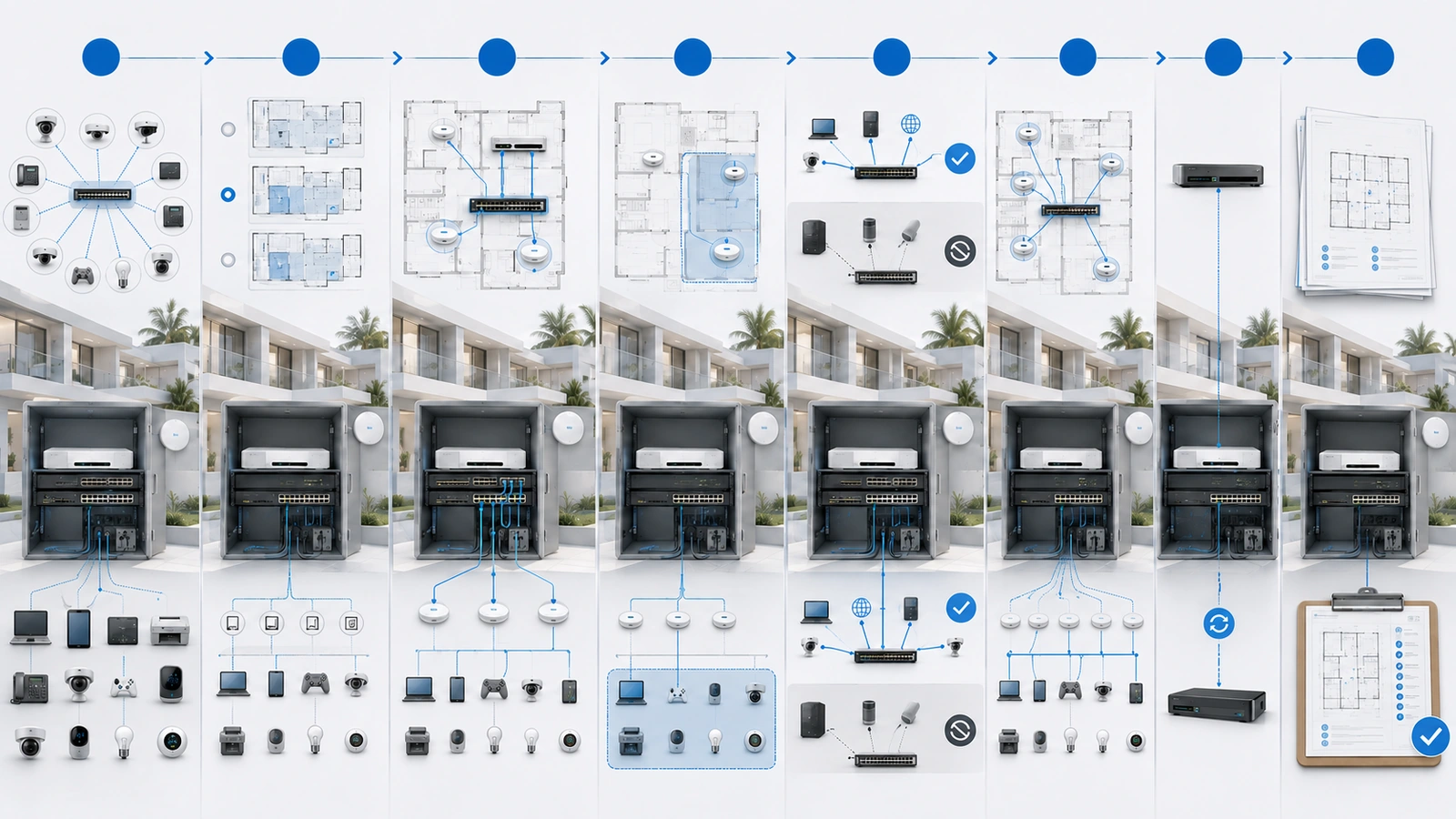
10 Implement the Template in Stages
Replacing a flat production network with several segments simultaneously can interrupt cameras, printing, casting, remote access, and building systems.
A staged approach reduces risk:
- Inventory devices, users, owners, and required communication.
- Document the current addressing and physical connections.
- Back up the existing gateway, switch, and wireless configurations.
- Create the new zones and infrastructure services.
- Build the intended firewall policy.
- Move a small group of representative devices.
- Test required and prohibited communication.
- Resolve dependencies without adding unrestricted exceptions.
- Migrate the remaining devices in controlled groups.
- Update diagrams, port records, and support procedures.
Critical systems should receive a rollback plan and an appropriate maintenance window. Coordinate changes involving gates, doors, cameras, payment systems, or association operations with the responsible stakeholders.
11 Commission and Maintain the Final Design
Segmentation Commissioning Checklist
- Confirm that every device receives an address from the intended zone.
- Verify DHCP, DNS, time, and required internet services.
- Test approved cross-zone applications.
- Confirm that prohibited destinations are blocked.
- Test guest-to-guest isolation where required.
- Verify casting, printing, controllers, cameras, and discovery services.
- Protect firewall, switch, access-point, and controller interfaces.
- Test approved local and remote vendor access.
- Confirm equivalent IPv4 and IPv6 policy.
- Review logs for unexpected communication attempts.
- Save a current configuration backup.
- Record the completed test results and exceptions.
Review the design when the property adds a new system, changes vendors, expands into another building, or introduces a new shared service. Periodic reviews should remove obsolete rules, accounts, network assignments, and remote-access paths.
Do not expand the template automatically. A new system may fit an existing zone if its trust, ownership, and communication requirements align. Create another boundary only when the existing design cannot represent the requirement safely.
Final Perspective
Simple network segmentation is not measured by the number of VLANs. It is measured by whether users and systems receive appropriate access while unrelated or lower-trust devices remain separated.
A small home may need only Private and Guest networks. A connected home may add IoT separation. An advanced residence may justify dedicated Security and Management zones. An HOA clubhouse or shared community may need stronger boundaries among public access, staff, surveillance, access control, building operations, vendors, and infrastructure management.
The templates provide a starting structure, but firewall policy, infrastructure mapping, documentation, testing, and ongoing ownership determine whether the design works.
The right template is the simplest one that accurately represents the property’s real trust relationships and can remain understandable throughout its operational life.