
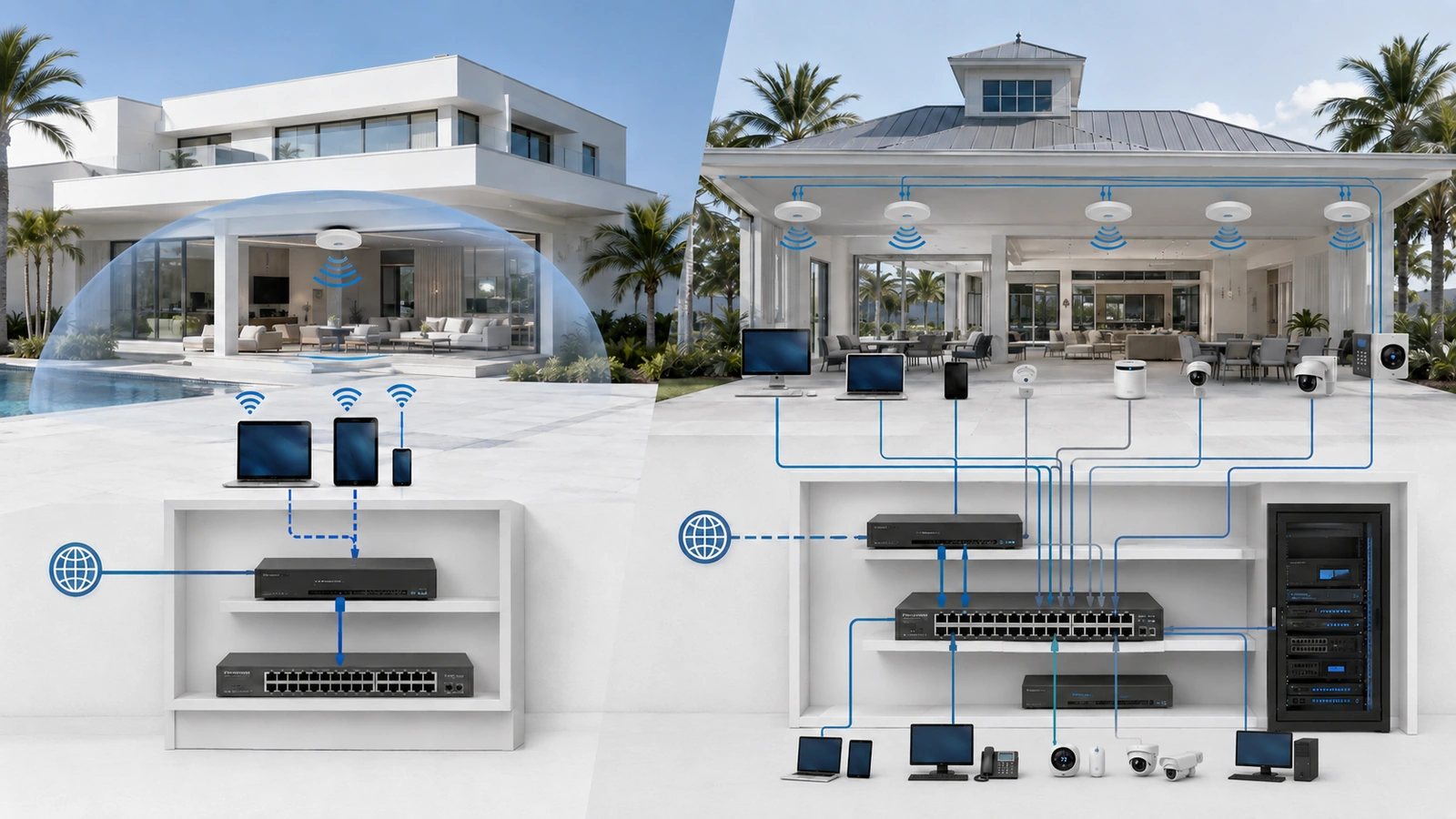
Guest networks and VLANs are frequently discussed as though they were two versions of the same feature. They can work together, but they describe different parts of a network design.
A guest network is a service created for visitors, temporary users, or other devices that should receive limited access. A VLAN is a technical method for separating traffic into logical networks across compatible infrastructure.
The distinction matters because a property can have a guest network without giving administrators broad segmentation control. It can also use multiple VLANs for private, operational, security, and management systems—one of which may support the guest network.
01 What Is a Guest Network?
A guest network provides internet access to users or devices that should not receive the same access as trusted users.
In a residence, it may be used by visitors, contractors, service technicians, short-term occupants, or connected devices that the homeowner does not want on the private network.
In a community environment, guest access may be available in a clubhouse, lobby, pool area, fitness center, meeting room, leasing office, or other shared amenity.
A properly designed guest service generally attempts to:
- Provide appropriate internet connectivity
- Prevent access to private or operational systems
- Protect network-management interfaces
- Reduce unnecessary communication between guest devices
- Apply suitable bandwidth, filtering, or usage controls
The word “guest” therefore describes the role and expected access of the user. It does not specify exactly how the separation is implemented.
One platform may create the guest network using a dedicated VLAN and firewall policy. Another may use a separate software interface, wireless client isolation, internal access-control rules, or a combination of methods.
02 What Is a VLAN?
A virtual local area network, or VLAN, separates traffic logically across compatible switches, access points, gateways, and other managed network equipment.
This allows one physical infrastructure to support multiple logical networks. A single switch might connect office computers, cameras, access-control devices, and access points while keeping those systems assigned to different VLANs.
VLANs can support many purposes:
- Private or trusted users
- Guest internet access
- Connected appliances and IoT devices
- Surveillance and security systems
- Building operations
- Staff or management-office systems
- Network administration
A VLAN is therefore broader than a guest-network feature. It is one of the architectural tools used to build trust zones throughout a network.
VLANs create boundaries, but those boundaries are not a complete security policy. A router or firewall must control traffic moving between the VLANs. If inter-VLAN routing is allowed without appropriate restrictions, logically separated devices may still reach one another.
03 The Difference Between SSIDs, VLANs and Subnets
Several related terms must be separated to understand the design correctly.
| Component | Primary Function | What It Does Not Prove |
|---|---|---|
| SSID | Provides a named wireless connection | That users are placed in a separate network |
| VLAN | Creates a logical Layer 2 traffic boundary | That routed communication is blocked |
| Subnet | Defines an IP network and routing boundary | That a restrictive firewall policy exists |
| Client isolation | Restricts direct communication between connected clients | That every internal or wired destination is blocked |
| Firewall policy | Permits or blocks routed communication | That local same-network traffic is isolated |
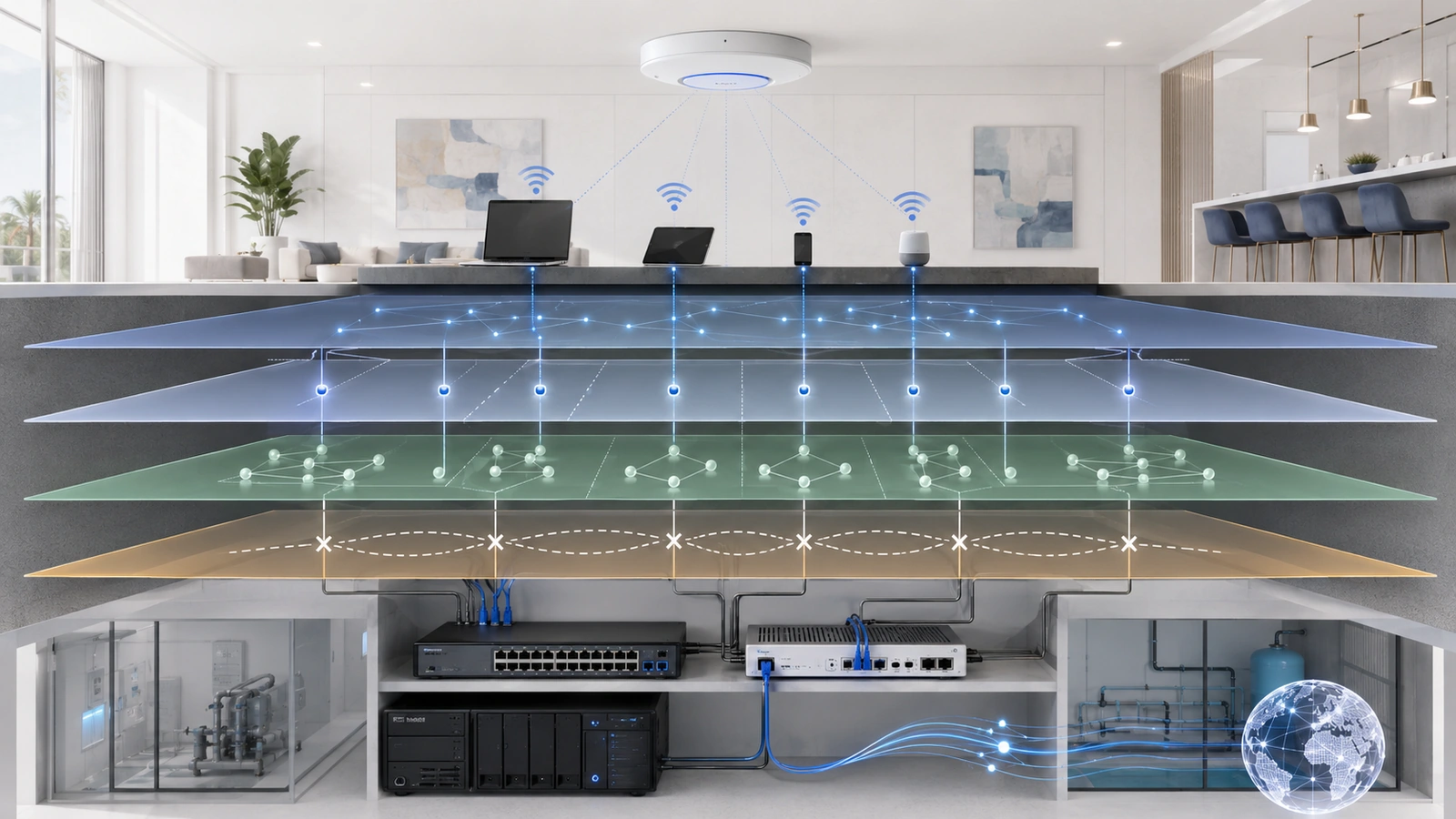
A professionally configured guest service may use all of these components together. The guest SSID places wireless clients into a guest VLAN and subnet. Client isolation restricts communication among guests, while firewall policy blocks private networks and permits approved internet services.
The most important lesson is that a second SSID is not, by itself, evidence of security. Two Wi-Fi names can still lead to the same local network unless the underlying system separates them.
04 A Guest Network Is a Use Case
The easiest way to understand the distinction is to think of a guest network as a use case.
It answers this question:
How can visitors receive internet access without being treated as trusted internal users?
A VLAN answers a different question:
How can the infrastructure keep selected groups of traffic logically separated?
A guest network may be implemented with a VLAN, but a VLAN is not necessarily a guest network. A property can use VLANs for cameras, network management, building automation, staff devices, or many other purposes.
This distinction also explains why a guest-network button in a consumer router is different from a configurable VLAN system. The guest button typically offers a predefined service with limited choices. A managed VLAN environment allows administrators to define multiple zones, attach wired and wireless devices, and create specific communication policies.
05 When a Guest Network Is Enough
A built-in guest network may be entirely sufficient for a straightforward residence.
Consider a home with trusted household devices, limited connected equipment, and occasional visitors. If the primary requirement is to give guests internet access without exposing computers, printers, storage, or smart-home systems, a properly isolated guest feature may solve the problem cleanly.
This approach can be preferable when:
- The property has few device categories.
- Only wireless visitors require separate access.
- No wired guest connections are needed.
- The router provides verified local-network blocking.
- The owner wants minimal ongoing administration.
- There are no additional operational systems requiring separation.
The word “verified” is important. Product names and checkboxes vary, and guest features do not behave identically across platforms.
Connect a representative device to the guest network and confirm that it can reach the internet but cannot reach private IP addresses, router administration, shared storage, printers, cameras, or other protected resources.
If the platform offers client isolation, also test whether two guest devices can communicate with one another. This may be useful in a public or community environment where the guests do not know or trust each other.
06 When VLANs Are the Better Choice
VLANs become the better architectural choice when a property must separate more than one group of visitors from one private network.
A connected home may need distinct policies for trusted devices, guests, smart appliances, cameras, and network management. A community property may need separation among guests, residents, employees, security systems, access control, building operations, and vendors.
VLAN-based design is especially useful when:
- Both wired and wireless devices require separation.
- Several trust zones require different policies.
- Multiple access points must provide consistent guest access.
- Cameras or access-control systems share the infrastructure.
- Network-management interfaces require protection.
- Selected services must be shared across certain zones.
- Administrators need centralized visibility and control.
A VLAN architecture allows the guest zone to extend across compatible access points and managed switches. It can also apply the same guest policy to approved wired ports where necessary.
This is important in clubhouses, event spaces, offices, high-rise common areas, and other properties where guest connectivity is not limited to one wireless router.
07 Guest Networks Do Not Protect Everything Else
One of the most common mistakes is assuming that creating guest Wi-Fi completes the property’s segmentation strategy.
A guest network addresses the boundary between guests and protected resources. It does not automatically separate other internal systems from one another.
For example, a guest network may successfully prevent visitors from reaching the main network while cameras, office computers, access-control panels, smart televisions, and network switches remain together on one unrestricted internal network.
The property has reduced guest risk, but several unrelated systems can still communicate unnecessarily.
This limitation matters more in shared environments. An HOA clubhouse may have correctly isolated public Wi-Fi while leaving management computers and operational equipment exposed to each other. A large smart home may isolate visitors but leave every connected appliance on the same network as work computers and private storage.
Guest access should therefore be treated as one trust zone within the larger architecture—not as proof that every meaningful boundary has been addressed.
08 Firewall Rules Turn Boundaries Into Policy
Whether the guest service uses a VLAN or another isolated interface, firewall rules determine which routed destinations guests can reach.
A typical policy objective may permit guest devices to use approved DHCP, DNS, and internet services while blocking private, operational, and management networks.
The exact implementation should also consider:
- IPv4 and IPv6 connectivity
- Access to the gateway’s administrative interface
- Communication between guest clients
- Bandwidth and application controls
- Content or DNS filtering requirements
- Logging and abuse response
- Terms of use or captive-portal requirements
Stateful firewall behavior normally allows return traffic for connections that guests are permitted to initiate. It should not require broad inbound access from protected networks.
Network address translation should not be mistaken for guest isolation. NAT may change addressing as traffic crosses an internet boundary, but it does not replace explicit policy between internal networks.
Administrators should also verify that restrictions apply equivalently to IPv6 where IPv6 is available. Blocking private IPv4 networks while leaving an unintended IPv6 path would weaken the intended boundary.
09 Plan Carefully for Shared Services
Strict guest isolation is usually straightforward because guests often need only internet connectivity. Other VLANs may require controlled access to local services.
Trusted users may need to print to an IoT-zone printer, view cameras, control a television, or communicate with a smart-home controller. These services can depend on multicast or broadcast discovery that does not cross VLAN boundaries by default.
A carefully configured multicast or mDNS gateway may expose selected discovery services between approved zones. It should not reflect every available service across the entire property.
Guest users should not automatically receive the same discovery access. If a community intentionally offers a guest printer, casting display, or event-room system, the required communication should be narrowly defined and tested.
Convenience exceptions should not quietly provide broader access to the network hosting the shared device.
10 Choose the Simplest Suitable Approach
| Property Requirement | Likely Approach | Verification Needed |
|---|---|---|
| Occasional visitors in a simple home | Built-in isolated guest network | Confirm private-network and management blocking |
| Connected home with several trust levels | Guest network plus selective VLAN segmentation | Test firewall rules and required shared services |
| HOA clubhouse or shared property | Managed VLAN architecture with a dedicated guest zone | Verify wired, wireless, IPv4, IPv6, and administrative boundaries |
Guest Network and VLAN Checklist
- Identify who will use the guest service.
- Determine whether guest access is wireless only or also wired.
- Confirm that a separate SSID maps to a separate network.
- Block access to private, operational, and management destinations.
- Decide whether guest devices should communicate with each other.
- Apply suitable internet, bandwidth, and usage policies.
- Account for both IPv4 and IPv6 traffic.
- Test from actual guest devices rather than trusting configuration labels.
- Identify other internal systems that require separate trust zones.
- Document the design and retain current configuration backups.
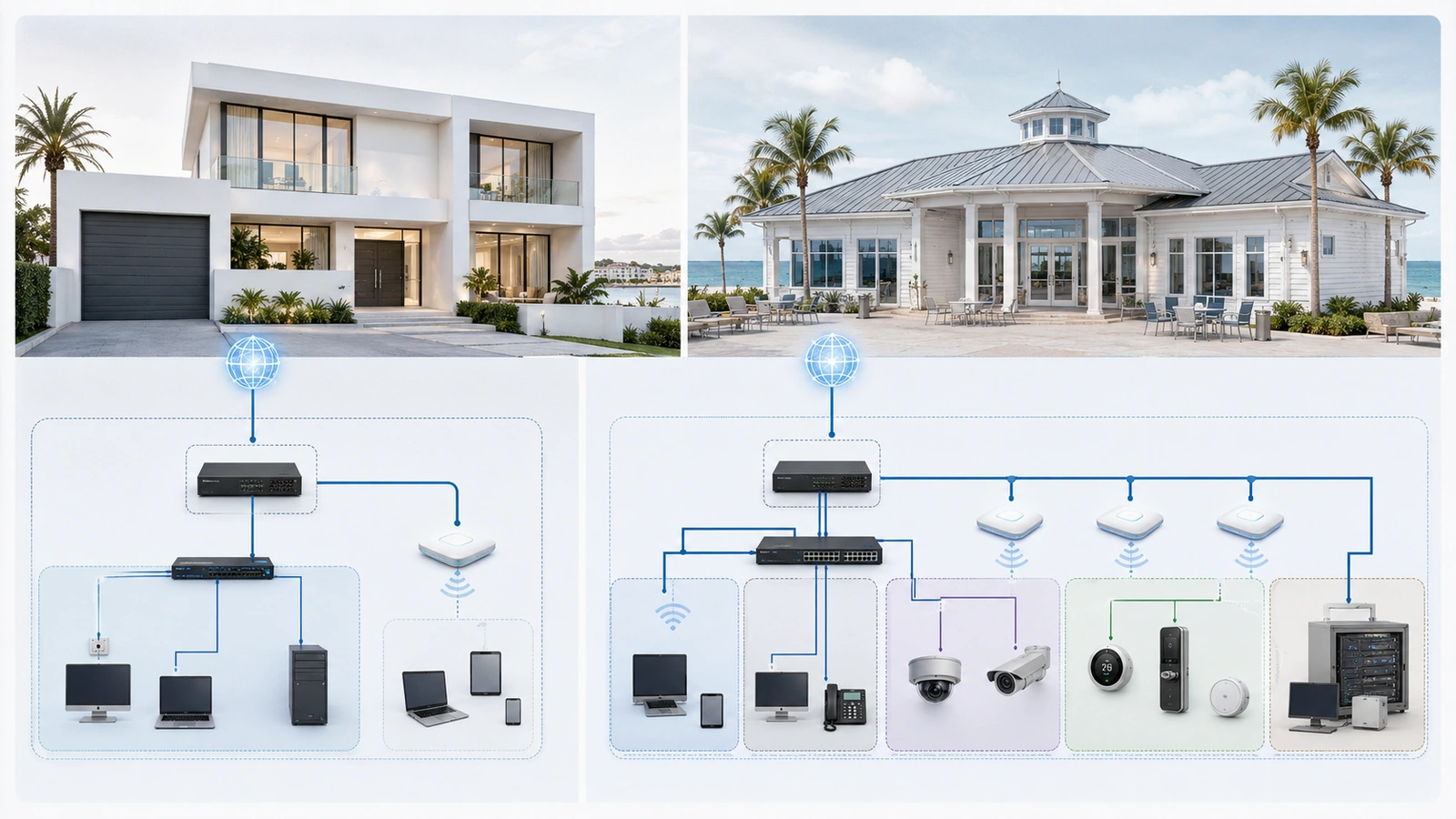
A simple home should not be forced into unnecessary infrastructure complexity. If a verified guest feature satisfies the property’s only separation requirement, it may be the correct choice.
A shared property should not rely on a basic guest feature when several internal systems have different owners, risks, and access requirements. In that environment, a managed VLAN design provides a more useful foundation.
Final Perspective
A guest network and a VLAN are related, but they are not interchangeable.
A guest network is an access service designed for visitors or lower-trust devices. A VLAN is a logical separation mechanism that can support guest access as well as private, IoT, security, operational, and management zones.
An SSID gives users a visible wireless connection. A VLAN creates an underlying traffic boundary. A subnet establishes an IP network, client isolation can restrict nearby users, and firewall rules determine what routed communication is allowed.
For a simple residence, a properly isolated guest network may be all that is needed. For a connected home, clubhouse, HOA, or other shared environment, the guest network is more likely to be one component of a broader segmentation design.
The correct choice is the simplest architecture that provides the required boundaries, can be verified through testing, and remains supportable over time.