
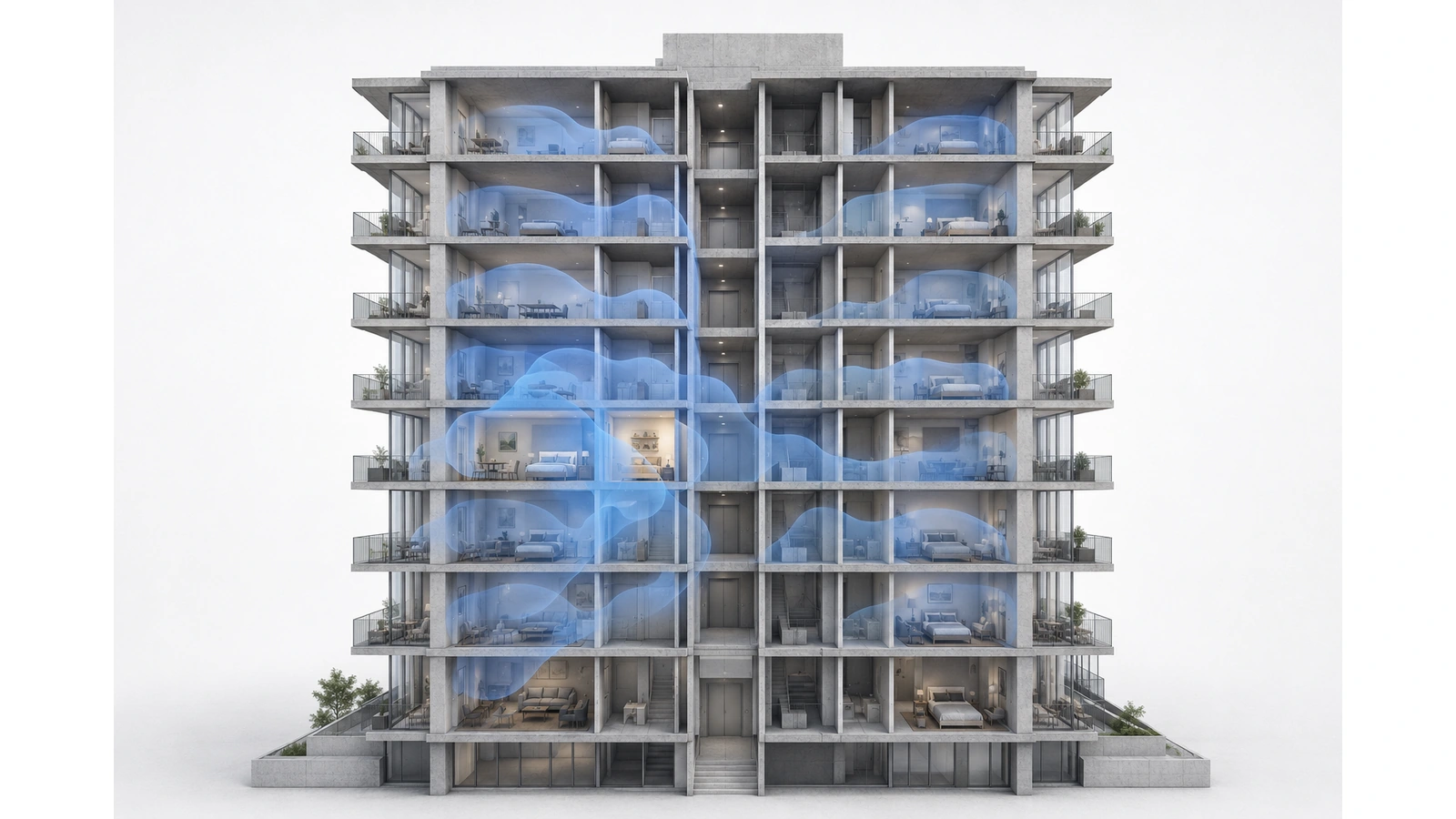
Consumer Wi-Fi can perform extremely well inside an apartment or condominium. A properly placed router or access point connected to a reliable private service may provide everything a resident needs.
The difficulty is that a high-rise unit is not an isolated radio environment. It is surrounded horizontally and vertically by neighboring networks, dense construction, reflective materials, resident devices, building-managed wireless systems, and other users competing for the same unlicensed spectrum.
When performance declines, the equipment is often blamed first. Yet the actual cause may be poor placement, neighboring-channel activity, wireless mesh backhaul, a weak unit connection, an overloaded building uplink, or the internet provider itself.
Understanding those layers is more useful than declaring all consumer equipment unsuitable. It helps residents improve what they can control and helps buildings recognize when the problem requires coordinated infrastructure.
Key Takeaway
Consumer Wi-Fi does not struggle simply because it is installed in a high-rise. It struggles when independent equipment must operate in a dense, obstructed, and uncoordinated environment that exceeds what one household can control.
01 High-Rise Wi-Fi Is a Shared Radio Environment
Every Wi-Fi network uses shared radio spectrum. Devices generally take turns transmitting on a channel rather than communicating simultaneously without limitation. When more networks and devices can hear one another, each transmission competes for available airtime.
A high-rise apartment may receive signals from:
- Units on the same floor
- Units above and below
- Hallway or common-area access points
- Nearby buildings
- Resident routers, mesh nodes, extenders, and hotspots
- Non-Wi-Fi devices operating in related spectrum
A strong signal from the resident’s own router does not guarantee an uncongested channel. Signal strength describes how clearly that signal reaches the device; it does not reveal how many other transmitters are waiting to use the same airtime.
This is why a speed test may look excellent early in the morning and deteriorate during busy evening hours even though the displayed Wi-Fi signal remains strong.
02 Interference Arrives from Above and Below
Wireless planning is often imagined as a flat floor plan. In a tower, the radio environment is three-dimensional.
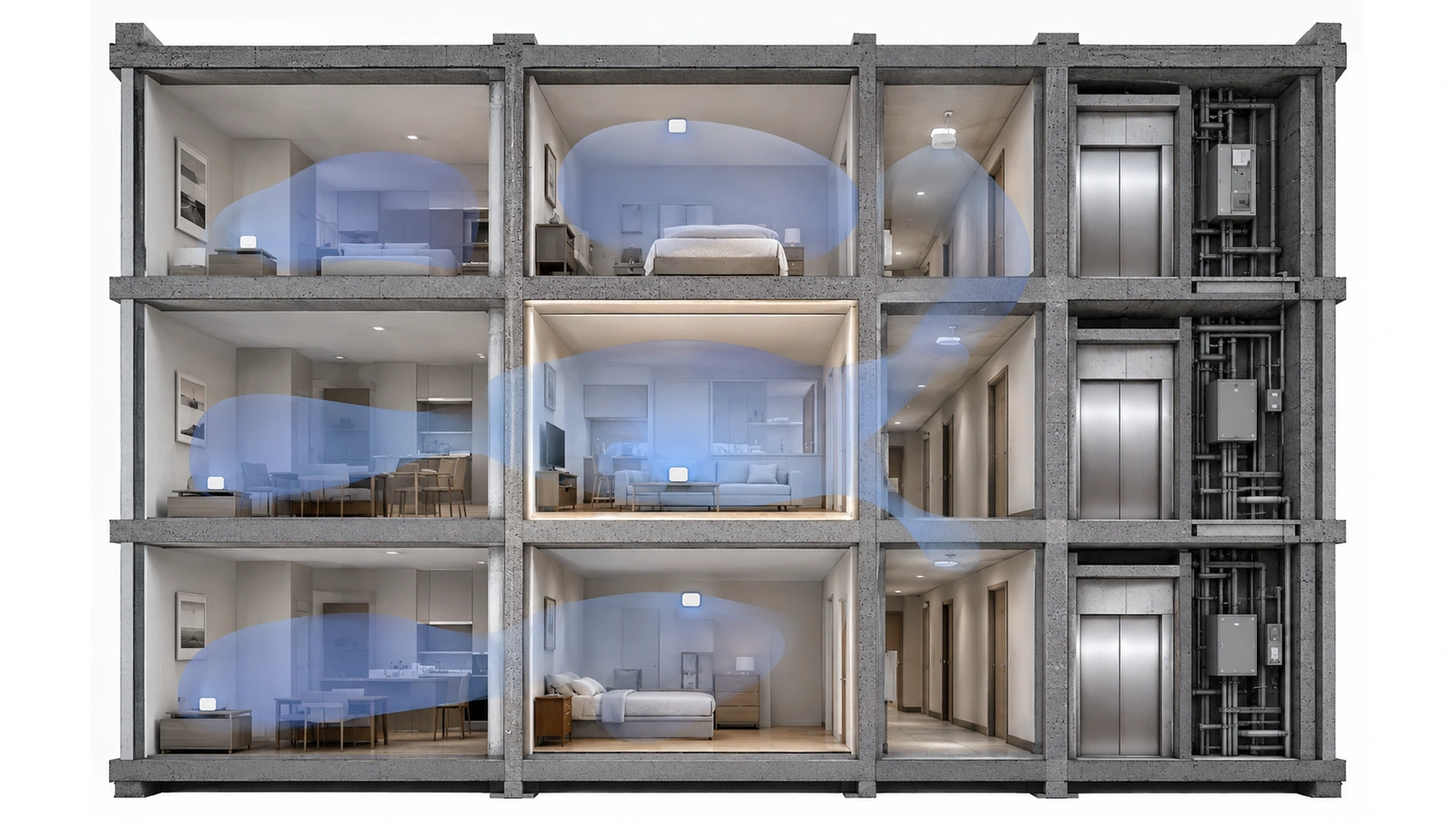
Signals can travel through floors, around exterior openings, along corridors, through shafts, and across balconies. A resident may therefore compete not only with adjacent units but also with networks several floors above or below.
Construction can make this behavior difficult to predict. Reinforced concrete may weaken a direct path while reflections create usable or interfering signals through another route. Elevator cores, metal assemblies, mirrors, appliances, mechanical spaces, and fire-rated walls can all alter propagation.
The result is rarely a clean circular coverage pattern. One room may receive strong neighboring signals while another room in the same unit has difficulty hearing its own router.
03 Each Frequency Band Has Different Tradeoffs
Residents often see 2.4, 5, and increasingly 6 GHz presented as progressively better versions of Wi-Fi. In reality, each band has different propagation, capacity, compatibility, and congestion characteristics.
| Frequency Band | Typical Strength | High-Rise Consideration |
|---|---|---|
| 2.4 GHz | Longer reach and broad device compatibility | Limited channel reuse, greater congestion, and signals that may travel into more neighboring units |
| 5 GHz | More channel options and strong performance at practical indoor distances | Still subject to neighboring networks and may be weakened substantially by dense walls and unit depth |
| 6 GHz | Additional spectrum and lower interference from older Wi-Fi devices | Requires compatible devices and generally has less ability to penetrate dense construction |
On 2.4 GHz, careful use of non-overlapping 20 MHz channels is important because the band offers little room for many independent networks. Wider channels may provide higher theoretical rates in a quiet environment but consume more spectrum and can be counterproductive in dense buildings.
Five-gigahertz service often provides a better balance of capacity and coverage, but wide channels can still increase overlap. Six gigahertz can provide valuable additional spectrum where compatible equipment and devices are present, although its propagation characteristics make access-point placement increasingly important.
No band removes the need for sound design. The goal is to use available spectrum efficiently rather than chase the highest advertised connection rate.
04 Placement Often Matters More Than Router Class
A capable router placed inside a metal structured-wiring enclosure, utility closet, corner room, or cabinet may perform worse than modest equipment installed in a more suitable location.
Common placement problems include:
- Locating the router beside the service entry rather than near the areas of use
- Placing equipment inside enclosed cabinets
- Hiding it behind televisions or large appliances
- Installing it at one end of a long or irregular unit
- Relying on signal to cross several concrete or fire-rated walls
- Positioning multiple wireless nodes where they hear one another poorly
Newer equipment cannot overcome every physical obstruction. Higher-capacity Wi-Fi modes generally require a sufficiently clean and strong connection. When a device is far from the access point or behind dense construction, it may use slower and more resilient transmission methods that consume more airtime.
Where possible, the service gateway and the primary Wi-Fi location should be treated as separate decisions. Structured cabling can allow the internet handoff to remain in a utility area while an access point is positioned more effectively inside the residence.
05 Stronger Signal Can Create More Contention
A common reaction to poor Wi-Fi is to increase transmit power, add an extender, or install another access point immediately. These changes may improve coverage in one location while increasing interference elsewhere.
Higher transmit power expands the area over which a network can be heard. In a dense building, that can enlarge the contention domain and make neighboring networks compete across more units.
There is also an important imbalance between access points and client devices. A router may transmit loudly enough for a phone to hear it, while the phone lacks the power or conditions needed to communicate back reliably. The user sees a network with apparently strong signal but experiences retries, delay, or unstable performance.
Additional access points work best when they:
- Serve a clearly defined coverage area
- Use appropriate channel and power settings
- Connect through reliable wired backhaul where practical
- Avoid unnecessary overlap
- Operate as one coordinated system inside the unit
The objective is not maximum signal everywhere. It is sufficient signal, manageable overlap, and efficient airtime use.
More Wi-Fi Is Not Automatically Better Wi-Fi
An extra node can improve a genuine coverage gap, but unnecessary radios, excessive power, and wide channels can increase contention. Every added access point should solve a defined problem.
06 Mesh Helps Coverage but Does Not Remove Building Density
Mesh systems can be effective inside apartments and condominiums, particularly where running new Ethernet is impractical. A well-positioned secondary node may extend service into an area that the primary router cannot reach.
The principal limitation is backhaul. If a mesh node uses Wi-Fi to communicate with the primary node, that connection must operate within the same challenging radio environment. Poor placement, dense walls, long distances, and neighboring activity can weaken the link between nodes.
A mesh node placed inside an existing dead zone may have little usable connection to repeat. Moving it closer to the primary node can improve backhaul even if that location seems less intuitive.
Mesh cannot independently correct:
- Congestion created by neighboring networks
- A slow or unstable internet service
- An undersized building backbone
- Poor tenant isolation
- Interference from building-managed wireless systems
- Construction that blocks the path between nodes
Wired backhaul generally provides a more predictable connection between access points when suitable cabling exists. Wireless mesh remains a legitimate alternative when its placement and performance expectations reflect the environment.
07 Not Every Slow Connection Is a Wi-Fi Problem
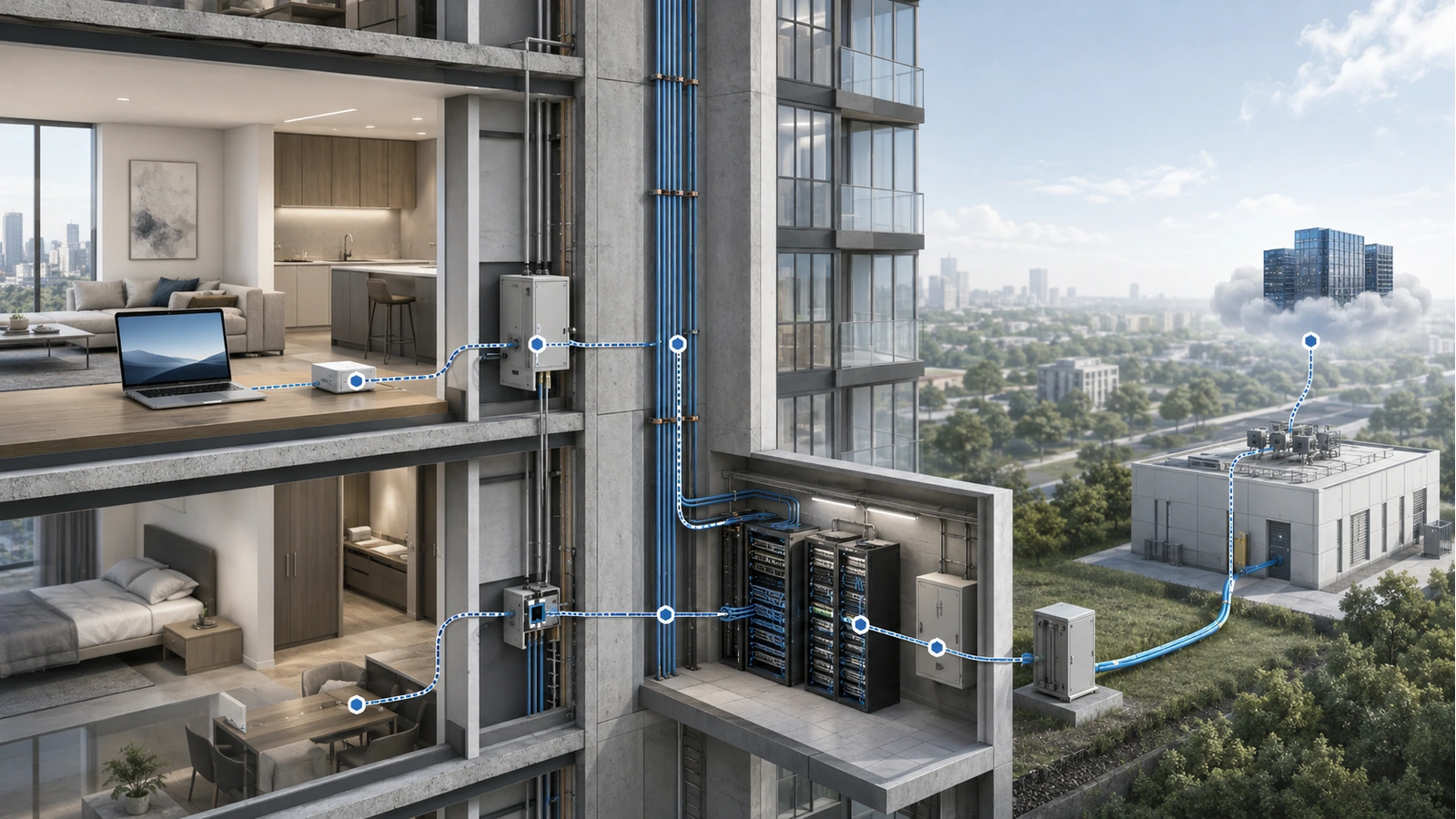
Internet performance involves several separate links. A problem at any one of them can appear to the resident as “bad Wi-Fi.”
The service path may include:
- The resident device
- The local Wi-Fi connection
- The router or residential gateway
- The unit’s fiber, copper, or coaxial connection
- Floor and building distribution equipment
- The provider’s local and upstream network
- The remote application or service being used
A wired test from the gateway can help separate local wireless performance from the internet service. Comparing results at different times can reveal busy-period congestion. Testing several devices can help identify whether one client has a compatibility, software, or hardware problem.
Latency, packet loss, connection stability, and application behavior can matter as much as headline download speed. A high speed-test result does not rule out intermittent wireless retransmissions or application-specific problems.
Building management should also avoid assuming every resident complaint belongs to the resident’s equipment. If several units or floors experience similar problems at the same time, the shared distribution system or provider service warrants investigation.
08 Improve What the Resident Can Control
Residents cannot coordinate every neighboring network, but they can improve the conditions inside their own units.
Practical In-Unit Wi-Fi Checklist
- Place the primary access point in an open, reasonably central location
- Avoid metal cabinets, floor-level corners, large appliances, and dense obstructions
- Use Ethernet for stationary high-demand devices where practical
- Use wired backhaul between access points when suitable cabling exists
- Position wireless mesh nodes where they retain a strong upstream connection
- Avoid adding extenders or nodes without identifying a real coverage gap
- Use appropriate channel widths for a dense environment
- Keep router and access-point software maintained
- Replace equipment that can no longer support required devices or security updates
- Compare wired and wireless tests before blaming one layer
- Record when and where performance problems occur
- Ask whether neighboring units report the same symptoms
Automatic channel selection can be useful, especially when conditions change, but it optimizes only within the visibility and capabilities of that system. Independently managed networks cannot form a complete building-wide channel plan.
Residents should be cautious about manually selecting channels based on one brief scan. High-rise radio conditions change as neighboring equipment starts, stops, and moves between channels.
09 Recognize When the Building Must Participate
Some problems cannot be solved from inside one residence. Building-level action becomes appropriate when multiple units experience common symptoms, telecommunications pathways limit router placement, shared infrastructure is unstable, or building-managed Wi-Fi contributes to the radio environment.
The property may need to evaluate:
- Backbone and provider capacity during busy periods
- Unit demarcation and structured-cabling locations
- Common-area and hallway access-point design
- Radio interaction between managed and resident-owned networks
- Power and environmental conditions in MDF and IDF spaces
- Tenant isolation and resident-service architecture
- Patterns of complaints across floors, orientations, or unit layouts
Hallway Wi-Fi is not inherently ineffective. It can serve corridors and nearby spaces appropriately. Whether it can provide reliable service deep inside units depends on wall construction, doors, unit geometry, access-point placement, frequency bands, and the performance the building promises.
Likewise, a managed building-wide service is not automatically better than independent resident networks. It succeeds only when the building or operator provides proper capacity, coverage, isolation, monitoring, maintenance, and support.
Consumer equipment is most appropriate where residents have independent service, the unit can be covered from suitable locations, and support responsibilities are clear. Coordinated managed infrastructure becomes more attractive when the property intends to provide unit-wide connectivity as an amenity or must solve recurring problems that individual households cannot control.
The final article in this category turns these observations into a practical design process. Continue with In-Building Wi-Fi Strategy for Apartments and Condos.