
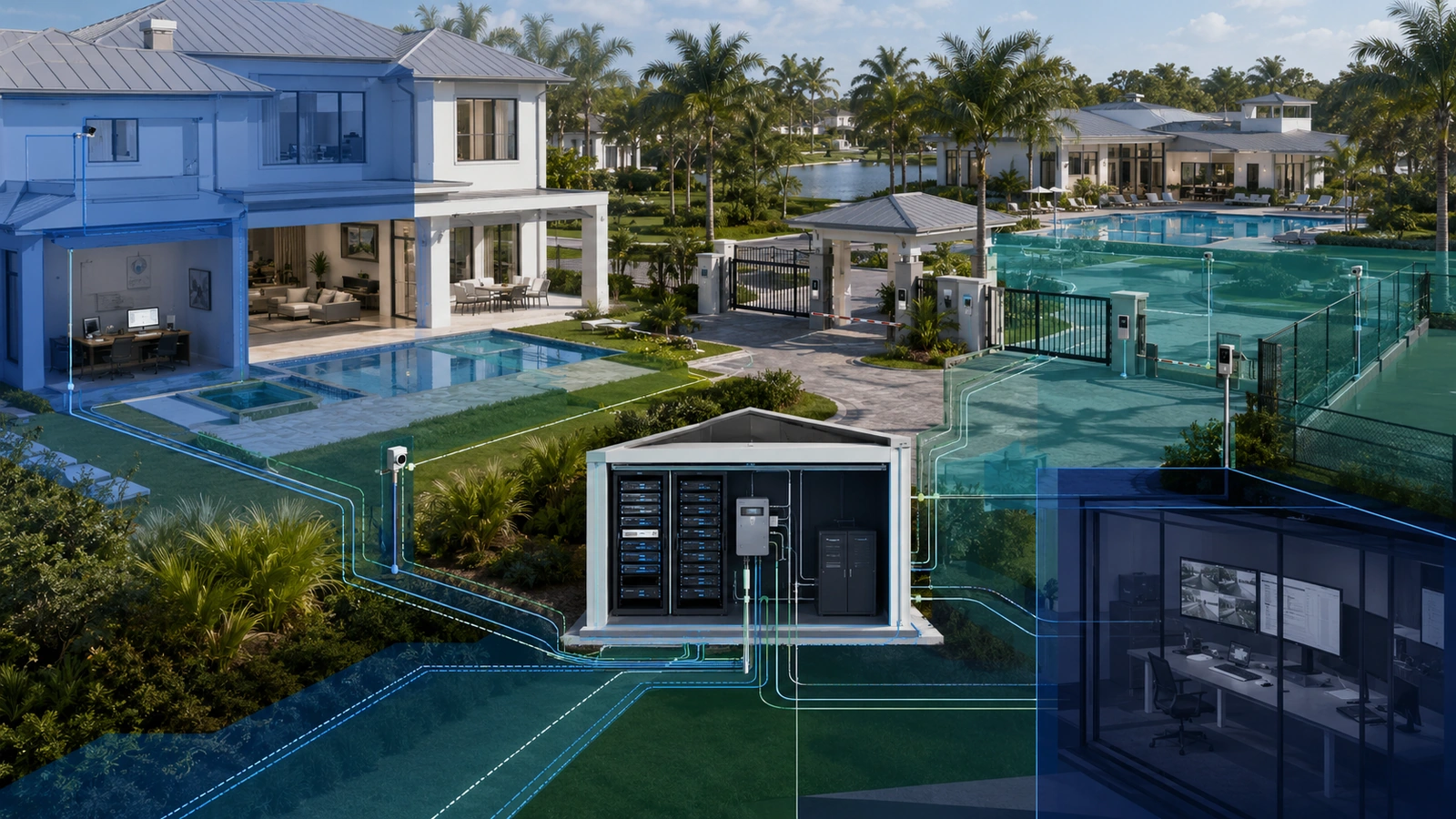
Network segmentation is one of the most useful ways to improve security in a modern home, residential community, condominium, or homeowners association. It limits which users and devices can communicate, reduces unnecessary exposure, and makes problems easier to contain.
However, effective segmentation is not created simply by adding several VLANs or wireless network names. It requires a clear understanding of what is being protected, which communication is necessary, where policy will be enforced, and who will maintain the design after installation.
01 What Network Segmentation Actually Does
A flat network allows most connected devices to communicate with one another without passing through a meaningful security boundary. That may be convenient, but it can also give an infected, compromised, or poorly secured device unnecessary access to other systems.
Segmentation divides the environment into smaller logical or physical zones. Communication within and between those zones can then be permitted, restricted, inspected, or logged according to operational requirements.
For example, a resident’s computer may need to reach a printer, but a visitor’s phone usually does not need access to that printer. A security camera may need to communicate with its recorder and a time server, but it should not necessarily initiate connections to administrative computers.
Segmentation gives the property a structure through which those differences can be enforced.
It is important to keep the risk in perspective. A flat network is not automatically compromised or unusable. Its risk depends on the number and type of devices, who can connect, the sensitivity of the systems involved, available security controls, and the consequences of unauthorized access or service disruption.
02 Start With Assets, Users and Consequences
The first step should not be creating VLAN numbers. It should be understanding the environment.
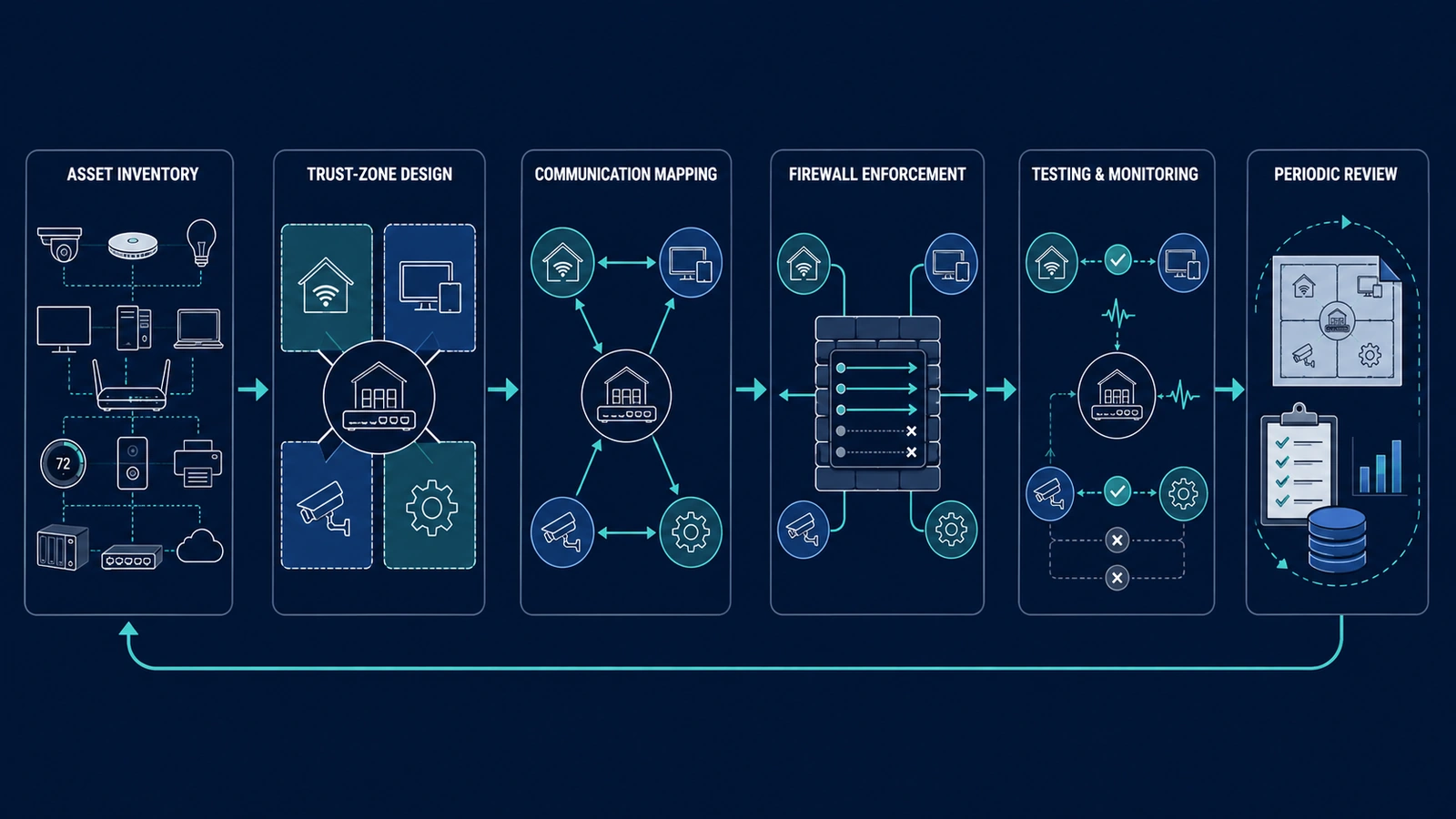
Identify the systems that use the network, the people or organizations responsible for them, and the communication each system requires. In a residence, assets may include computers, mobile devices, televisions, smart appliances, cameras, access controls, automation controllers, printers, and storage devices.
A community environment may also contain management-office systems, maintenance devices, amenity Wi-Fi, building controls, surveillance infrastructure, access-control panels, intercoms, vendor equipment, and association records.
For each system or group, consider:
- Who owns and administers it?
- Who should be allowed to connect to it?
- Which local and internet services does it require?
- What would happen if it were compromised?
- What would happen if legitimate communication were blocked?
- Does a vendor require remote access?
- How will the system be supported and replaced?
This inventory provides the foundation for sensible trust zones. Without it, segmentation frequently becomes guesswork.
03 A Practical Four-Zone Starting Model
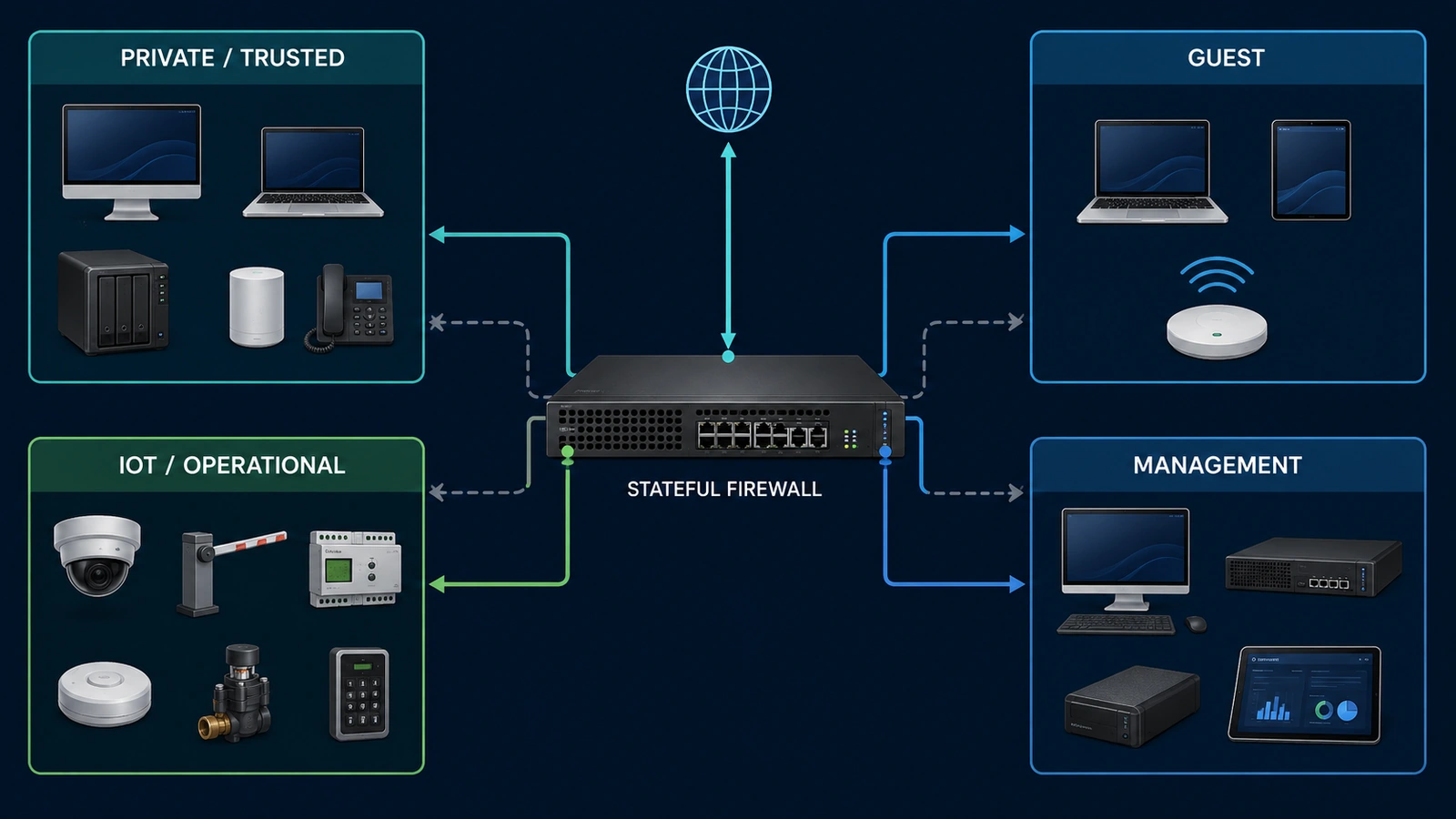
Many residential and smaller community networks can begin with four broad zones. The exact names are less important than the purpose and policy assigned to each one.
| Trust Zone | Typical Systems | General Policy Objective |
|---|---|---|
| Private or Trusted | Resident computers, phones, approved printers, trusted storage | Allow required trusted services while restricting access from lower-trust zones |
| Guest | Visitor phones, tablets and temporary devices | Provide internet access with little or no access to internal systems |
| IoT or Operational | Cameras, televisions, appliances, controllers and building devices | Permit defined services while limiting unnecessary access to trusted systems |
| Management | Network controllers, switches, firewalls, access points and administrative interfaces | Restrict administration to authorized personnel and approved management paths |
Larger associations may need additional zones for staff, security systems, access control, vendors, residents, amenities, or individual buildings. Those zones should be added because their trust requirements or operational consequences differ—not merely because the equipment supports more VLANs.
Some systems may also require physical separation due to vendor requirements, regulatory obligations, system criticality, or contractual boundaries. Logical separation is suitable for many environments, but it should not be assumed to meet every isolation requirement.
04 Understand the Different Separation Tools
Several networking terms are often used interchangeably even though they describe different functions.
An SSID is the name and configuration through which wireless devices connect. Multiple SSIDs can place users into different networks, but different names alone do not prove that traffic is separated.
A subnet is an IP address range and routing boundary. Different subnets generally require a router or firewall to move traffic between them, creating an opportunity to apply policy.
A VLAN separates traffic logically across compatible switches and access points. It can carry several networks over shared physical infrastructure. A VLAN creates a boundary, but it does not determine what routed traffic is allowed across that boundary.
Client isolation prevents connected clients—commonly wireless guests—from communicating directly with one another. It can be useful even when all guests share the same VLAN.
Physical separation uses different switches, cabling, firewalls, or internet connections. It may provide stronger operational separation, but it also increases equipment, maintenance, and troubleshooting requirements.
A complete design may use several of these methods together. For example, a guest SSID could place clients into a guest VLAN and subnet, enable wireless client isolation, and use a firewall to permit internet access while blocking private networks.
05 Define Required Communication Before Blocking It
Good segmentation begins with an allowed-communication model. Before creating restrictive rules, document what each zone must reach.
Common shared services include DHCP for address assignment, DNS for name resolution, NTP for accurate time, printing, storage, automation controllers, camera recorders, update servers, and approved internet destinations.
Discovery-dependent services require special attention. Casting, AirPlay, certain printers, smart-home platforms, and some automation systems rely on multicast or broadcast discovery that normally remains within one local network.
Placing these devices in different VLANs may stop discovery even when direct IP communication is allowed. Where cross-zone discovery is genuinely required, a carefully governed multicast or mDNS gateway may be appropriate. It should expose only the necessary services and zones rather than reflecting all discovery traffic throughout the property.
A communication matrix can make the policy easier to review:
| Source | Destination | Expected Access |
|---|---|---|
| Guest devices | Internet | Allowed through approved security policy |
| Guest devices | Private and management zones | Blocked |
| Trusted users | Approved IoT services | Allowed only as required |
| IoT devices | Trusted users | Blocked unless a documented function requires it |
| Authorized administrators | Management interfaces | Allowed through a controlled management path |
This model should be tailored to the property. A rule that is appropriate for a residence may be unsuitable for a community office, security system, or multi-building deployment.
06 Use the Firewall as the Enforcement Point
The firewall or security gateway commonly controls routed communication between zones and between the property and the internet. Its policy determines whether segmentation provides meaningful protection.
A strong objective is to deny unnecessary communication between trust zones and then allow documented services. This does not mean blindly blocking everything. It means beginning with a restrictive posture and adding the access required for legitimate operation.
Modern firewalls are generally stateful. When an approved device initiates a permitted connection, the firewall can allow the corresponding return traffic without requiring an unrestricted rule in the opposite direction.
Rules should be specific enough to express their purpose. Where practical, identify the source zone, destination, service or port, direction, and business or operational reason.
Internet access should also be reviewed. Some connected devices require cloud services, but unrestricted outbound access should not be accepted automatically for every system. DNS filtering, controlled time services, logging, application controls, or destination restrictions may be appropriate depending on the platform and risk.
Network address translation is not a substitute for firewall policy. It may alter addresses as traffic crosses a boundary, but it does not define a complete security model.
IPv6 must also be considered. If a property uses or receives IPv6 connectivity, equivalent segmentation and firewall policies should be applied. Protecting only IPv4 can leave an unintended communication path.
07 Protect the Management Plane
The interfaces used to administer firewalls, switches, access points, controllers, cameras, and building systems deserve stronger protection than ordinary user services.
Management access should normally be limited to authorized administrators using approved devices or controlled access paths. Administrative interfaces should not be exposed to guest, resident, or general IoT networks unless a documented design requires it.
Useful protections may include:
- A dedicated management VLAN or equivalent trusted path
- Unique administrator accounts instead of shared credentials
- Multifactor authentication where supported
- Encrypted management protocols
- Restricted remote administration
- Configuration backups and recovery documentation
- Logging of administrative access and significant changes
Vendor access requires particular care. Permanent inbound exposure should not be created simply because a contractor occasionally needs support access. Prefer time-limited, authenticated, logged, and revocable methods such as an approved VPN or managed remote-access platform.
08 Test, Document and Monitor the Design
A configuration should not be considered complete merely because the VLANs appear in the controller and devices receive IP addresses.
Testing should confirm both sides of the policy: required services must work, and prohibited communication must fail. Test from representative devices in every relevant zone rather than relying exclusively on configuration screens.
Documentation should include:
- Zone names, purposes, VLAN identifiers, and subnets
- SSID-to-network assignments
- Firewall-rule purposes and dependencies
- Approved cross-zone services
- Management and emergency-access procedures
- Vendor access requirements
- Responsible owners and support contacts
- Backup and restoration procedures
Logging should be useful rather than merely enabled. Monitor repeated denied connections, unexpected cross-zone attempts, administrative logins, configuration changes, and failures involving critical services. Retention and review practices should match the property’s risk and operational capacity.
Changes should follow a simple process: document the reason, identify affected systems, back up the current configuration, define the expected result, make the change, test it, and record the outcome. This prevents temporary troubleshooting rules from quietly becoming permanent exposure.
09 Keep Segmentation Proportional and Maintainable
More zones do not automatically produce a more secure environment. Every additional boundary creates policies, dependencies, documentation, and troubleshooting responsibilities.
A complicated design that nobody understands may be less dependable than a smaller design that is consistently maintained. The goal is to create meaningful separation between groups with different trust levels or consequences—not to create a different VLAN for every device.
Practical Starting Checklist
- Inventory users, devices, services, and administrators.
- Identify systems with different trust levels or operational consequences.
- Begin with a small number of clearly defined zones.
- Map SSIDs, switch ports, VLANs, and subnets deliberately.
- Document required communication before building firewall rules.
- Account for discovery, casting, printing, and controller dependencies.
- Protect network-management interfaces and remote administration.
- Apply equivalent policy to IPv4 and IPv6 where both are used.
- Test required access and intended restrictions from actual devices.
- Back up configurations and document future changes.
- Review rules periodically and remove obsolete exceptions.
For a small residence, this may mean separating trusted devices, guests, connected devices, and network management. For a community association, additional zones may be justified for staff, residents, security systems, amenities, vendors, or building operations.
The architecture should expand only when ownership, trust, required communication, or operational consequences justify the additional boundary.
Final Perspective
Network segmentation is most effective when it reflects how a property actually operates. The design should begin with assets, users, responsibilities, required communication, and consequences—not with a predetermined number of VLANs.
VLANs, subnets, SSIDs, client isolation, and physical separation are tools. Firewall policies, access controls, secure management, documentation, testing, and ongoing review turn those tools into a dependable security system.
Segmentation is not complete cybersecurity on its own. It should work alongside secure configuration, software updates, strong authentication, backups, monitoring, physical protection, and an understood incident-response process.
When the boundaries are purposeful and maintainable, segmentation can reduce unnecessary exposure without making the property unnecessarily difficult to support.