
Introduction
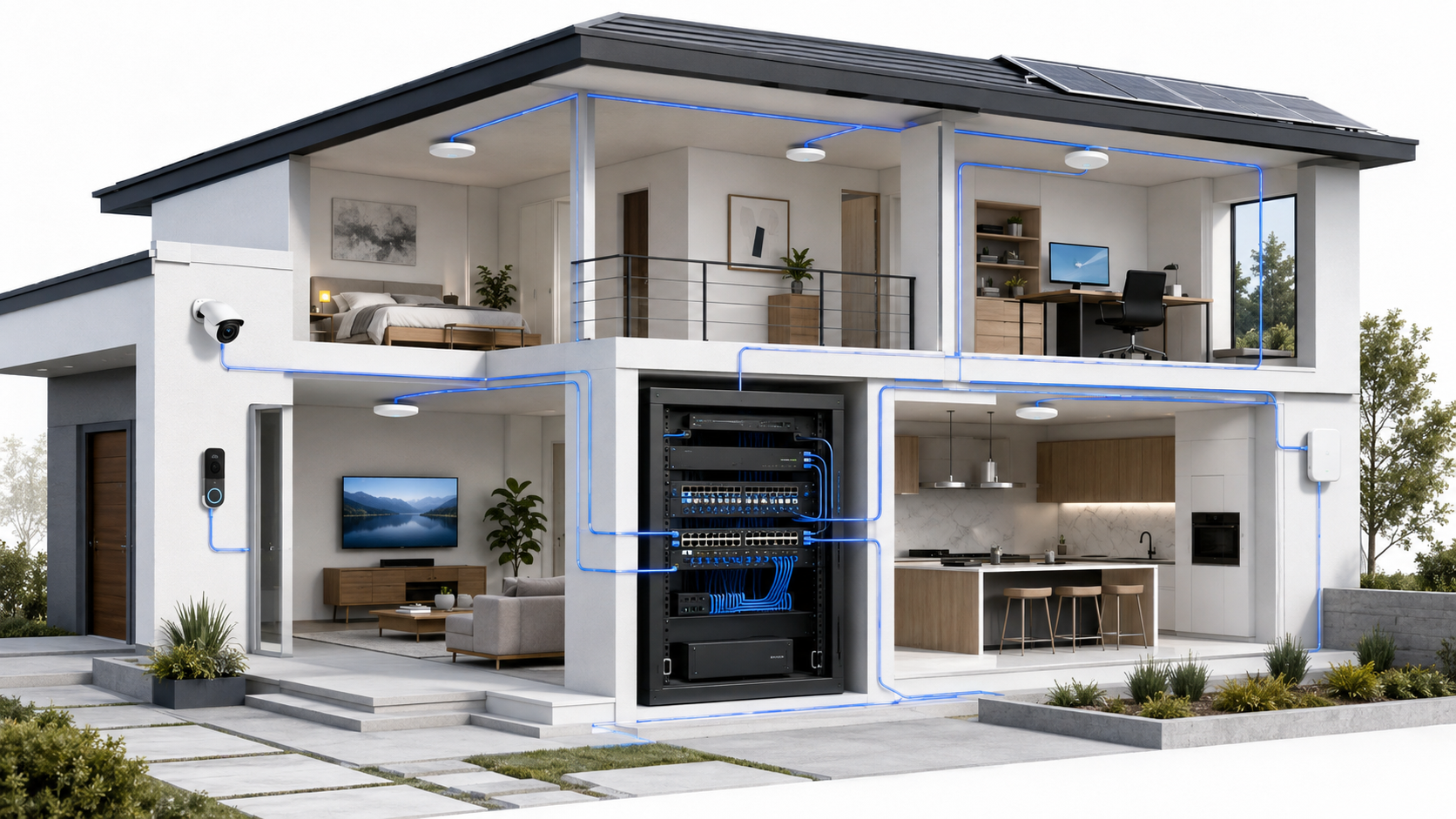
Effective Wi-Fi and wired infrastructure design begins with understanding how routing, switching, Ethernet, access points, security, and property layout work together.
Most home networks begin the same way: an internet provider installs a gateway, confirms that Wi-Fi works, runs a quick speed test, and leaves. For a smaller home with modest needs, that simple setup may work perfectly well.
But a network that works is not necessarily a network that has been designed.
As a property grows beyond 3,000 square feet, adds another floor, extends into outdoor living areas, or begins supporting cameras, smart-home devices, remote work, streaming, and gaming at the same time, the limits of the one-box approach become easier to see. That is especially true when planning the best Wi-Fi setup for a large home.
The solution is not simply to buy a more expensive router. It is to understand how the network should be structured so that coverage, stability, security, and future expansion are built into the property from the beginning.
01 How Most Home Networks Begin
In many homes, the internet setup follows a compact all-in-one design:
- Fiber or coaxial service enters the property.
- The connection terminates at an ISP-provided gateway.
- The gateway performs routing, firewall, switching, and Wi-Fi functions.
- Most phones, televisions, computers, and smart devices connect wirelessly.
This design is not inherently wrong. In a single-story home with an open floor plan and moderate usage, one well-positioned gateway may provide acceptable coverage and performance.
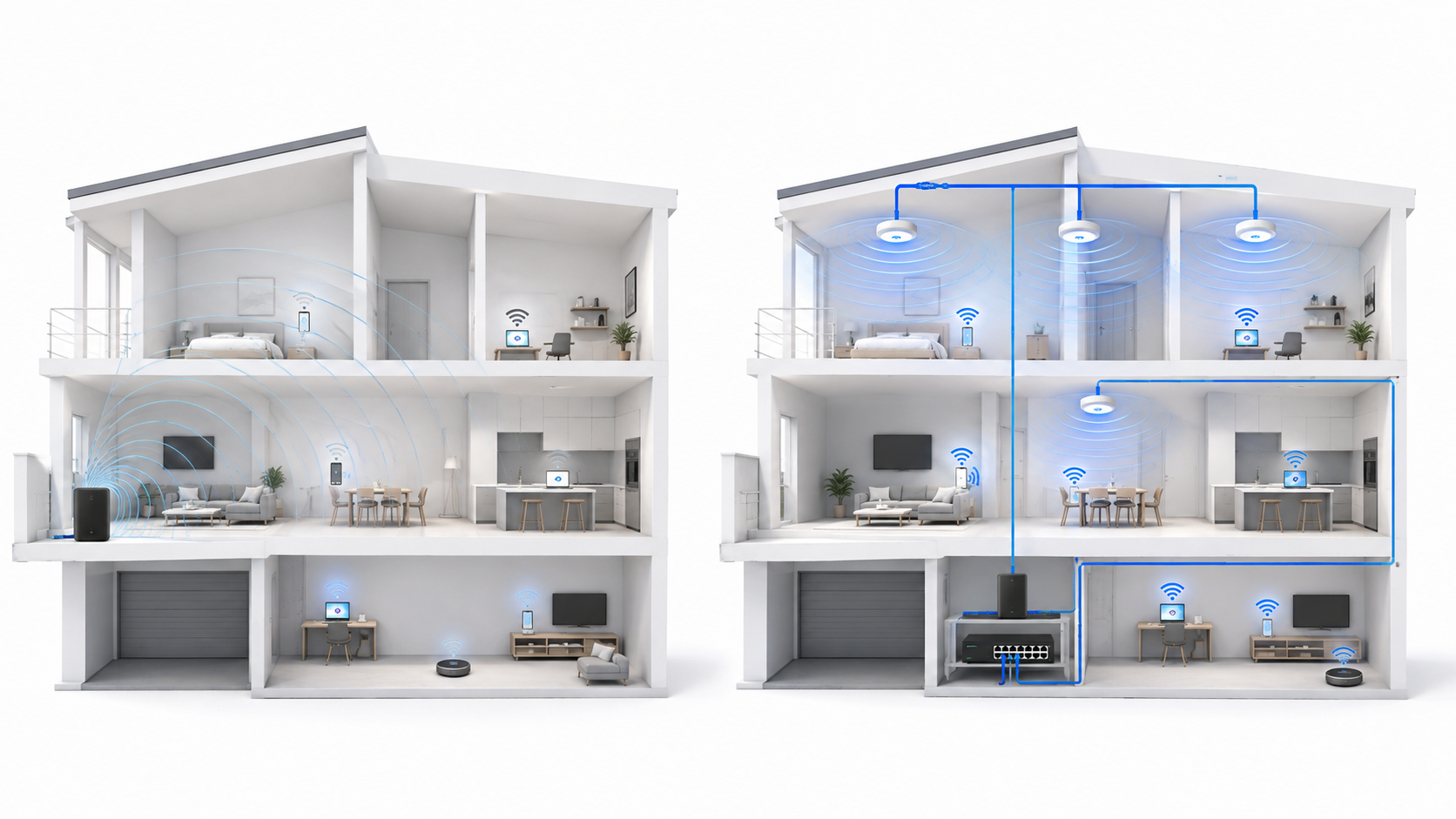
The limitation is scalability. An all-in-one gateway concentrates every network function—and the entire wireless coverage plan—into one physical location. When the floor plan becomes larger or more complex, that location is rarely ideal for every device.
02 Where the One-Box Design Starts to Break
Network problems often appear when the property or its technology outgrows the original design. Common pressure points include:
- A home larger than approximately 3,000 square feet
- Two or more floors
- Concrete block, masonry, metal, or other signal-resistant materials
- Outdoor living areas that require dependable coverage
- Multiple simultaneous video calls, streams, or gaming sessions
- Security cameras, smart locks, doorbells, thermostats, and other connected systems
- A poorly located structured panel or ISP entry point
These conditions do not always mean the internet connection is too slow. The service entering the home may be excellent while the experience inside the home remains inconsistent.
That distinction matters. Increasing the internet plan cannot correct weak coverage, poor access-point placement, wireless interference, insufficient switching capacity, or an overloaded wireless backhaul. Those are architecture problems, not speed-tier problems.
03 Think in Functions, Not Individual Devices
The most useful planning question is not, “Which router should I buy?” It is, “Where should each network function live?”
Every home network contains four core functions:
- Internet handoff: the point where the service provider delivers the connection.
- Routing and firewall: the layer that directs traffic and controls communication between the home and the internet.
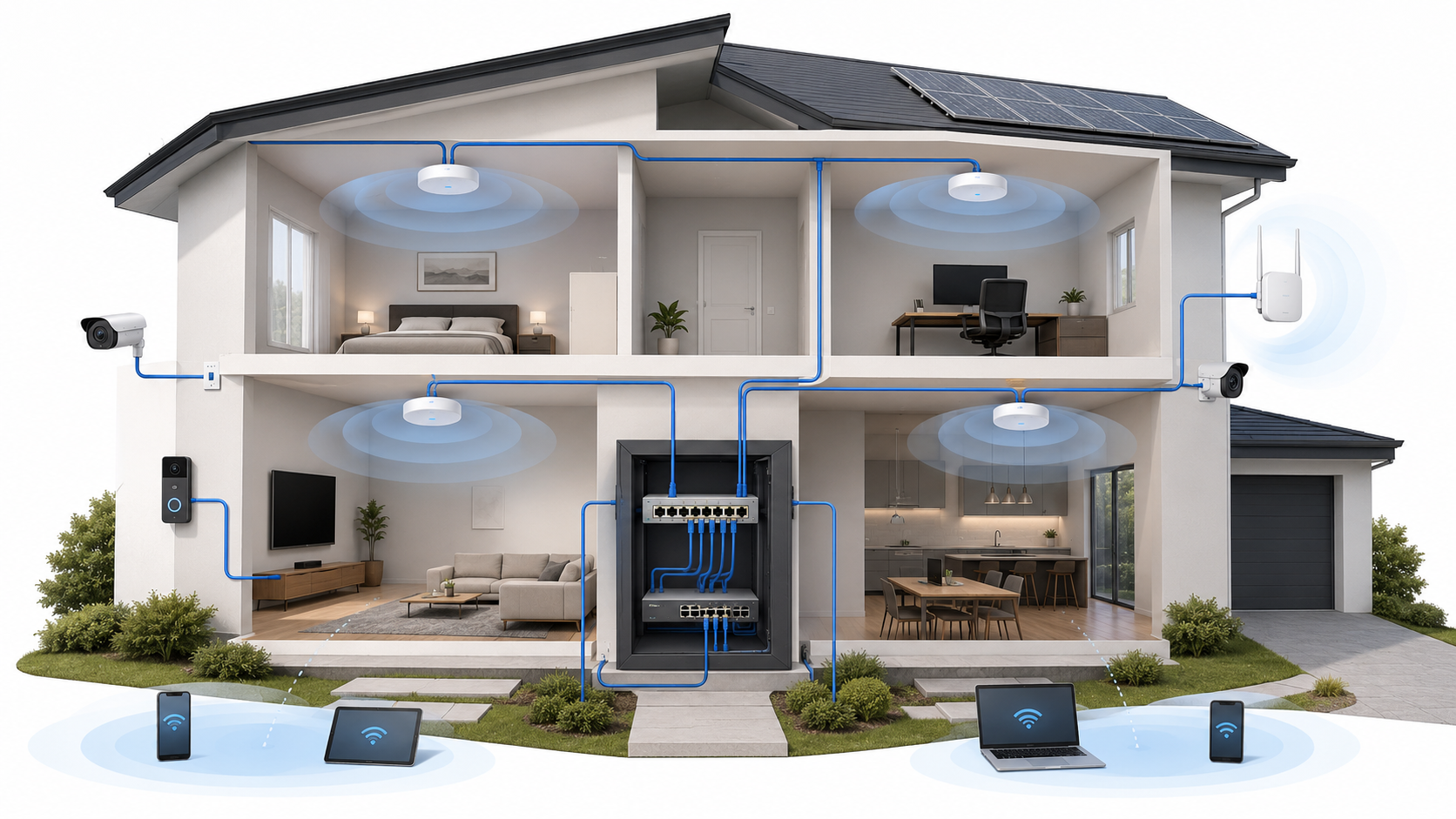
- Switching: the wired distribution layer that connects access points, cameras, computers, televisions, and other Ethernet devices.
- Wireless access: the access points that provide Wi-Fi coverage in the areas where people and devices actually use it.
One device can perform all four functions in a small installation. In a larger home, separating them allows each part of the network to be placed, sized, maintained, and upgraded more intelligently.
This does not require a commercial data center in the garage. A structured residential system can still be compact and discreet. The goal is logical separation and intentional placement—not unnecessary complexity.
04 Build the Network Around a Wired Backbone
Wireless is ideal for mobility. Wired infrastructure is ideal for stability.
A well-planned wired backbone normally begins at a central network location, such as a structured wiring panel, wall-mounted cabinet, or small equipment rack. Ethernet then extends from that location to strategic points throughout the property.
The highest-value wired connections usually include:
- Ceiling- or wall-mounted wireless access points
- Security cameras and video recorders
- Home offices and fixed workstations
- Media rooms, televisions, and streaming devices
- Network switches in secondary locations
- Control systems and other infrastructure devices
Not every device needs Ethernet. The purpose of the backbone is to remove predictable, high-demand traffic from Wi-Fi and provide dependable connections where they matter most.
This principle is especially valuable for access points. A wired access point has a dedicated path back to the network switch. A wireless mesh node may have to use part of its radio capacity to communicate with another node before client traffic can move through the network.
05 Design Wi-Fi by Coverage Zone
Mesh systems are popular because they are convenient, and in the right home they can be an effective improvement. The problem begins when mesh is treated as a substitute for planning.
Adding more wireless nodes does not automatically create a better network. Nodes that are too far apart may have a weak backhaul. Nodes that are too close together may create unnecessary overlap and interference. A unit placed inside a metal cabinet or at the edge of the home may begin with a poor signal and simply repeat that limitation.
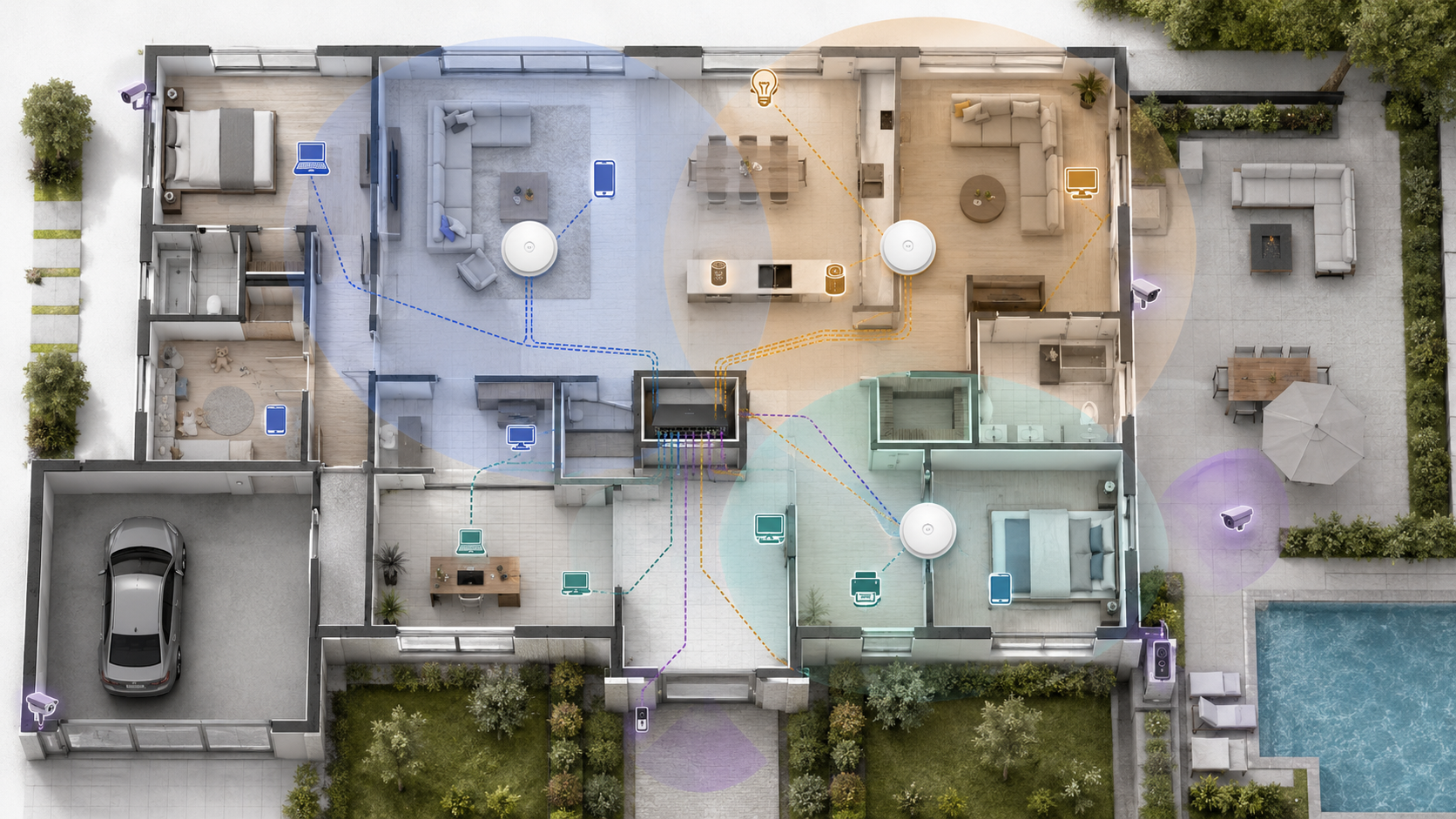
A stronger approach divides the property into coverage zones and considers:
- The size and shape of each floor
- Wall and ceiling materials
- Vertical coverage between floors
- High-use rooms and device density
- Patios, pools, garages, driveways, and other outdoor areas
- Available Ethernet pathways
The number of access points should follow the building—not a universal square-foot formula. If you are estimating a project, start with how many access points the property may need, then refine the design using an intentional access-point placement strategy.
Placement usually matters more than brand. A properly located midrange access point can outperform a premium unit installed in the wrong location.
06 Add Segmentation When the Home Needs It
Network segmentation separates groups of devices so they do not all share the same level of access. In managed networks, this is often accomplished with virtual networks, commonly called VLANs.
Most modest homes do not need an elaborate collection of VLANs. A secure primary network and an isolated guest network may be entirely sufficient.
Segmentation becomes more valuable when a property includes:
- Security cameras and recording systems
- Smart locks, doorbells, appliances, and other IoT devices
- Work computers that handle sensitive information
- Frequent visitors, vendors, or short-term guests
- Home automation and control platforms
- Remote access or off-site management
A practical residential design might separate trusted personal devices, smart-home devices, cameras, and guests. The exact policy should remain understandable and maintainable. Segmentation that no one can support is not an improvement.
07 Choose the Right Residential Network Tier
There is no single correct design for every property. A useful architecture matches the size, construction, systems, and expectations of the home.
| Home Profile | Typical Architecture | Best Fit |
|---|---|---|
| Standard Residential Generally under 3,000 sq ft |
ISP gateway or quality all-in-one router; optional mesh; basic guest isolation; primarily wireless clients | Smaller or open-plan homes with moderate device counts and reliable coverage from a central location |
| Structured Residential Approximately 3,000–6,000 sq ft |
Dedicated gateway or bridged ISP equipment; managed PoE switch; multiple wired access points; central wiring location; UPS protection | Multi-floor homes, dense construction, outdoor areas, home offices, cameras, and growing smart-home systems |
| Estate / High-End Residential | Dedicated firewall and routing; managed PoE switching; structured segmentation; indoor and outdoor access points; camera network; monitoring and remote management | Large or complex properties where connectivity supports security, automation, entertainment, work, and property operations |
The boundaries between these tiers are flexible. A smaller home with concrete construction and extensive technology may benefit from structured architecture, while a larger but open single-story home may remain comparatively simple.
Square footage is a starting point. Construction, layout, device density, use cases, and service expectations determine the final design.
08 Create the Blueprint Before Buying Equipment
Before selecting a gateway, switch, or access-point model, document the property and the outcomes the network must support.
Home Network Planning Checklist
- Identify the ISP entry point and the best central equipment location.
- Review the floor plan, construction materials, and outdoor coverage areas.
- List fixed devices that should use Ethernet whenever possible.
- Map likely access-point locations before choosing the access-point count.
- Confirm that Ethernet and power can reach each planned infrastructure device.
- Estimate the required PoE ports and power budget for access points, cameras, and other powered devices.
- Decide whether guests, smart devices, cameras, or work systems need separation.
- Include battery backup, ventilation, labeling, documentation, and room for growth.
- Choose equipment only after the architecture and capacity requirements are clear.
This order prevents a common mistake: purchasing attractive hardware first and then trying to force it into a property it was not selected to serve.
09 Final Blueprint Summary
A well-designed home network is not defined by the most expensive equipment or the fastest advertised Wi-Fi standard. It is defined by whether the system fits the property and performs predictably where people depend on it.
The strongest residential designs follow a few durable principles:
- Centralize the core equipment in a suitable, serviceable location.
- Use a wired backbone for access points and fixed, high-value devices.
- Plan wireless coverage around the building and its usage zones.
- Separate traffic when security or operational needs justify it.
- Provide enough switching, PoE capacity, and physical space for future growth.
- Document the network so it can be maintained long after installation.
Simple networks can serve simple homes beautifully. Larger or more technology-dependent homes require more intentional architecture, but the objective remains the same: stable connectivity that feels effortless to the people using it.
The scale may change. The principles do not.